High CPU usage
了解高 CPU 使用率可能对你的 Supabase 实例意味着什么,以及可能的原因。
🌐 Learn what high CPU usage could mean for your Supabase instance and what could have caused it.
高CPU使用率的危险 #
🌐 The danger of high CPU usage
每个 Supabase 项目都运行在它专用的虚拟机中。你的实例会根据你的 计算附加组件 配置不同的硬件。你的硬件可能不适合预期的工作负载,并且可能会出现高 CPU 使用率。
🌐 Every Supabase project runs in its dedicated virtual machine. Your instance will have a different set of hardware provisioned depending on your compute add-on. Your hardware may not be suitable for the intended workload and may experience high CPU usage.
高 CPU 使用率可能会带来一系列问题:
🌐 High CPU usage could come with a range of issues:
- 较慢的查询
- 日常备份例程中断
- 在极少数情况下,你的实例可能会无响应
而且,如果你的实例已经有很高的CPU使用率,将来可能无法应对流量高峰。
🌐 Moreover, your instance might not be able to handle future traffic spikes if it already has a high CPU usage.
监控你的CPU #
🌐 Monitor your CPU
你可以直接在 Supabase 平台上查看 CPU 使用情况。为此,请在可观察性部分中进入数据库健康,并选择你的项目。
🌐 You can check your CPU usage directly on the Supabase Platform. For this go to database health in the Observability section and select your project.
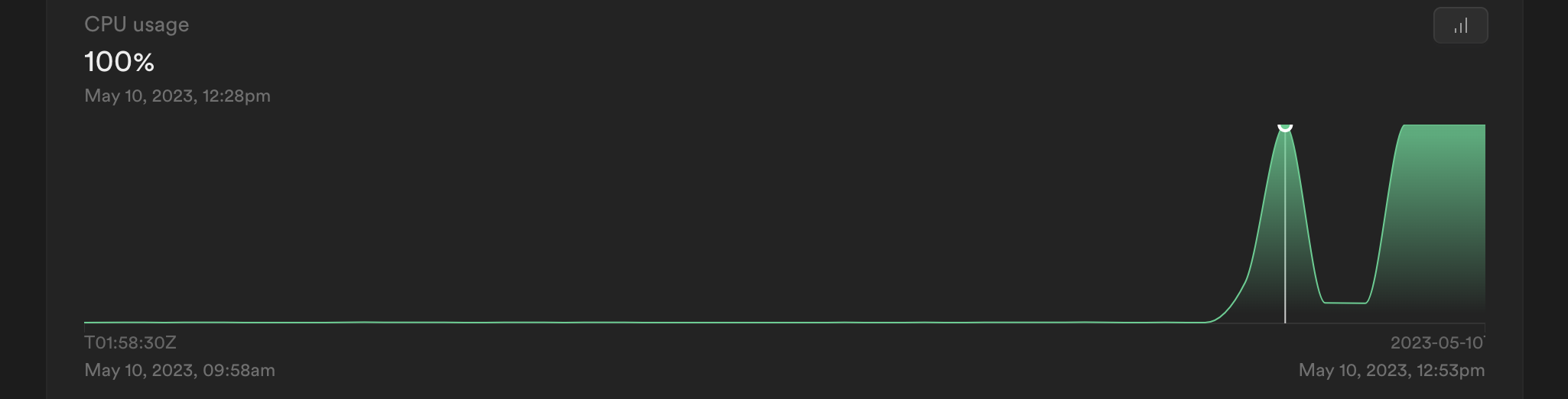
你也可以使用 Prometheus/Grafana 来监控你的资源并设置提醒。你可以在这里找到相关指南。
🌐 It is also possible to monitor your resources and set up alerts using Prometheus/Grafana. You can find a guide for this here.
CPU 使用率高的常见原因 #
🌐 Common reasons for high CPU usage
你对 Supabase 项目的每一项操作都需要计算资源。因此,高 CPU 使用率可能有很多原因。以下是一些常见的情况:
🌐 Everything you do with your Supabase project requires compute. Hence, there can be many reasons for high CPU usage. Here are some common ones:
- 查询性能: 执行时间较长的查询(>1秒)以及过多的查询可能会给CPU带来压力。查看我们的查询性能检查指南。
- 缺失的索引: 你的数据库可能需要扫描大量数据才能找到所需的信息。创建索引可以帮助你的数据库更快地找到数据。在这里了解更多关于索引的信息 here。
- 不合适的计算资源: 你的 Supabase 项目的计算资源可能不适合你的应用,因为你可能有更多的流量或者运行资源密集型操作。
解决高CPU使用率 #
🌐 Solving high CPU usage
解决高 CPU 有两种方法:
🌐 There are two ways to solve high CPU: