Identifying Lovable backend: Lovable Cloud or Supabase
概览 #
🌐 Overview
当你在 Lovable 中创建一个项目时,你的应用后台可以连接到以下两种选项之一:
🌐 When you create a project in Lovable, your app’s backend can be connected to one of two options:
- 可爱的云 — 后端(Supabase 实例)完全由 可爱 管理。
- 你自己的 Supabase 项目 — 后端是你创建并直接在你的 Supabase 控制台 中管理的 Supabase 项目。
知道你的项目使用的是哪个后端可以帮你了解数据库、API 密钥和配置是在哪里管理的。
🌐 Knowing which backend your project uses helps you understand where your database, API keys, and configuration are managed.
如何识别你的后端 #
🌐 How to identify your backend
在 Lovable 界面中,点击项目编辑器顶部栏的 云图标。这个部分会显示你的项目当前连接的是哪个后端。
🌐 In the Lovable interface, click the Cloud icon on the top bar of your project editor. This section shows which backend your project is currently connected to.

云图标会出现在所有项目中,无论你使用哪种后端类型。点击它可以查看你的实际后端配置。
🌐 The Cloud icon appears for all projects, regardless of which backend type you're using. Click it to see your actual backend configuration.
一旦你打开云设置,根据你的后端类型,你会看到两种界面之一:
🌐 Once you open the Cloud settings, you see one of two interfaces depending on your backend type:
可爱的云端后台 #
🌐 Lovable Cloud backend
如果页面显示一个菜单和用来管理你的数据库表和用户的界面(类似下面的截图),那么你的后台是由 Lovable Cloud 管理的。
🌐 If the page shows a menu and screens to manage your Database tables, and Users from within Lovable (similar to the screenshot below), then your backend is managed by Lovable Cloud.
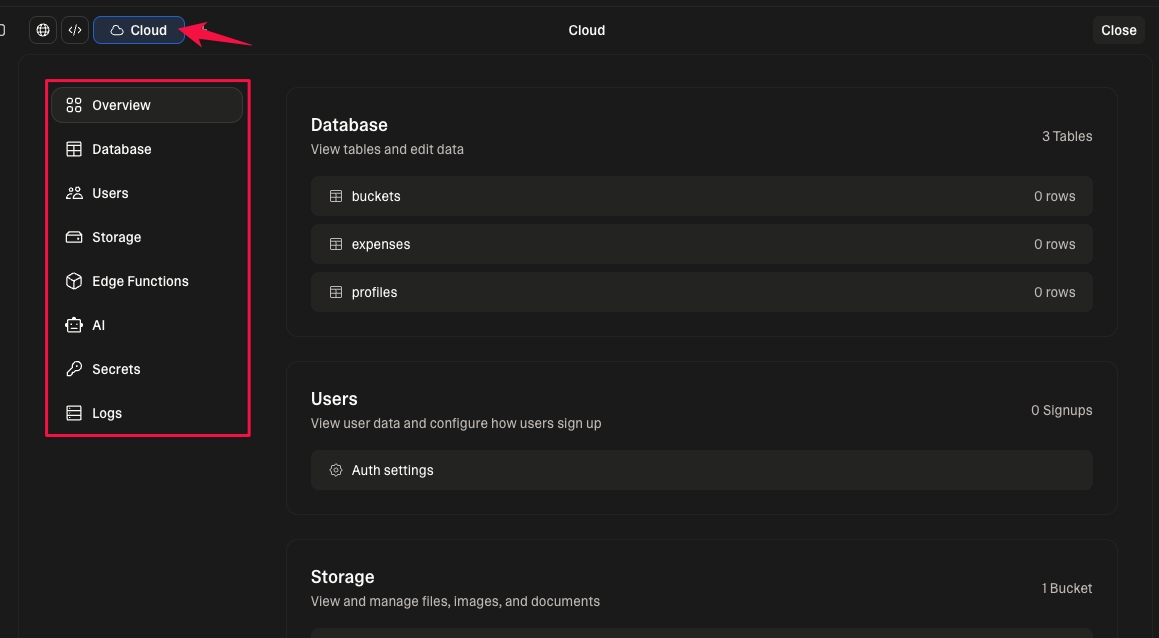
在这种情况下,你的 Supabase 实例是 由 Lovable 拥有和管理的,而不是你个人的 Supabase 账户。你在 Supabase 仪表板里看不到这个项目,也无法访问服务角色密钥或直接的数据库 URL。
🌐 Your Supabase instance in this case is owned and managed by Lovable, not by your personal Supabase account. You won’t see this project in your Supabase Dashboard, and you won’t have access to service role keys or direct database URLs.
已连接的 Supabase 后端 #
🌐 Connected Supabase backend
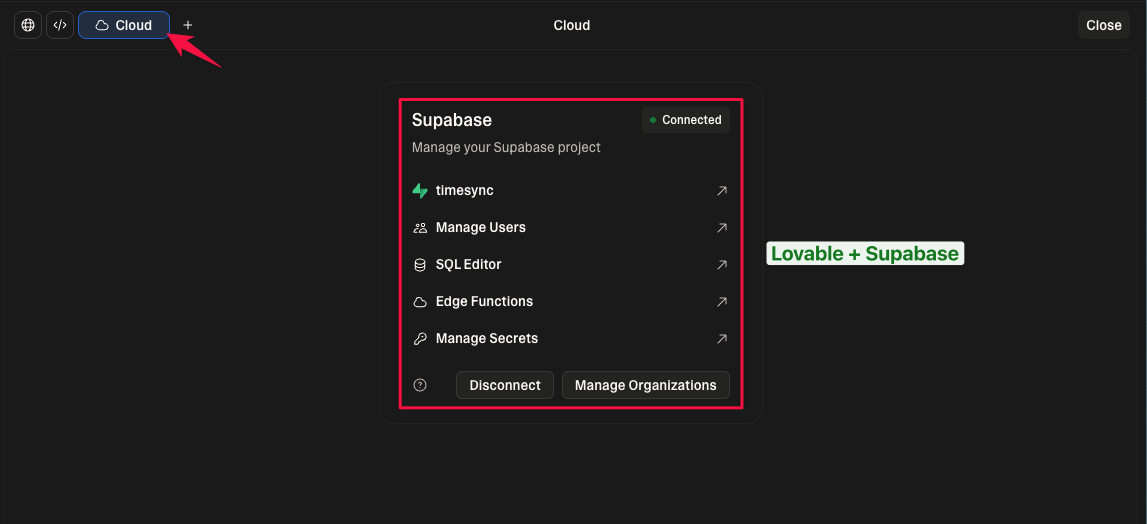
如果页面显示 Supabase 图标、你的 Supabase 项目名称,以及一些指向 Supabase 仪表板的链接(类似下面的截图),那么你的 Lovable 项目就连接到了一个你直接管理的 Supabase 项目。
🌐 If the page displays the Supabase icon, your Supabase project name, and some links that direct you to the Supabase Dashboard (similar to the screenshot below), then your Lovable project is connected to a Supabase project you manage directly.
总结 #
🌐 Summary
| 后端类型 | 管理者 | 是否显示在 Supabase 仪表板 | 服务角色 / 数据库访问 |
|---|---|---|---|
| Lovable 云 | Lovable | ❌ 否 | ❌ 否 |
| 自己的 Supabase 项目 | 你 | ✅ 是 | ✅ 是 |
常见问题 #
🌐 Frequently asked questions
可爱的云 – 具体问题 #
🌐 Lovable Cloud – specific questions