Resolving database hostname and managing your IP address
查找你的数据库主机名 #
🌐 Finding your database hostname
你的数据库主机名对于建立直接连接非常重要。它会解析到你的数据库的实际IP地址。
🌐 Your database's hostname is crucial for establishing a direct connection. It resolves to the underlying IP address of your database.
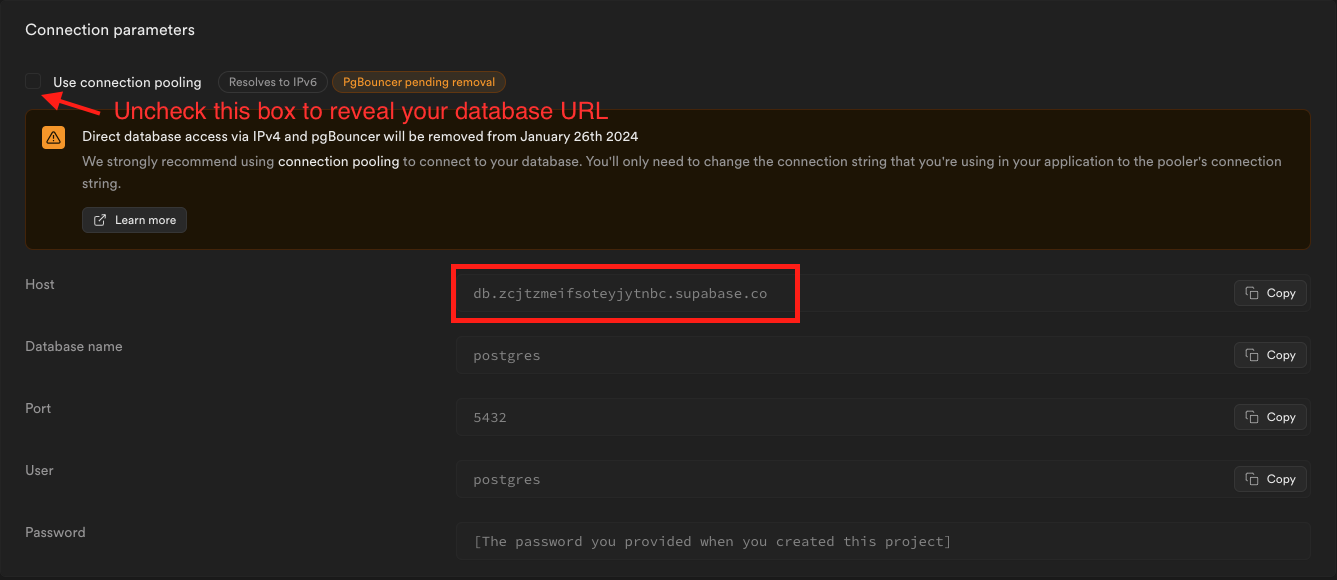
要查找你的主机名,进入仪表板然后点击连接。查看直接连接字符串,并点击它下面的查看参数来查看主机名。
🌐 To find your hostname, navigate to the dashboard and click Connect. Look at the Direct connection string and click the View parameters under it to see the hostname.
示例主机名:db.zcjtzmeifsoteyjytnbc.supabase.co
🌐 Example Hostname: db.zcjtzmeifsoteyjytnbc.supabase.co
管理你的IP地址 #
🌐 Managing your IP address
要确定你当前的IP地址,你可以使用IP地址查询网站或终端命令:
🌐 To determine your current IP address, you can use an IP address lookup website or the terminal command:
- 输入
nslookup hostname然后按回车。 - 这个命令会查询域名服务器,以找到给定主机名的IP地址。
示例 IPv6 地址:2a05:d014:1c06:5f0c:d7a9:8616:bee2:30df
🌐 Example IPv6 Address: 2a05:d014:1c06:5f0c:d7a9:8616:bee2:30df
IPv6 地址 #
🌐 IPv6 address
在创建项目时,会分配一个静态 IPv6 地址。不过,需要明白的是,这个 IPv6 地址可能会因为某些操作而改变:
🌐 Upon project creation, a static IPv6 address is assigned. However, it's essential to understand that this IPv6 address can change due to specific actions:
- 当一个项目被暂停或恢复时。
- 在数据库版本升级期间。
IPv4 地址 #
🌐 IPv4 address
选择静态 IPv4 附加功能 可以提供更稳定的连接地址。IPv4 地址会保持不变,除非:
🌐 Opting for the static IPv4 add-on provides a more stable connection address. The IPv4 address remains constant unless:
- 项目已暂停或已恢复。
- 和IPv6地址不同,升级你的数据库不会影响IPv4地址。