适用于平台的 Supabase
Use Supabase as a platform for your own business and tools.
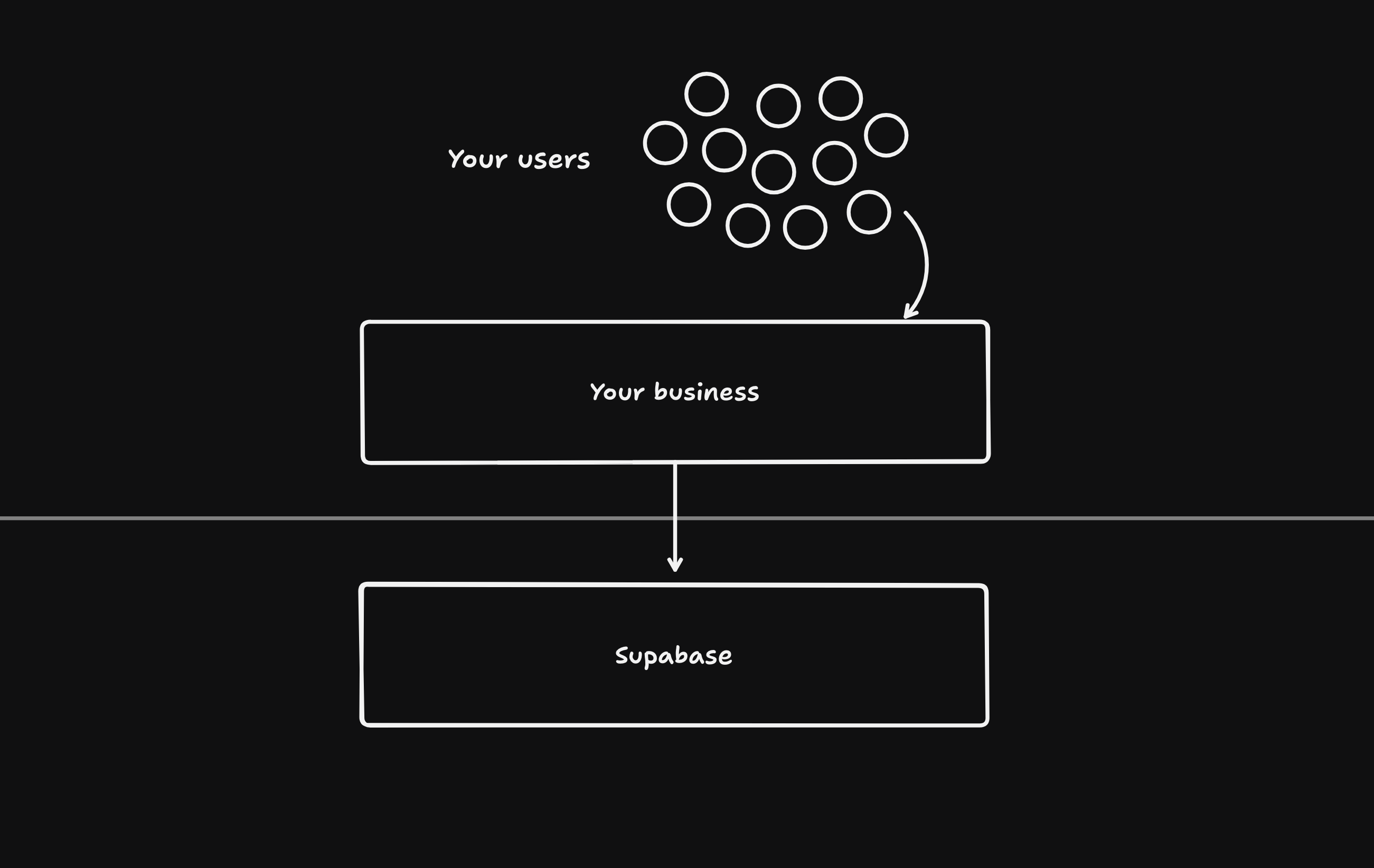
Supabase 是一个平台即服务(PaaS),可以通过编程方式进行管理。你可以用它向自己的用户提供关键基础功能,比如数据库、身份验证、边缘函数、存储和实时功能。Supabase 常被 AI 构建者和需要后端的框架用作平台。
🌐 Supabase is a Platform as a Service (PaaS) that can be managed programmatically. You can use it to offer the key primitives to your own users, such as Database, Auth, Edge Functions, Storage, and Realtime. Supabase is commonly used as a platform by AI Builders and frameworks needing a backend.
这份文档将指导你在为自己的平台使用 Supabase 时的最佳实践,并假设 Supabase 项目属于你拥有的 Supabase 组织。如果你想要与用户拥有的项目进行交互,请前往 OAuth 集成 获取更多详情。
🌐 This document will guide you on best practices when using Supabase for your own platform and assumes that Supabase projects are in a Supabase organization that you own. If you want to instead interact with projects that your users own, navigate to OAuth integration for more details.
概览 #
🌐 Overview
Supabase 的所有功能都可以通过 管理 API 或 远程 MCP 服务器 来管理。
🌐 All features of Supabase can be managed through the Management API or the remote MCP Server.
启动项目 #
🌐 Launching projects
管理 API 端点:
🌐 Management API endpoints:
- 创建项目:
POST /v1/projects - 获取智能区域选择代码:GET /v1/projects/available-regions
- 检查服务状态:
GET /v1/projects/{ref}/health
我们推荐:
🌐 We recommend:
- 为每个数据库设置一个非常安全的密码。不要在多个数据库间重复使用相同的密码。
- 存储密码的加密版本。在项目创建时设置密码后,没有办法通过程序来更改密码,但你可以在 Supabase 仪表板上手动更改。
- 使用智能区域选择来确保有足够的容量。可用的智能区域代码有
americas、emea和apac,你可以向GET /v1/projects/available-regions请求区域详情。 - 使用合适的实例大小。归零计费仅适用于 Nano 实例,创建项目时请确保不要传入
desired_instance_size。>= Micro 实例无法归零缩放。 - 确保在项目创建后服务是
ACTIVE_HEALTHY。创建项目后,通过轮询GET /v1/projects/{ref}/health确认你想要请求的服务状态为ACTIVE_HEALTHY。例如,在发送请求设置 Auth 配置之前,先确认 Auth 服务的状态为ACTIVE_HEALTHY。
1curl https://api.supabase.com/v1/projects \2 --request POST \3 --header "Content-Type: application/json" \4 --header "Authorization: Bearer YOUR_SECRET_TOKEN" \5 --data '{6 "name": "Todo App",7 "organization_slug": "aaaabbbbccccddddeeee",8 "db_pass": "SUPER_SECURE_PASSWORD",9 "region_selection": {10 "type": "smartGroup",11 "code": "americas"12 },13 "desired_instance_size": "micro"14 }'微型计算实例 #
🌐 Nano compute instance
推荐的 API 密钥 #
🌐 Recommended API keys
管理 API 端点:
🌐 Management API endpoints:
- 获取 API 密钥:
GET /v1/projects/{ref}/api-keys - 启用 API 密钥:
POST /v1/projects/{ref}/api-keys
我们正在将现有的旧 API 密钥 anon 和 service_role 迁移到新的 API 密钥 publishable 和 secret。
🌐 We are in the process of migrating away from our legacy API keys anon and service_role and towards API keys publishable and secret.
你可以通过访问 即将对 Supabase API 密钥进行的更改 #29260 来了解更多信息。
🌐 You can learn more by navigating to Upcoming changes to Supabase API Keys #29260.
通过发起 GET /v1/projects/{ref}/api-keys 请求来获取 API 密钥。
🌐 Get the API keys by making a GET /v1/projects/{ref}/api-keys request.
1curl 'https://api.supabase.com/v1/projects/{ref}/api-keys?reveal=true' \2 --header 'Authorization: Bearer YOUR_SECRET_TOKEN'如果回复中包含 "publishable" 和 "secret" 键,那么就没问题了,从现在开始你应该只使用它们。
🌐 If the response includes "publishable" and "secret" keys then you're all set and you should only use those from now on.
否则,通过发送两个 POST /v1/projects/{ref}/api-keys 请求来启用 API 密钥,一个用于 publishable,另一个用于 secret。
🌐 Otherwise, enable the API keys by making two POST /v1/projects/{ref}/api-keys requests, one for publishable and another for secret.
1curl 'https://api.supabase.com/v1/projects/{ref}/api-keys' \2 --request POST \3 --header 'Content-Type: application/json' \4 --header 'Authorization: Bearer YOUR_SECRET_TOKEN' \5 --data '{6 "type": "publishable",7 "name": "default"8}'1curl 'https://api.supabase.com/v1/projects/{ref}/api-keys?reveal=true' \2 --request POST \3 --header 'Content-Type: application/json' \4 --header 'Authorization: Bearer YOUR_SECRET_TOKEN' \5 --data '{6 "type": "secret",7 "name": "default",8 "secret_jwt_template": {9 "role": "service_role"10 }11}'更改计算大小 #
🌐 Changing compute sizes
管理 API 端点:PATCH /v1/projects/{ref}/billing/addons
🌐 Management API endpoint: PATCH /v1/projects/{ref}/billing/addons
你可以通过向PATCH /v1/projects/{ref}/billing/addons发出请求来升级或降级计算大小。
🌐 You can upgrade and downgrade compute sizes by making requests to PATCH /v1/projects/{ref}/billing/addons.
1curl 'https://api.supabase.com/v1/projects/{ref}/billing/addons' \2 --request PATCH \3 --header 'Content-Type: application/json' \4 --header 'Authorization: Bearer YOUR_SECRET_TOKEN' \5 --data '{6 "addon_type": "compute_instance",7 "addon_variant": "ci_small"8 }'配置更改 #
🌐 Configuration changes
管理 API 端点:
🌐 Management API endpoints:
- 作者:
PATCH /v1/projects/{ref}/config/auth - 数据 API(PostgREST):
PATCH /v1/projects/{ref}/postgrest - 边缘函数:
- 存储:
PATCH /v1/projects/{ref}/config/storage - 实时:
PATCH /v1/projects/{ref}/config/realtime
你可以使用管理 API 来管理所有服务的配置。
🌐 You can manage the configuration of all services using the Management API.
开发工作流程 #
🌐 Development workflow
Supabase 是一个有状态的服务:我们存储数据。如果生产环境出现任何问题,你无法“回滚”到某个时间点,因为这样可能会导致用户自上次检查点以来在生产环境中接收到的任何数据丢失。
🌐 Supabase is a stateful service: we store data. If anything breaks in production, you can't "roll back" to a point in time because doing so might cause your users to lose any data that their production environment received since the last checkpoint.
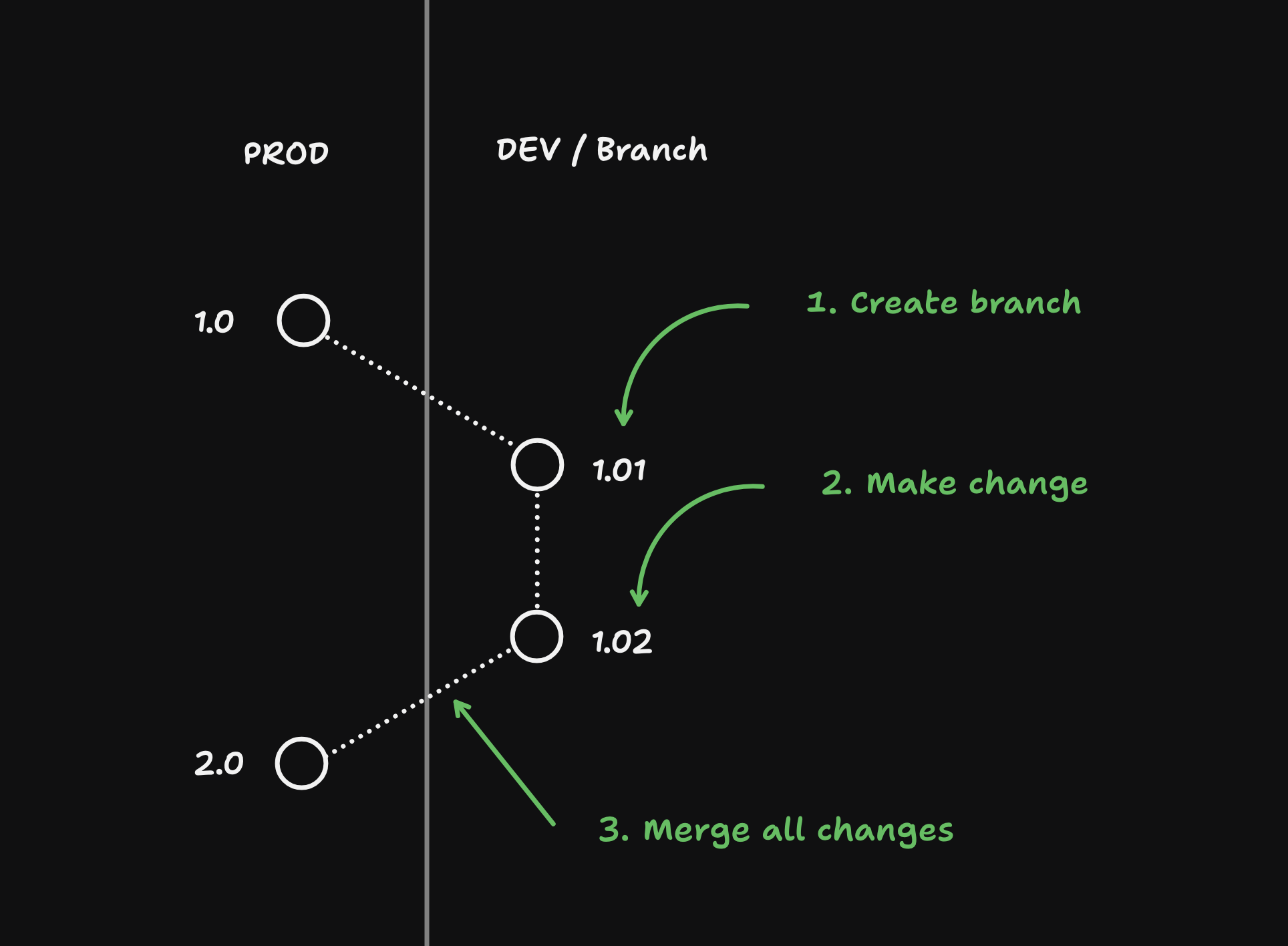
因此,重要的是,你需要为你的用户采用一个开发工作流程:
🌐 Because of this, it's important that you adopt a development workflow on behalf of your users:
创建一个 DEV#
🌐 Creating a DEV branch
管理 API 端点:POST /v1/projects/{ref}/branches
🌐 Management API endpoint: POST /v1/projects/{ref}/branches
在启动一个项目后,重要的是所有的更改都应该在开发分支上进行。分支可以像临时服务器一样对待:如果发生任何问题,你可以要么恢复更改,要么销毁这个分支,然后基于生产环境创建一个新分支。
🌐 After launching a project, it's important that all changes happen on a development branch. Branches can be treated like ephemeral servers: if anything goes wrong you can either revert the changes or destroy the branch and create a new one based off of production.
1curl 'https://api.supabase.com/v1/projects/{ref}/branches' \2 --request POST \3 --header 'Content-Type: application/json' \4 --header 'Authorization: Bearer YOUR_SECRET_TOKEN' \5 --data '{6 "branch_name": "DEV",7 "secrets": {8 "STRIPE_SECRET_KEY":"sk_test_123...",9 "STRIPE_PUBLISHABLE_KEY":"pk_test_123..."10 }11 }'修改数据库 #
🌐 Make database changes
管理 API 端点:POST /v1/projects/{ref}/database/migrations
🌐 Management API endpoint: POST /v1/projects/{ref}/database/migrations
在这个例子中,我们将使用 POST /v1/projects/{ref}/database/migrations 接口创建一个 todos 表。
🌐 For this example we will create a todos table using the POST /v1/projects/{ref}/database/migrations endpoint.
1create table public.todos (2 id serial primary key,3 task text not null4);56alter table public.todos7enable row level security;这个端点会自动在 supabase_migrations 模式下创建一个迁移并运行它。如果模式迁移失败,所有的更改将会被回滚。
🌐 This endpoint will automatically create a migration inside the supabase_migrations schema and run the migration. If the schema migration fails, the changes will be rolled back.
1curl https://api.supabase.com/v1/projects/{ref}/database/migrations \2 --request POST \3 --header 'Authorization: Bearer YOUR_SECRET_TOKEN' \4 --header 'Content-Type: application/json' \5 --data '{6 "query": "create table public.todos (id serial primary key, task text not null); grant select on public.todos to anon; grant select, insert, update, delete on public.todos to authenticated; grant select, insert, update, delete on public.todos to service_role; alter table public.todos enable row level security;",7 "name": "Create a todos table"8 }'创建还原点 #
🌐 Create a restore point
每次对数据库进行更改后,最好创建一个还原点。这样,如果你决定走另一条路线,就可以回滚数据库。
🌐 After every change you make to the database, it's a good idea to create a restore point. This will allow you to roll back the database if you decide to go in a different direction.
注意,创建还原点时只会捕捉到数据库的更改。
🌐 Beware that only database changes are captured when creating a restore point.
1curl https://api.supabase.com/v1/projects/{ref}/database/backups/restore-point \2 --request POST \3 --header 'Authorization: Bearer YOUR_SECRET_TOKEN' \4 --header 'Content-Type: application/json' \5 --data '{6 "name": "abcdefg"7 }'正在撤销更改 #
🌐 Reverting changes
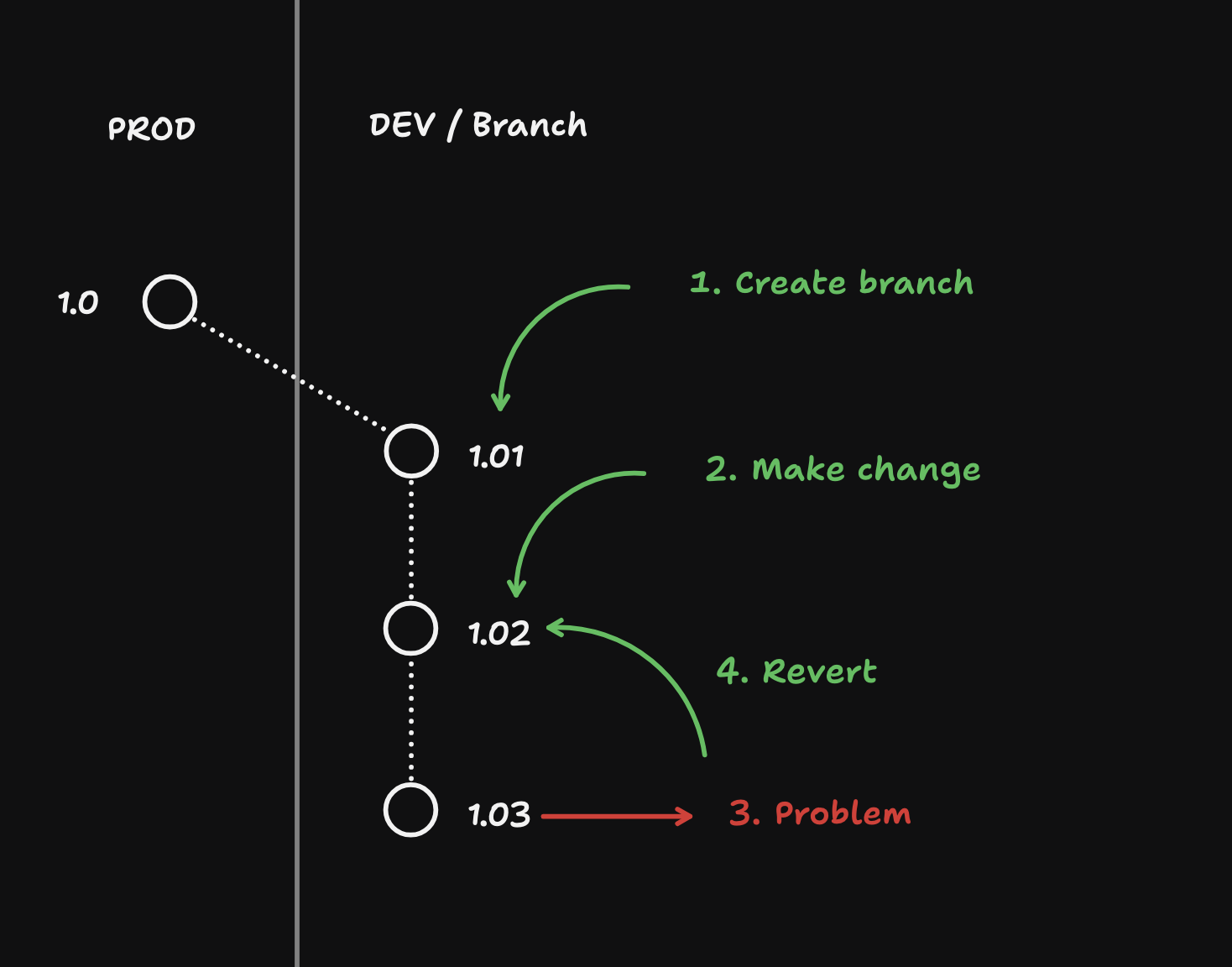
创建还原点后,你可以恢复到你想要的任何还原点。
🌐 After creating restore points, you are able to revert back to any restore point that you want.
1curl https://api.supabase.com/v1/projects/{ref}/database/backups/undo \2 --request POST \3 --header 'Authorization: Bearer YOUR_SECRET_TOKEN' \4 --header 'Content-Type: application/json' \5 --data '{6 "name": "abcdefg"7}'当你恢复更改时,你会撤销自指定还原点以来的所有数据库更改,包括:
🌐 When you revert changes, you are undo-ing all database changes since the specified restore point, including:
- 模式变更
- 你插入的任何种子数据
- 任何已注册的测试用户(以及登录用的授权令牌)
- Supabase 存储中的文件指针。
它不会影响:
🌐 It will not affect:
- 配置更改
- 添加的任何秘密
- 存储对象本身
- 任何已部署的 Edge 功能
添加种子数据 #
🌐 Add seed data
别在分支里用生产数据!
重要的是,开发分支中的数据绝对不能是生产数据,尤其是对于那些不理解使用这些数据可能带来影响的非开发者。安全性和副作用(例如给所有生产用户发送邮件)是两个重要原因。
🌐 It's important that the data in development branches is NOT production data, especially for non-developers who don't understand the implications of working with data. Security and side-effects (e.g. emailing all production users) are two reasons why this is important.
在 DEV 分支中,种子数据是用户的常用测试数据。把下面的种子插入到新的 todos 表中:
🌐 In DEV branches, seed data is common test data for users. Insert the following seed into the new todos table:
1insert into todos (task)2values3 ('Task 1'),4 ('Task 2'),5 ('Task 3');你可以使用 POST /database/query 接口来添加数据:
🌐 You can use the POST /database/query endpoint to add data:
1curl https://api.supabase.com/v1/projects/{branch_ref}/database/query \2 --request POST \3 --header 'Authorization: Bearer YOUR_SECRET_TOKEN' \4 --header 'Content-Type: application/json' \5 --data-binary @- <<EOF6{7 "query": "insert into todos (task) values ('Task 1'), ('Task 2'), ('Task 3');"8}9EOF部署边缘功能 #
🌐 Deploying Edge Functions
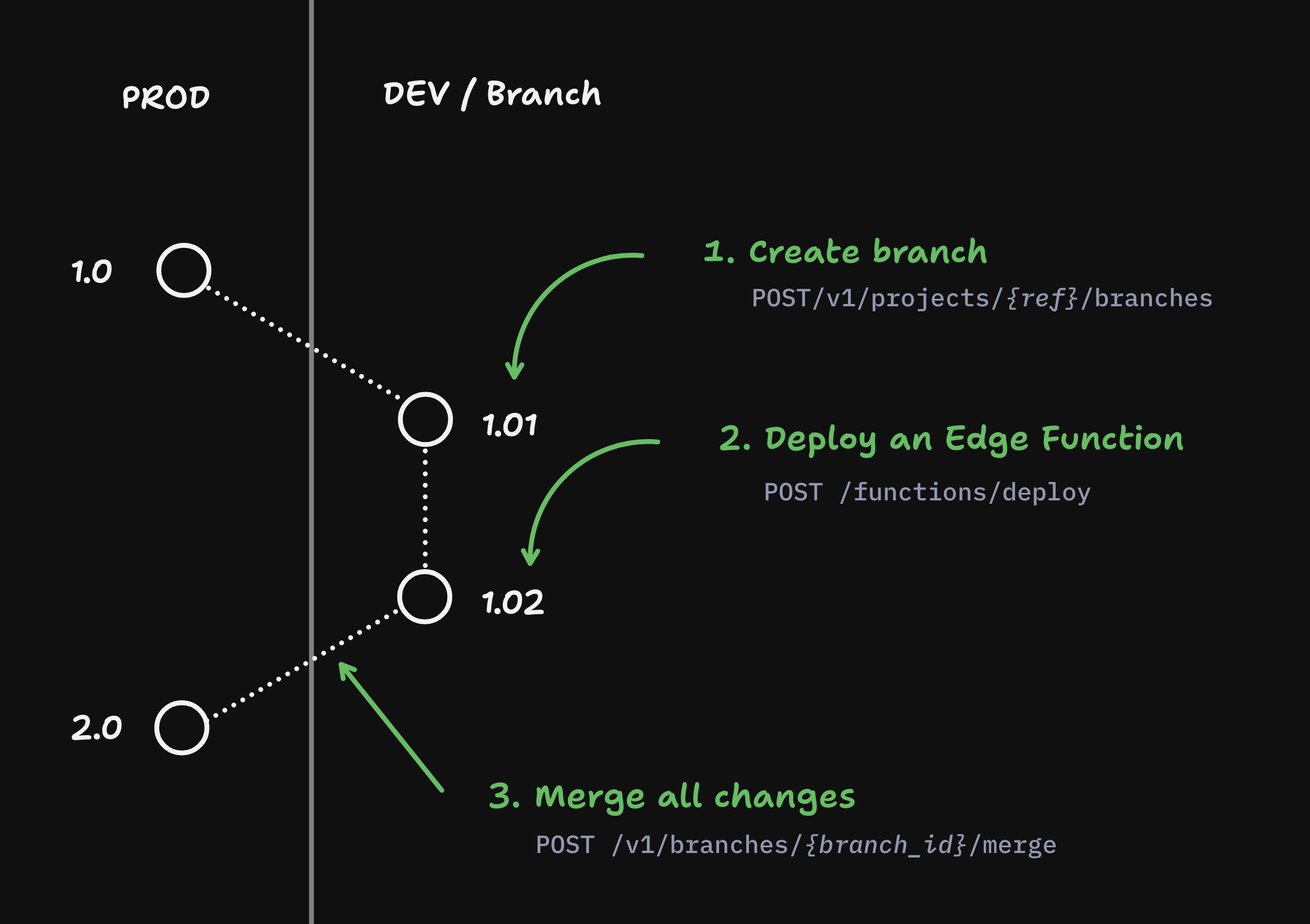
你可以在一个分支上创建并部署 Edge Functions,然后再把它们合并到生产环境。
🌐 You can create and deploy Edge Functions on a branch and then merge them into Production.
1curl https://api.supabase.com/v1/projects/functions/deploy \2 --request POST \3 --header 'Authorization: Bearer YOUR_SECRET_TOKEN' \4 --header 'Content-Type: multipart/form-data' \5 --form 'file=@path/to/function.zip' \6 --form 'metadata={7 "name": "my-function",8 "entrypoint_path": "index.ts",9 "import_map_path": "import_map.json",10 "static_patterns": ["assets/*", "public/*"],11 "verify_jwt": true12 }'合并所有更改 #
🌐 Merge all changes
管理 API 端点:POST /v1/branches/{branch_id_or_ref}/merge
🌐 Management API endpoint: POST /v1/branches/{branch_id_or_ref}/merge
一旦更改完成,你就可以把这些更改合并到生产项目里了:
🌐 Once the changes have been made, you can merge the changes into the production project:
1curl https://api.supabase.com/v1/branches/{ref}/merge \2 --request POST \3 --header 'Authorization: Bearer YOUR_SECRET_TOKEN' \4 --header 'Content-Type: application/json' \5 --data '{}'合并更改将只自动合并以下内容:
🌐 Merging changes will automatically merge only the following:
- 数据库变更
- 已部署的边缘函数
生产安全检查 #
🌐 Security checks for production
管理 API 端点:GET /v1/projects/{ref}/advisors/security
🌐 Management API endpoint: GET /v1/projects/{ref}/advisors/security
在部署到生产环境之前,我们强烈建议在项目上运行安全顾问,以确保最新的更改是安全的。
🌐 Prior to deploying to production we strongly recommend running the security advisor on the project to make sure the latest changes are secure.
1curl https://api.supabase.com/v1/projects/{ref}/advisors/security \2 --request GET \3 --header 'Authorization: Bearer {PAT_OR_USER_TOKEN}' \4 --header 'Content-Type: application/json'生产环境的灾难恢复 #
🌐 Disaster recovery for production
管理 API 端点:POST /v1/projects/{ref}/database/backups/restore-pitr
🌐 Management API endpoint: POST /v1/projects/{ref}/database/backups/restore-pitr
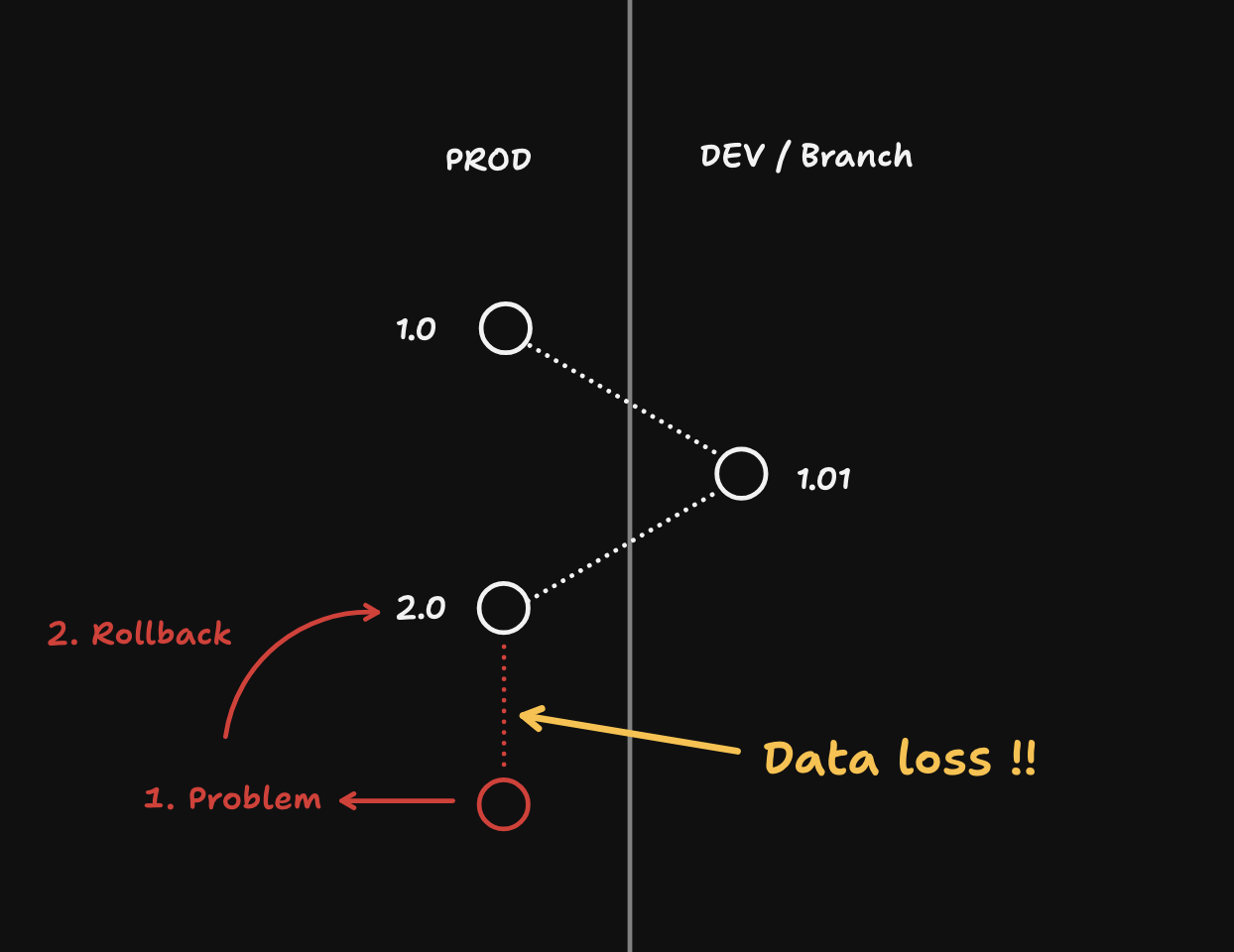
- 回滚可能会导致数据丢失。只有在
PROD中确实必要时才使用它。 - 只有在项目在回滚之前已经明确启用了 PITR 时,才在生产环境中可用。
1curl https://api.supabase.com/v1/projects/database/backups/restore-pitr \2 --request POST \3 --header 'Authorization: Bearer {PAT_OR_USER_TOKEN}' \4 --header 'Content-Type: application/json' \5 --data '{6 "recovery_time_target_unix": 17}'索赔流程 #
🌐 Claim flow
管理 API 端点:GET /v1/oauth/authorize/project-claim
🌐 Management API endpoint: GET /v1/oauth/authorize/project-claim
你的用户可能想要认领目前在你组织里的项目,这样他们就可以对它有更多的控制权。
🌐 Your users may want to claim the project that currently lives in your org so that they can have more control over it.
我们已经启用将项目从你的组织转移到你用户的组织,同时你仍然可以通过 OAuth 集成 访问和操作该项目。
🌐 We've enabled transferring the project from your org to your user's org while you continue to retain access to interact with the project through an OAuth integration.
1curl -L "https://api.supabase.com/v1/oauth/authorize/project-claim?project_ref={ref}&client_id={oauth_client_id}&response_type=code&redirect_uri={redirect_uri}" \2 --request GET \3 --header 'Authorization: Bearer {PERSONAL_ACCESS_TOKEN}'用户被重定向到 Supabase 界面:
🌐 The user is redirected to a Supabase UI:
- 创建一个新的 Supabase 账户或登录已有账户
- 创建一个新的 Supabase 组织或选择一个已有的
- 查看你的 OAuth 集成权限范围
- 查看项目转移详情
- 确认所选组织的 OAuth 集成和项目转移
在转移项目之前移除自定义配置
在把项目转给你用户的组织之前,确保删除任何你不希望用户项目保留的自定义配置。
🌐 Before transferring the project to your user's org, make sure to remove any custom configuration that you do not want your user's project to retain.
平台套件 #
🌐 Platform kit
文档:https://supabase.com/ui/docs/platform/platform-kit
🌐 Docs: https://supabase.com/ui/docs/platform/platform-kit
我们创建了 Platform Kit,它是一个 UI 组件集合,可以与管理 API 互动,是 Supabase Dashboard 的轻量版,你可以直接嵌入到你的应用中,这样用户就无需离开应用就能操作项目。
🌐 We've created Platform Kit, a collection of UI components that interact with Management API, as a lightweight version of Supabase Dashboard that you can embed directly in your app so your users never have to leave in order to interact with the project.
调试项目 #
🌐 Debugging projects
管理 API 端点:GET /v1/projects/{ref}/analytics/endpoints/logs.all
🌐 Management API endpoint: GET /v1/projects/{ref}/analytics/endpoints/logs.all
当你需要调试一个项目时,你可以查询该项目的日志,看看是否有错误,然后相应地处理它们。
🌐 When you need to debug a project, you can query the project's logs to see if there are any errors and address them accordingly.
1curl 'https://api.supabase.com/v1/projects/{ref}/analytics/endpoints/logs.all' \2 --get \3 --header 'Authorization: Bearer YOUR_SECRET_TOKEN' \4 --data-urlencode 'sql=SELECT datetime(timestamp), status_code, path, event_message5 FROM edge_logs6 CROSS JOIN UNNEST(metadata) AS metadata7 CROSS JOIN UNNEST(response) AS response8 WHERE status_code >= 4009 ORDER BY timestamp DESC10 LIMIT 100' \11 --data-urlencode 'iso_timestamp_start=2025-03-23T00:00:00Z' \12 --data-urlencode 'iso_timestamp_end=2025-03-23T01:00:00Z'