基准
Scalability Benchmarks for Supabase Realtime.
本指南探讨了 Realtime 功能的可扩展性:广播、在线状态和 Postgres 变更。
🌐 This guide explores the scalability of Realtime's features: Broadcast, Presence, and Postgres Changes.
方法 #
🌐 Methodology
- 这些基准测试是使用开源负载测试工具 k6 对部署在 AWS 上的实时集群进行的。
- 这些集群配置使用2-6个节点,测试了单区域和多区域设置,所有节点都连接到同一个Supabase项目。
- 负载生成器(k6 服务器)部署在 AWS 上,以尽量减少网络延迟对结果的影响。
- 测试从一开始就以满负荷执行,没有预热运行。
收集的指标包括:消息吞吐量、延迟百分位、CPU 和内存使用率,以及连接成功率。请注意,生产环境下的性能可能会因网络状况、硬件规范和具体使用模式等因素而有所不同。
🌐 The metrics collected include: message throughput, latency percentiles, CPU and memory utilization, and connection success rates. Note that performance in production environments may vary based on factors such as network conditions, hardware specifications, and specific usage patterns.
工作量 #
🌐 Workloads
这些拟议的工作负载旨在展示 Supabase Realtime 的吞吐量和可扩展性。这些基准测试关注核心功能和常见使用模式。基准测试结果包括以下工作负载:
🌐 The proposed workloads are designed to demonstrate Supabase Realtime's throughput and scalability. These benchmarks focus on core functionality and common usage patterns. The benchmarking results include the following workloads:
- 广播表现
- 有效载荷大小对广播的影响
- 大规模广播
- 认证与新连接速率
- 数据库事件
结果 #
🌐 Results
广播:使用 WebSockets #
🌐 Broadcast: Using WebSockets
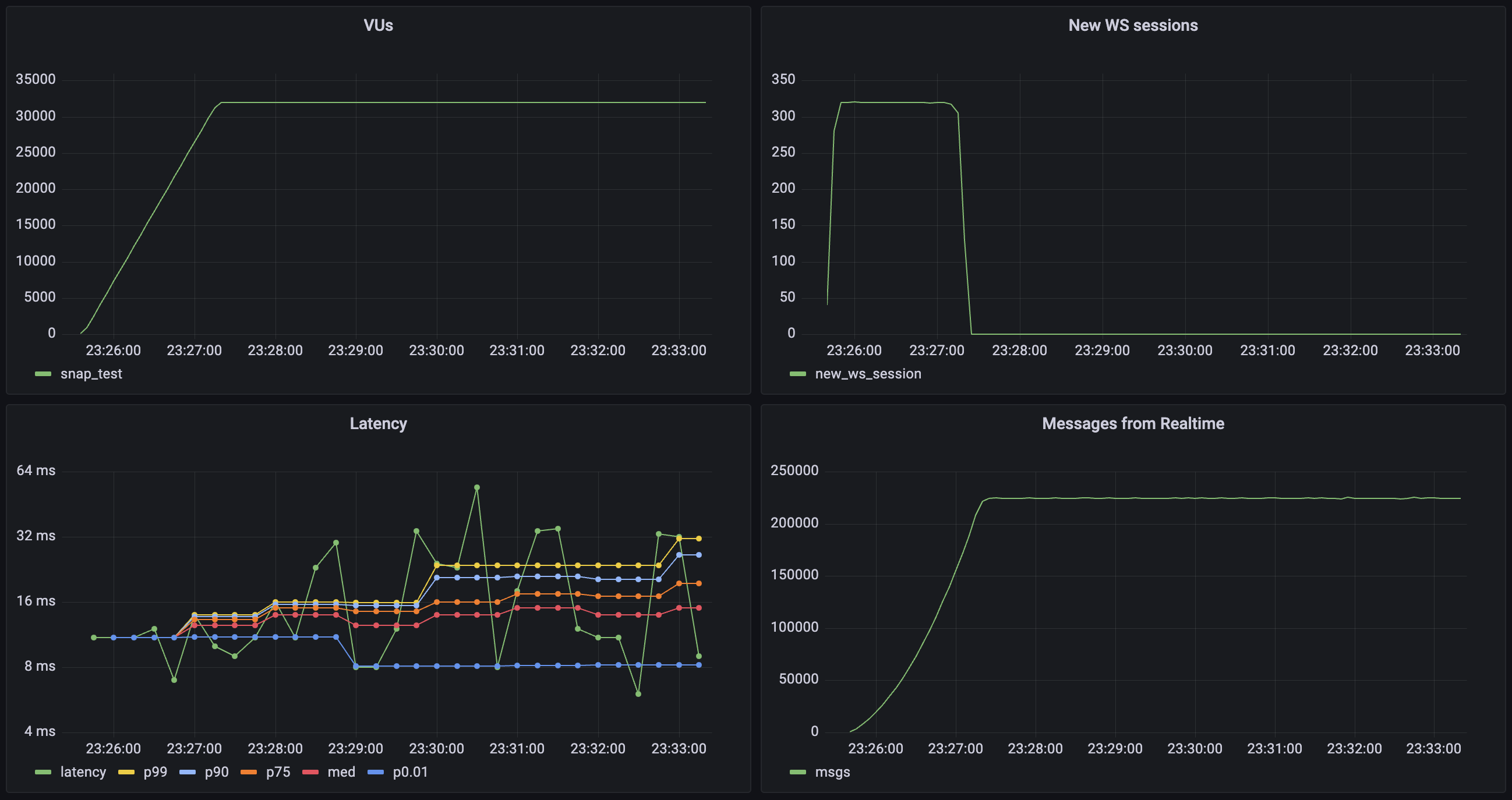
这个工作负载评估系统处理多个并发 WebSocket 连接以及通过 WebSocket 发送广播消息的能力。测试中的每个虚拟用户(VU):
🌐 This workload evaluates the system's capacity to handle multiple concurrent WebSocket connections and sending Broadcast messages via the WebSocket. Each virtual user (VU) in the test:
- 建立并保持一个 WebSocket 连接
- 加入两个不同的通道:
- 一个回声通道(每个通道1个用户)用于直接消息反射
- 一个广播通道(每个通道6个用户)用于群组通信
- 通过向每个加入的通道每秒发送2条消息,持续10分钟来产生流量
| 指标 | 数值 |
|---|---|
| 并发用户 | 32_000 |
| 总通道加入数 | 64_000 |
| 消息吞吐量 | 224_000 条/秒 |
| 中位延迟 | 6 毫秒 |
| 延迟 (p95) | 28 毫秒 |
| 延迟 (p99) | 213 毫秒 |
| 接收数据 | 6.4 MB/s (总计 7.9 GB) |
| 发送数据 | 23 KB/s (总计 28 MB) |
| 新连接速率 | 320 连接/秒 |
| 通道加入速率 | 640 加入/秒 |
广播:使用数据库 #
🌐 Broadcast: Using the database
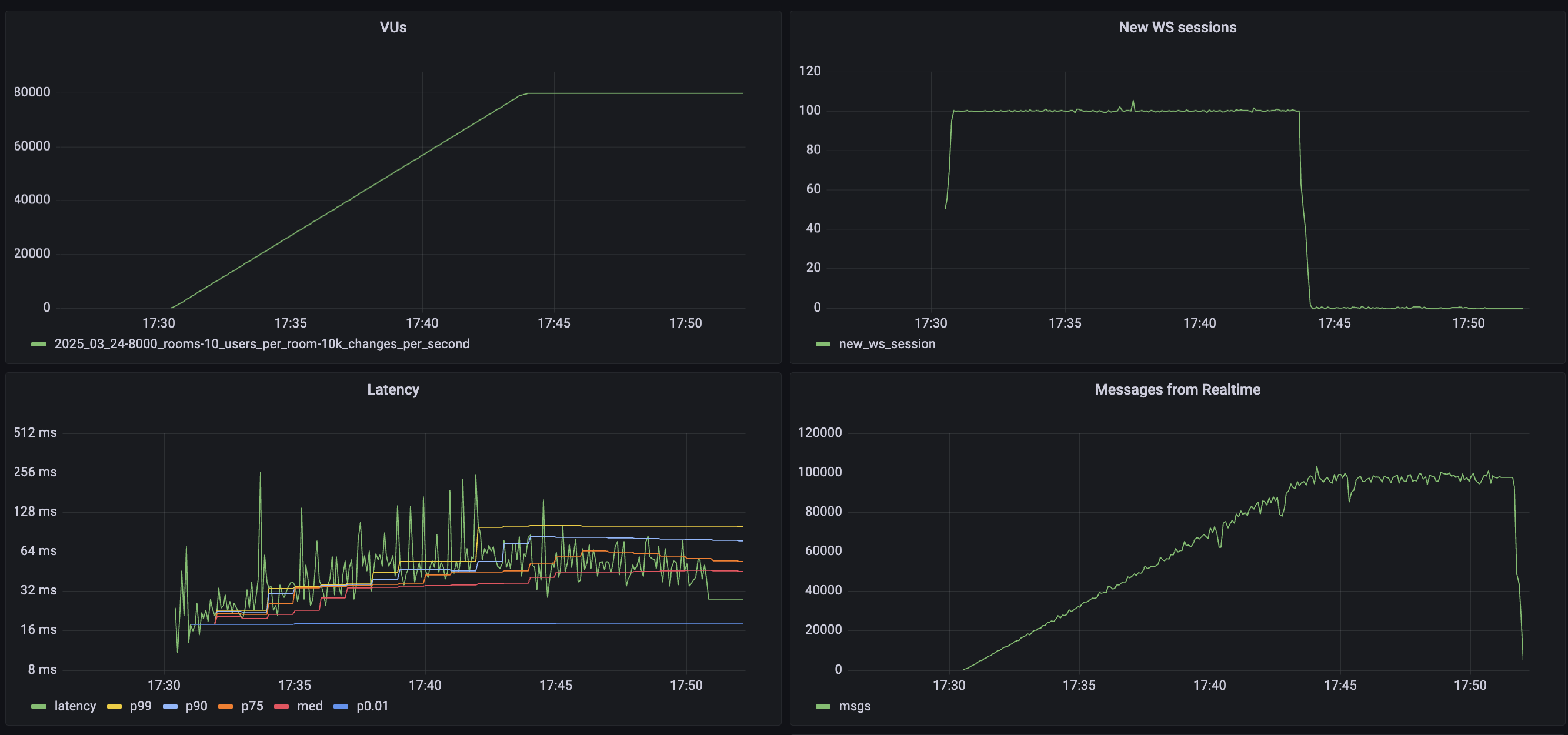
这个工作负载评估系统使用 realtime.broadcast_changes 功能从数据库发送广播消息的能力。测试中的每个虚拟用户 (VU):
🌐 This workload evaluates the system's capacity to send Broadcast messages from the database using the realtime.broadcast_changes function. Each virtual user (VU) in the test:
- 建立并保持一个 WebSocket 连接
- 加入一个独立的通道:
- 一个通道(每个通道100名用户)用于群组交流
- 数据库设置了一个触发器,在每次插入时运行
realtime.broadcast_changes - 数据库每秒触发 10,000 次插入
| 指标 | 数值 |
|---|---|
| 并发用户 | 80,000 |
| 总通道加入数 | 160,000 |
| 消息吞吐量 | 10,000 消息/秒 |
| 中位延迟 | 46 毫秒 |
| 延迟 (第95百分位) | 132 毫秒 |
| 延迟 (第99百分位) | 159 毫秒 |
| 接收数据 | 1.7 MB/秒 (总计 42 GB) |
| 发送数据 | 0.4 MB/秒 (总计 4 GB) |
| 新连接速率 | 2000 连接/秒 |
| 通道加入速率 | 4000 加入/秒 |
广播:有效载荷大小的影响 #
🌐 Broadcast: Impact of payload size
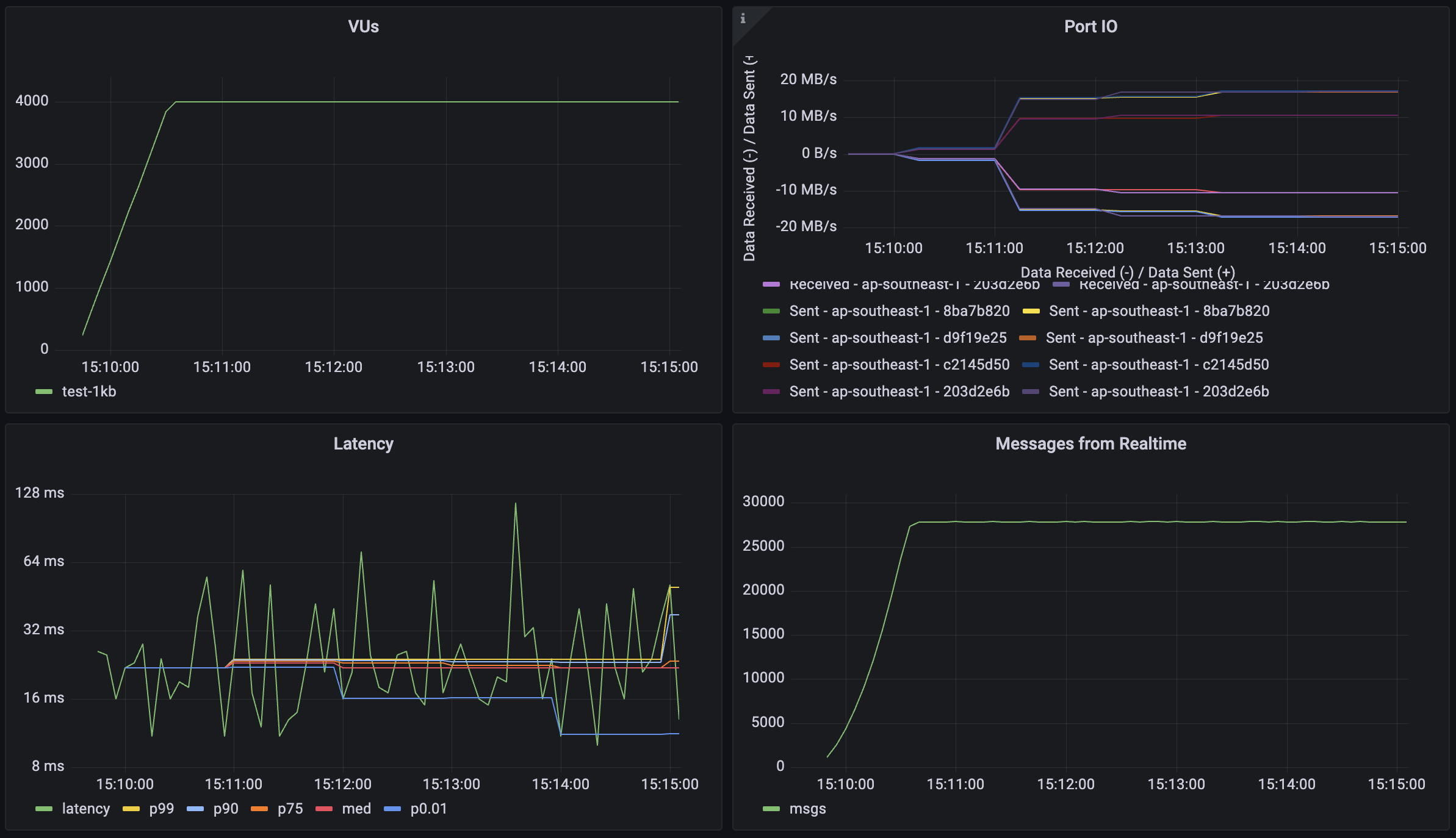
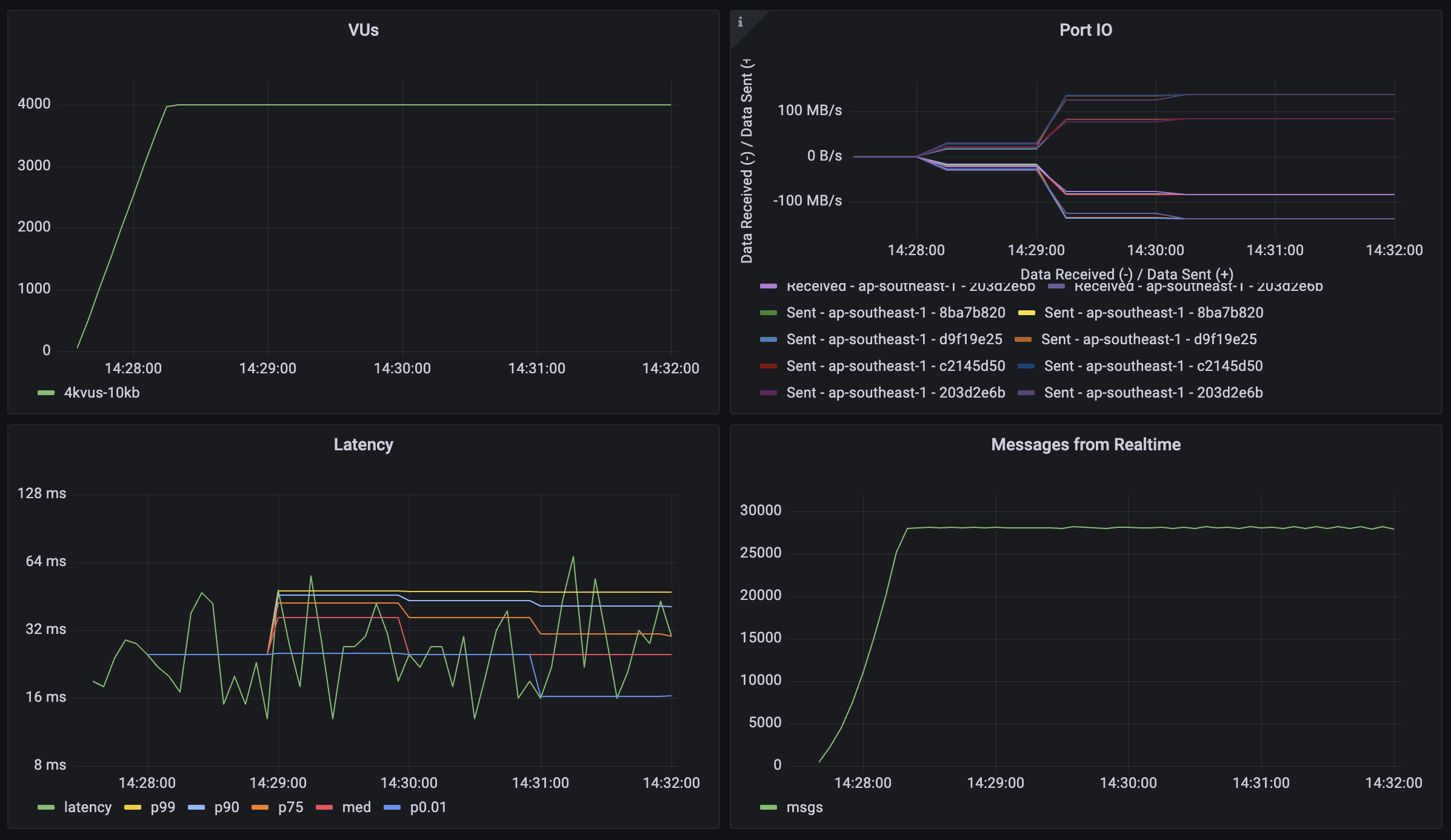
这个工作负载测试系统在不同消息负载大小下的性能,以了解数据量如何影响吞吐量和延迟。每个虚拟用户(VU)遵循与广播测试相同的连接模式,但消息大小各不相同:
🌐 This workload tests the system's performance with different message payload sizes to understand how data volume affects throughput and latency. Each virtual user (VU) follows the same connection pattern as the broadcast test, but with varying message sizes:
- 建立并保持一个 WebSocket 连接
- 加入两个不同的通道:
- 一个回声通道(每个通道1个用户)用于直接消息反射
- 一个广播通道(每个通道6个用户)用于群组通信
- 发送 1KB、10KB 和 50KB 的消息
- 通过向每个加入的通道每秒发送2条消息,持续5分钟来产生流量
1KB 的负载 #
🌐 1KB payload
10KB 的负载 #
🌐 10KB payload
50KB 的负载 #
🌐 50KB payload
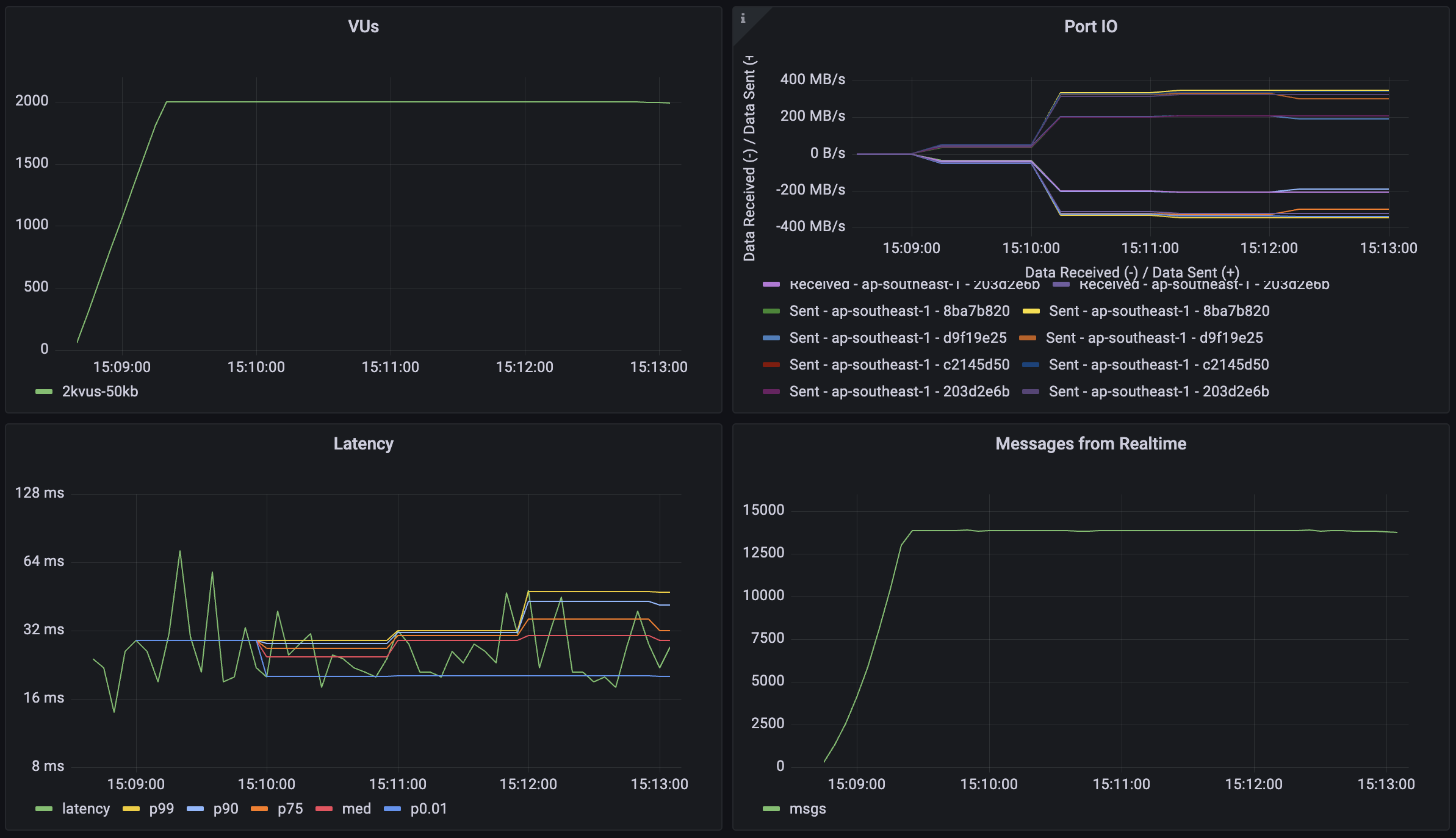
| 指标 | 1KB 数据负载 | 10KB 数据负载 | 50KB 数据负载 | 50KB 数据负载(降低负载) |
|---|---|---|---|---|
| 并发用户 | 4_000 | 4_000 | 4_000 | 2_000 |
| 消息吞吐量 | 28_000 消息/秒 | 28_000 消息/秒 | 28_000 消息/秒 | 14_000 消息/秒 |
| 中位延迟 | 13 毫秒 | 16 毫秒 | 27 毫秒 | 19 毫秒 |
| 延迟 (p95) | 36 毫秒 | 42 毫秒 | 81 毫秒 | 39 毫秒 |
| 延迟 (p99) | 85 毫秒 | 93 毫秒 | 146 毫秒 | 82 毫秒 |
| 接收数据 | 31.2 MB/s (10.4 GB) | 268 MB/s (72 GB) | 1284 MB/s (348 GB) | 644 MB/s (176 GB) |
| 发送数据 | 9.2 MB/s (3.1 GB) | 76 MB/s (20.8 GB) | 384 MB/s (104 GB) | 192 MB/s (52 GB) |
注意:最后一列显示了在 50KB 负载测试中减少负载(2,000 用户)后的结果,展示了系统在不同并发级别下处理较大负载的表现。
广播:可扩展性场景 #
🌐 Broadcast: Scalability scenarios
这个工作负载展示了Realtime处理高规模场景的能力,可以应对大量并发用户和广播通道。测试模拟了每个用户参与群组通信并定期广播消息的场景。每个虚拟用户(VU):
🌐 This workload demonstrates Realtime's capability to handle high-scale scenarios with a large number of concurrent users and broadcast channels. The test simulates a scenario where each user participates in group communications with periodic message broadcasts. Each virtual user (VU):
- 建立并维持 WebSocket 连接(30-120 分钟)
- 加入了两个广播通道
- 每个加入的通道每分钟发送1条消息
- 每条消息都会被广播给另外100个用户
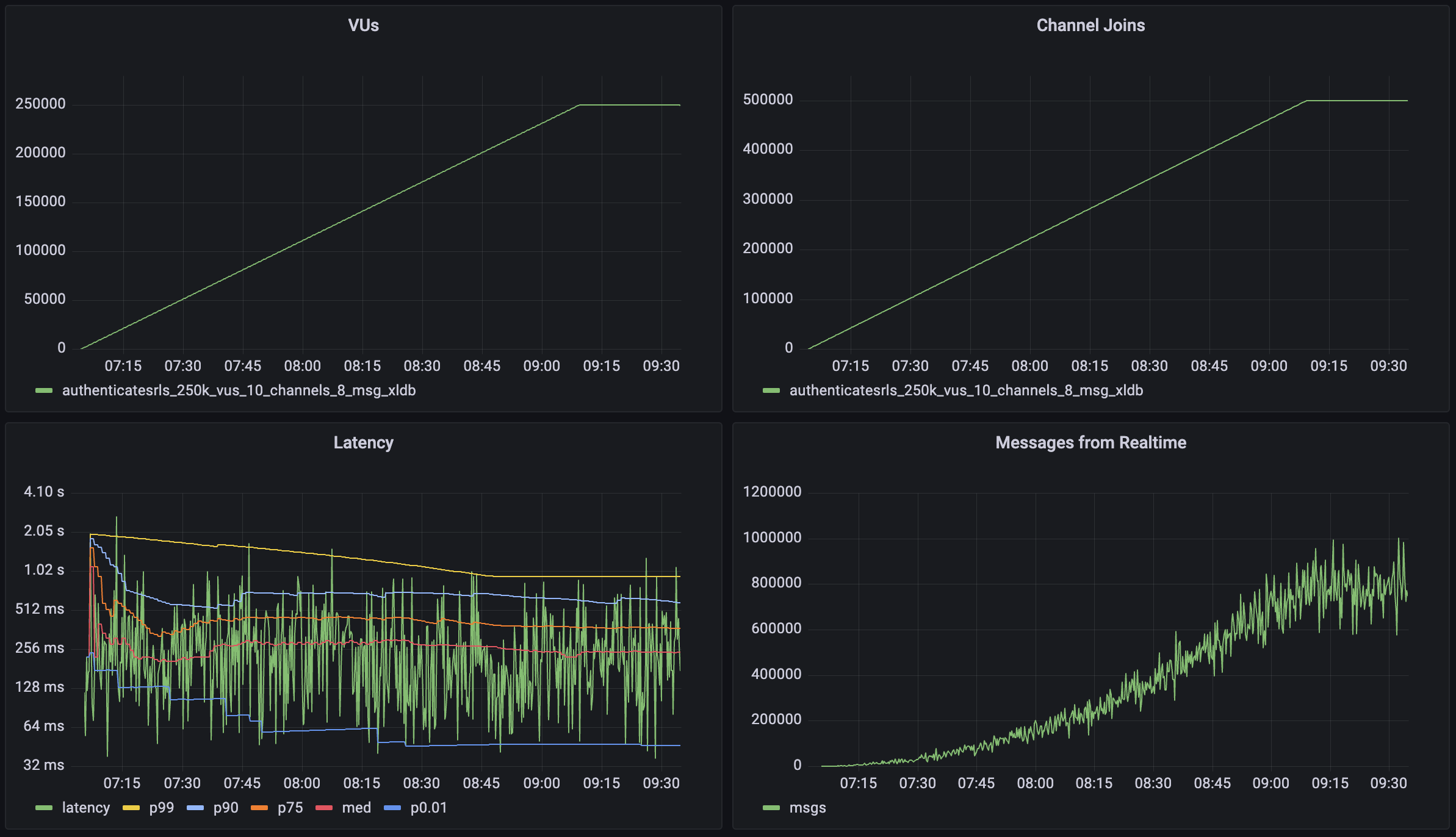
| 指标 | 数值 |
|---|---|
| 并发用户 | 250,000 |
| 总通道加入数 | 500,000 |
| 每个通道的用户数 | 100 |
| 消息吞吐量 | >800,000 消息/秒 |
| 中位延迟 | 58 毫秒 |
| 延迟 (p95) | 279 毫秒 |
| 延迟 (p99) | 508 毫秒 |
| 接收数据 | 68 MB/秒 (600 GB) |
| 发送数据 | 0.64 MB/秒 (5.7 GB) |
实时认证 #
🌐 Realtime Auth
这个工作负载展示了 Realtime 在每秒处理大量新连接和每秒加入通道方面的能力,同时这些通道启用了身份验证行级安全 (RLS)。测试模拟了大量用户连接到 Realtime 并参与受身份验证保护的通信的场景。每个虚拟用户 (VU):
🌐 This workload demonstrates Realtime's capability to handle large amounts of new connections per second and channel joins per second with Authentication Row Level Security (RLS) enabled for these channels. The test simulates a scenario where large volumes of users connect to realtime and participate in auth protected communications. Each virtual user (VU):
- 建立并维持 WebSocket 连接(2.5 分钟)
- 加入了两个广播通道
- 每个加入的通道每分钟发送1条消息
- 每条消息都会被广播给另外100个用户
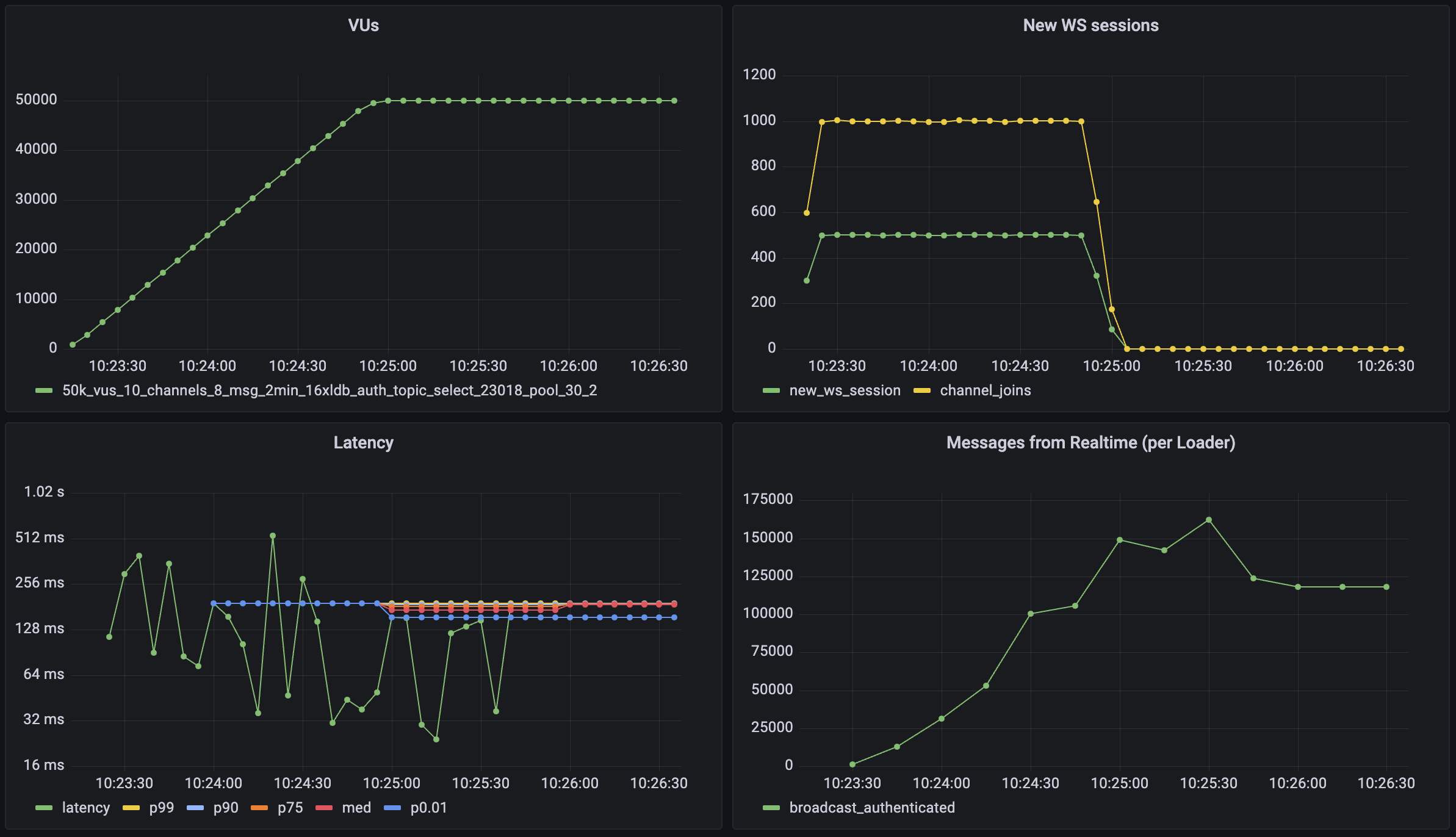
| 指标 | 数值 |
|---|---|
| 并发用户 | 50_000 |
| 总通道加入数 | 100_000 |
| 每个通道用户数 | 100 |
| 消息吞吐量 | >150_000 条/秒 |
| 新连接速率 | 500 连接/秒 |
| 通道加入速率 | 1000 加入/秒 |
| 中位延迟 | 19 毫秒 |
| 延迟 (p95) | 49 毫秒 |
| 延迟 (p99) | 96 毫秒 |
Postgres 变更 #
🌐 Postgres Changes
实时系统通常需要提前考虑,因为它们的扩展动态。对于 Postgres Changes 功能,每个变更事件都必须检查订阅的用户是否有访问权限。例如,如果你有 100 个用户订阅了一个表,而你在该表中进行一次插入操作,那么就会触发 100 次“读取”:每个用户一次。
🌐 Realtime systems usually require forethought because of their scaling dynamics. For the Postgres Changes feature, every change event must be checked to see if the subscribed user has access. For instance, if you have 100 users subscribed to a table where you make a single insert, it will then trigger 100 "reads": one for each user.
数据库可能会成为瓶颈,限制消息吞吐量。如果你的数据库无法足够快地授权更改,这些更改就会被延迟,直到你收到超时。
🌐 There can be a database bottleneck which limits message throughput. If your database cannot authorize the changes rapidly enough, the changes will be delayed until you receive a timeout.
数据库的更改是在单线程上处理的,以保持更改顺序。这意味着计算升级对 Postgres 更改订阅的性能影响不大。你可以在下面估算你的数据库的预期最大吞吐量。
🌐 Database changes are processed on a single thread to maintain the change order. That means compute upgrades don't have a large effect on the performance of Postgres change subscriptions. You can estimate the expected maximum throughput for your database below.
如果你在大规模使用 Postgres Changes,你应该考虑使用一个没有 RLS 和过滤器的单独“public”表。或者,你也可以仅使用 Realtime 服务器端,然后通过 Realtime 广播将变化重新传送给你的客户端。
🌐 If you are using Postgres Changes at scale, you should consider using a separate "public" table without RLS and filters. Alternatively, you can use Realtime server-side only and then re-stream the changes to your clients using a Realtime Broadcast.
输入你的数据库设置来估算你的实例的最大吞吐量:
🌐 Enter your database settings to estimate the maximum throughput for your instance:
别忘了自己运行一遍基准测试,确保性能对你的使用场景来说是可以接受的。
🌐 Don't forget to run your own benchmarks to make sure that the performance is acceptable for your use case.
Supabase 继续改进 Realtime 的 Postgres 变更。如果你对自己的使用场景性能不确定,可以通过 支持表单 联系我们。支持团队可以为每种使用场景提供最佳方案建议。
🌐 Supabase continues to make improvements to Realtime's Postgres Changes. If you are uncertain about your use case performance, reach out using the Support Form. The support team can advise on the best solution for each use-case.