Edge Function 503 error response
Last edited: 8/12/2026
来自 Edge Function 的 503 HTTP 状态码表示三种可能的情况之一:
🌐 A 503 HTTP status code from an Edge Function indicates one of three possible events:
- 这个功能因为
SyntaxError启动失败了 - 你自己的代码返回了 503
- 平台本身有问题
这些需要不同的修复方法,所以在调试之前弄清原因是很有用的:
🌐 These require different fixes, so it is useful to decipher the cause before debugging:
第一步:弄清你有哪种503 #
🌐 Step 1: Figure out which 503 you have
如果你收到了类似下面这样的 BOOT_ERROR 消息,你可以直接跳到解决方案部分:启动错误
🌐 If you received back a BOOT_ERROR message, like the one below, you can jump to the resolution section: Boot Error
1{2 "code": "BOOT_ERROR",3 "message": "Function failed to start (please check logs)"4}否则,在你的 日志探索器 中运行以下查询。
🌐 Otherwise, run the below query in your Log Explorer.
1select2 req.pathname as function_name,3 res.status_code,4 case5 when metadata.execution_id is not null6 and metadata.function_id is not null then 'app_level'7 when metadata.execution_id is null8 and metadata.function_id is not null then 'boot_error'9 when metadata.execution_id is null10 and metadata.function_id is null then 'internal_failure'11 end as error_type12from13 function_edge_logs14 cross join UNNEST(metadata) as metadata15 cross join UNNEST(metadata.request) as req16 cross join UNNEST(metadata.response) as res17where status_code = 50318limit 50;根据输出情况,你可以使用此表找到相应的调试部分:
🌐 Depending on the output, you can use this table to find the appropriate debugging section:
| 值 | 前往 |
|---|---|
app_level | 应用级错误 |
boot_error | 启动错误 - 功能无法编译 |
internal_failure | 平台问题 |
第2步:解决错误 #
🌐 Step 2: Addressing the error
应用级错误 #
🌐 App level error
在你的函数逻辑的某个地方,你自己返回了一个 503 响应:
🌐 Somewhere in your function logic, you are returning a 503 response yourself:
示例: #
🌐 Example:
1return new Response(JSON.stringify(data), {2 headers: { ...corsHeaders, 'Content-Type': 'application/json' },3 status: 503, // <-- you set this4})检查一下你的函数逻辑和任何第三方 API 响应,看看 503 是从哪里来的。
🌐 Check your function logic and any third-party API responses for where the 503 is originating.
- 在你的函数代码中搜索
503。查看Response对象上的明确状态码 - 追踪触发它的条件。如果你的函数调用了外部 API,它可能会传递那些服务返回的错误
- 在返回之前添加日志,这样将来发生时可以留下记录:
1console.error('Returning 503 - reason:', reason)🌐 See: Error handling in Edge Functions
启动错误 #
🌐 Boot error
一个 SyntaxError 阻止了你的代码动态编译。
🌐 A SyntaxError prevented your code from dynamically compiling.
在 Function Dashboard 中,在受影响函数的 Log 标签下,你可以筛选关键字 worker boot error:。日志会告诉你发生了语法错误:
🌐 In the Function Dashboard, under the affected function's Log tab, you can filter for the key phrase worker boot error:. the log will tell you syntax error occurred:
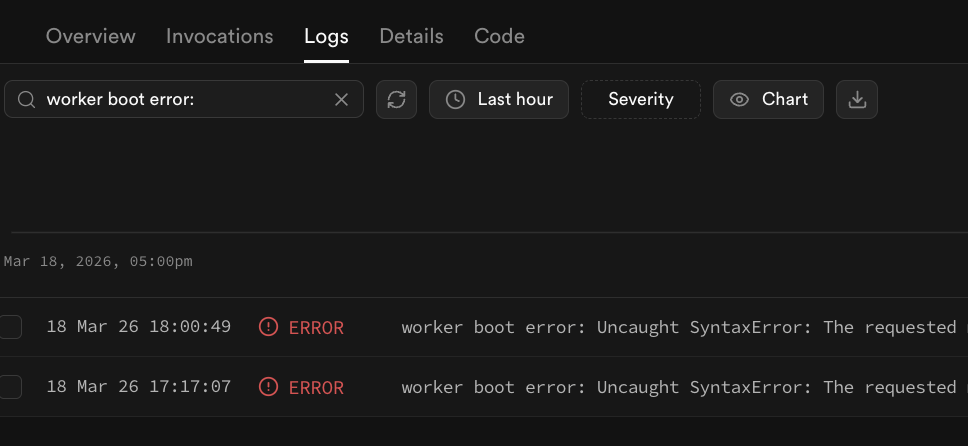
或者,你也可以不用 Function Dashboard,而是通过下面的查询在 日志浏览器 中以编程方式查找启动失败的错误信息:
1select2 fl.event_message,3 content.timestamp,4 fel.function_name,5 fel.status_code6from7 function_logs as fl8 left join UNNEST(fl.metadata) as content on true9 left join (10 select11 em.function_id,12 em.version,13 req.pathname as function_name,14 res.status_code15 from16 function_edge_logs17 left join UNNEST(metadata) as em on true18 left join UNNEST(em.request) as req on true19 left join UNNEST(em.response) as res on true20 ) as fel21 on content.function_id = fel.function_id and content.version = fel.version22where content.event_type = 'BootFailure'23order by timestamp, function_name24limit 20;示例原因 #
🌐 Example causes
重新定义常量 #
🌐 Redefining constant variables
重新定义一个常量值会导致代码无法编译:
🌐 Redefining a constant value can prevent the code from compiling:
1let some_var2const some_var // SyntaxError — already declared这些错误的日志信息应该说明原因 already declared 和受影响的文件。
🌐 The log message for these errors should state the cause already declared and the file impacted.
1worker boot error: Uncaught SyntaxError:2Identifier 'some_var' has already been declared at file:///var/tmp/sb-compile-edge-runtime/source/index.ts:6:7关键词违规 #
🌐 Key word violations
有些关键词只能在特定的上下文中使用。例如,await 关键词只能在 async 函数中使用。
🌐 Some key words can only be used in specific contexts. For instance, the await key word can only be used inside async functions.
1(req: Request) => {2 const { name } = await req.json(); // await only works inside async functions3}这些错误的日志信息应该说明原因 Unexpected reserved word 和受影响的文件。
🌐 The log message for these errors should state the cause Unexpected reserved word and the file impacted.
1worker boot error: Uncaught SyntaxError:2Unexpected reserved word at file:///var/tmp/sb-compile-edge-runtime/source/index.ts:6:28错误的导入:不存在的模块或命名导出 #
🌐 Bad imports: Non-existent modules or named exports
如果导入在边缘函数中不可用,可能会导致错误:
🌐 Imports can cause errors if they're not available within the edge function:
1// importing non-existent module2import supabase from 'does_not_exist'34// or accessing non-existent export5import { doesNotExist } from 'jsr:@supabase/functions-js'67doesNotExist()这些错误的日志信息应该说明原因 requested module... does not provide an export 和受影响的文件。
🌐 The log message for these errors should state the cause requested module... does not provide an export and the file impacted.
1worker boot error: Uncaught SyntaxError:2The requested module 'jsr:@supabase/functions-js' does not provide an export named 'doesNotExist' at file:///var/tmp/sb-compile-edge-runtime/source/index.ts:2:10”要修复,检查模块及其导入,确保它们存在并且受到 Supabase Edge Functions 支持。
🌐 To fix, check the module and its imports to make sure they exist and are supported by Supabase Edge Functions.
如果这个模块以前能用,看看最近的版本有没有重大更改,然后只导入可用的版本。
🌐 If the module worked before, check to see if the most recent release had breaking changes and then only import the working version.
平台问题 #
🌐 Platform issue
边缘函数运行时过载,或者 API 网关因为负载过高返回了自己的 503 错误。
🌐 The edge function runtime is overwhelmed, or the API Gateway is returning its own 503 due to excessive load.
打开一个支持工单,并附上步骤1的相关日志输出。
🌐 Open a support ticket and include the relevant log output from Step 1.
额外资源 #
🌐 Additional resources
还卡住吗? #
🌐 Still stuck?
- 查看 Discord、Supabase GitHub 讨论 和 Reddit 页面 上的类似报告,这些可以帮助调试
- 如果问题持续存在,并且你认为这是平台问题,请为你的项目提交支持工单