Edge Function 504 error response
Last edited: 8/12/2026
一个来自边缘函数的内部504意味着该函数未能在150秒内启动响应,最大执行时间。
截至目前,这个限制无法增加。如果你的函数总是需要比允许时间更多的时间,请跳到当优化不够用部分。否则,请按照以下步骤来加快响应时间。
🌐 As of now, this limit cannot be increased. If your function always needs more time than allowed, skip to When optimization isn't enough section. Otherwise, follow the steps below to speed up response times.
第1步:找出运行慢的函数 #
🌐 Step 1: Identifying slow Functions
你可以在日志浏览器中通过下面的查询筛选504事件:
🌐 You can filter for 504 events in the Log Explorer with the below query:
1select2 cast(timestamp as datetime) as timestamp,3 req.pathname,4 res.status_code,5 metadata.execution_time_ms6from7 function_edge_logs8 cross join UNNEST(metadata) as metadata9 cross join UNNEST(metadata.request) as req10 cross join UNNEST(metadata.response) as res11where res.status_code = 50412limit 20;你可以通过运行下面的 查询 来进一步了解某个特定函数平均需要多少时间:
🌐 You can further explore how much time a specific function takes on average by running the below query:
1select2 req.pathname,3 res.status_code,4 AVG(metadata.execution_time_ms) as avg_runtime_ms,5 MIN(metadata.execution_time_ms) as min_runtime_ms,6 MAX(metadata.execution_time_ms) as max_runtime_ms7from8 function_edge_logs9 cross join UNNEST(metadata) as metadata10 cross join UNNEST(metadata.request) as req11 cross join UNNEST(sb) as sb12 cross join UNNEST(req.headers) as headers13 cross join UNNEST(metadata.response) as res14where req.pathname = '/functions/v1/YOUR_FUNCTION_NAME' -- <---add your function name or remove filter15group by req.pathname, res.status_code16limit 20;一旦确定了候选函数,你就可以更仔细地研究了。
🌐 Once candidate functions are identified, you can investigate more thoroughly.
第2步:调查慢速函数 #
🌐 Step 2: Investigating slow Functions
在可疑部分周围添加 console.time 标签,以找出时间消耗的位置:
🌐 Add console.time labels around suspicious sections to pinpoint where time is being spent:
1console.time('fetch-user-data')2const userData = await fetchUserFromDatabase(id)3console.timeEnd('fetch-user-data')时间响应会显示在函数仪表板的Log标签下,显示你分配的标签。你可以使用这个标签作为关键词来搜索时间戳。
🌐 The time response will show up in the function's dashboard under the Log tab with the label you assigned it. You can use the label as a keyword to search for the timestamp.
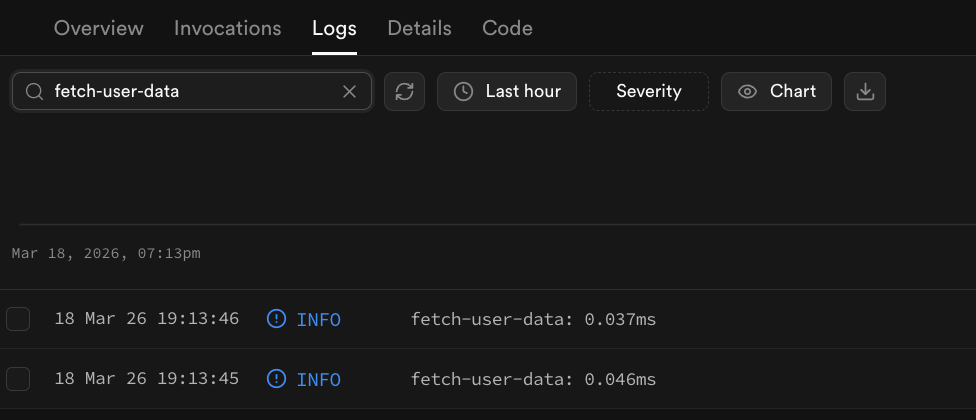
对于本地开发,你也可以使用 Chrome Dev Tools 单步执行代码。
🌐 For local development, you can also step through execution with Chrome Dev Tools.
常见原因:
🌐 Common culprits:
- 可以并行运行的顺序 API 调用
- 未建立索引或未优化的数据库查询
- 正在限制你访问的外部 API
- 没有明确退出条件的循环
步骤 3:优化 #
🌐 Step 3: Optimize
下面的建议是你可以采取的一些策略来减少执行时间。
🌐 The below suggestions are some strategies you can pursue to reduce execution times.
并行请求 #
🌐 Parallelizing requests
如果请求彼此独立,你可以不用按顺序调用它们,而是通过 Promise.all 并行调用,从而加快操作速度:
🌐 If requests are independent of one another, rather than calling them sequentially, you can speed up operations by calling them in parallel with Promise.all:
1// Before: sequential: total time = A + B2const resultA = await fetch('https://api-one.com/data')3const resultB = await fetch('https://api-two.com/data')45// After: parallel: total time = max(A, B)6const [resultA, resultB] = await Promise.all([7 fetch('https://api-one.com/data'),8 fetch('https://api-two.com/data'),9])拆分逻辑 #
🌐 Splitting up logic
Edge 函数可能做的事情比它需要的要多。把它的逻辑拆分成多个可以单独调用、运行时间更短的部分可能会更好。
🌐 The Edge Function may be doing more than it needs to. It may be better to split up it's logic into multiple parts that can be called individually and run for shorter periods.
使用后台任务 [utilize-background-tasks]
🌐 Use background tasks [utilize-background-tasks]
你可以在后台任务中启动功能,让它独立于请求/响应处理器运行。具体流程可以参考 后台任务文档
🌐 You can initiate functions in a background task to be handled independently of the request/response handler. The process is outlined in the Background Task docs
把工作分配给客户端或外部服务 #
🌐 Offload work to the client or an external service
与其在函数内部管理所有操作,不如使用一个外部 API,它可以更快地执行任务然后返回结果。或者,你也可以把一些处理工作交给请求者,而不是在函数内部做所有事情。
🌐 Instead of managing all operations within the function itself, there may be an external API that can execute jobs faster and then send back results. Alternatively, you may be able to offload some processing to the requester rather than doing everything within the function itself.
使用替代库 #
🌐 Using alternative libraries
有些库可能比其他的更优。值得去探索那些执行更快或者更轻量的替代库。
🌐 Some libraries, may be more optimal than others. It's worth exploring alternative libraries that may execute faster or are lighter weight.
优化数据库操作 #
🌐 Optimizing database operations
如果你正在从你的函数连接到 Supabase Postgres,你可以在性能仪表板中查看查询的速度。如果操作很慢,你可以查看性能和索引顾问获取改进建议。
🌐 If you are connecting to Supabase Postgres from your function, you can inspect the speed of your queries in the performance dashboard. If the operations are slow, you can review performance and index advisor for improvement suggestions.
实现缓存 #
🌐 Implement caching
如果你对同一个资源进行请求,而且返回值变化不规律,你可以考虑使用一个外部缓存层,比如 Upstash Redis,来减少等待时间。
🌐 If you are making requests to the same resource and the return values change irregularly, you may be able to implement an external cache layer, such as Upstash Redis to reduce wait times.
限制请求负载 #
🌐 Restrict request load
如果该函数用于评估用户提交,你可以限制加载大小以减少计算时间。你可以在 日志查看器 中使用下面的查询,根据初始请求者提供的内容大小(字节)进行筛选:
🌐 If the function is used to evaluate user submissions, you can restrict load size to reduce computational time. You can use the below query in the log explorer to filter by the content size in bytes provided by the initial requester:
1select2 req.pathname as function_name,3 res.status_code,4 AVG(COALESCE(cast(headers.content_length as int), 0)) as avg_content_size_in_bytes,5 MIN(COALESCE(cast(headers.content_length as int), 0)) as min_content_size_in_bytes,6 MAX(COALESCE(cast(headers.content_length as int), 0)) as max_content_size_in_bytes7from8 function_edge_logs9 cross join UNNEST(metadata) as metadata10 cross join UNNEST(metadata.request) as req11 cross join UNNEST(sb) as sb12 cross join UNNEST(req.headers) as headers13 cross join UNNEST(metadata.response) as res14where req.pathname = '/functions/v1/induce-504'15group by req.pathname, res.status_code16limit 10;当优化还不够的时候 #
🌐 When optimization is not enough
Edge Functions 有一个无法提升的运行时上限。如果你的使用场景确实需要更多,可以考虑:
🌐 Edge Functions have a hard runtime ceiling that cannot be raised. If your use case genuinely requires more, consider:
- 使用无服务器/边缘函数服务,比如 AWS Lambda,限制更少
- 自托管 Edge Functions 并重新配置运行时约束
- 重构你的应用,让服务器端任务依赖其他资源,比如 Next.js API 路由
还卡住吗? #
🌐 Still stuck?
这里有一些你可以参考的其他资料
🌐 Here are some further resources you can review