546 - WORKER_RESOURCE_LIMIT Exceeded / WORKER_LIMIT Exceeded
546 错误表示一个边缘函数使用的资源(CPU 或内存)超过了分配给它的额度。之前它是 WORKER_LIMIT。
🌐 A 546 error indicates that an edge function used more resources (CPU or Memory) than it was allocated. Previously it was WORKER_LIMIT.
错误的上下文 #
🌐 Context for the error
边缘函数在称为 isolates 的临时服务器上运行。每个 isolate:
🌐 Edge functions run in transient servers called isolates. Each isolate:
- 一次处理一个请求
- 绑定到单个功能(例如,
func_one的隔离体永远不会服务于func_two)
当有请求到达时,运行时会把它分配给一个空闲的隔离实例,或者如果所有现有的隔离实例都忙的话,就会启动一个新的。每个隔离实例也都有资源限制。
🌐 When a request arrives, the runtime assigns it to a free isolate or spins up a new one if all existing isolates are busy. Each isolate also has resource limitations.
| 资源 | 限制 |
|---|---|
| CPU周期 | 2秒 |
| 内存 | 250MB |
一旦一个隔离实例使用了任何资源的50%,它会完成当前的请求,然后关闭。
🌐 Once an isolate uses 50% of any resource, it will finish the current request and then shut down.
然而,如果剩下的请求在完成之前用尽了所有 CPU 或内存,隔离环境会立即终止并返回 546 响应。
🌐 However, if that remaining request exhausts all CPU or memory before completion, the isolate will terminate immediately and return a 546 response.
解决错误 #
🌐 Solving the error
第1步:找出错误 #
🌐 Step 1: Identifying the error
当边缘函数因内部 CPU 或内存限制失败时,它会返回以下错误:
🌐 When an edge function fails due to internal CPU or memory limits, it will return the error:
1{2 "code": "WORKER_RESOURCE_LIMIT",3 "message": "Function failed due to not having enough compute resources (please check logs)"4}在功能仪表板的Logs标签中,你可以找到具体的错误信息:
🌐 In the function dashboard's Logs tab, you can find the specific error message:
Memory limit exceededCPU Time exceeded
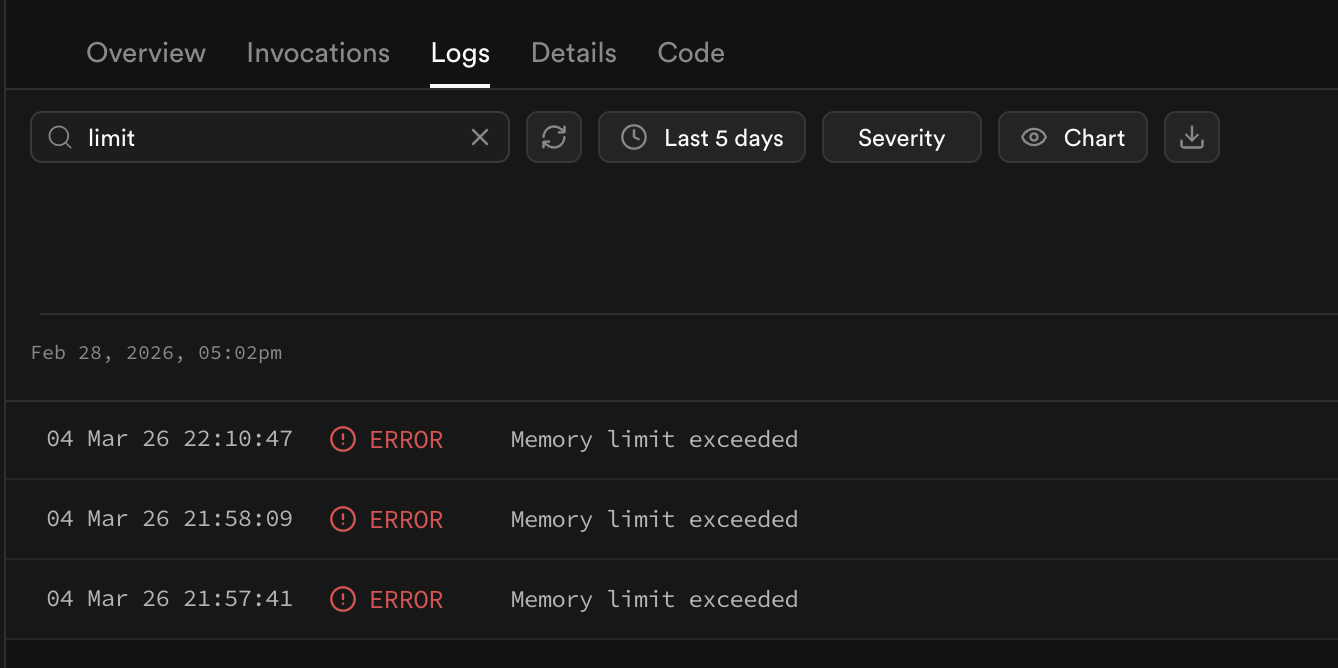
或者,你可以使用 日志浏览器 来筛选函数的特定错误
🌐 Alternatively, you can filter for the specific errors from the function using the log explorer
1select2 fl.event_message,3 content.timestamp,4 fel.function_name,5 fel.status_code6from7 function_logs as fl8 left join UNNEST(fl.metadata) as content on true9 left join (10 select11 em.execution_id,12 req.pathname as function_name,13 res.status_code14 from15 function_edge_logs16 left join UNNEST(metadata) as em on true17 left join UNNEST(em.request) as req on true18 left join UNNEST(em.response) as res on true19 ) as fel20 on content.execution_id = fel.execution_id21where content.level = 'error' and fel.status_code = 54622order by timestamp, function_name23limit 20;步骤 2:检查错误频率 #
🌐 Step 2: Check error frequency
在优化之前,在 日志浏览器 中运行下面的查询,以了解 546 错误发生的频率相对于总请求的比例:
🌐 Before optimizing, run the below query in the Log Explorer to understand how often 546s are occurring relative to total requests:
1select2 COUNT(id) as total_responses,3 COUNTIF(response.status_code = 546) as total_546,4 SAFE_DIVIDE(COUNTIF(response.status_code = 546), COUNT(*)) * 100 as pct_5465from6 function_edge_logs7 cross join UNNEST(function_edge_logs.metadata) as metadata8 cross join UNNEST(metadata.response) as response9 cross join UNNEST(metadata.request) as request10where method != 'OPTIONS' and pathname = '/functions/v1/YOUR_FUNCTION_NAME';11-- <-- add your function name to inspect specific endpoints根据结果,你可能能够判断这个事件是个极端情况,还是在影响某个功能的整体表现。
🌐 Depending on the results, you may be able to determine if the event is an edge case or affecting a function's overall behavior.
解读结果 #
🌐 Interpreting the results
| 546-比率 | 它可能的意思 |
|---|---|
| < 5% | May be an anomaly or edge case with how your function is structure or responds to payloads. May be acceptable for your use case |
| 5-50% | Affecting a meaningful portion of traffic |
| > 50% | 几乎所有请求资源都过剩;这个功能需要大量改进 |
第二步:缩小原因范围 #
🌐 Step 2: Narrowing down the cause
本地试验 #
🌐 Experimenting locally
对 Supabase 托管的边缘函数施加的相同限制,也适用于 CLI 创建的测试环境。你可以按照函数的本地开发指南来设置测试环境,然后在本地运行你的函数:
🌐 The same constraints placed on edge function's hosted by Supabase are also imposed by the test environment spun-up by the CLI. You can follow the function's local development guide to set up a test environment and then serve your function locally:
1supabase functions serve your-function --debug那就尝试做一些不同的压力测试,看看能否引发 546s。值得尝试的一些测试可能包括:
🌐 Then try experimenting with different stress tests to see if you can induce 546s. Some tests worth trying may involve:
- 发送大量负载
- 测试不同的路径或查询参数
- 一次发送多个请求
如果你找到了一种可靠的方法来引发这个错误,你可能想在操作之间记录以获得更多可见性,或者配置 Chrome 开发工具来准确找出出错的逻辑。
🌐 If you find a reliable way to induce the error, you may want to log between operations to gain more visibility or configure chrome dev-tools to pinpoint the underlying logic that is failing.
在日志中寻找故障模式 #
🌐 Exploring for failure patterns in the logs
还有一些其他查询可能有助于识别有关546错误的模式。
🌐 There are a few other queries that may be useful for identifying patterns around 546 errors.
第3步:纠正错误 #
🌐 Step 3: Correcting the error
应对这个错误的唯一方法是减少每个请求的资源消耗。有几种策略可以尝试。
🌐 The only way to manage the error is to reduce resource consumption per request. There are a few strategies one can go about.
1. 重构逻辑: #
🌐 1. Refactor logic:
如果你觉得某部分功能过于激进,可以尝试在本地测试看看重构是否能减少资源过度使用。
🌐 If you believe a portion of your function is overly aggressive, try testing locally whether refactoring reduces resource overuse.
常见原因:
🌐 Common culprits:
CPU 密集型递归:密集的循环或递归会耗尽 CPU
1// This will exhaust CPU allocation when called repeatedly2function fib(n: number): number {3 if (n <= 1) return n;4 return fib(n - 1) + fib(n - 2); // high levels of recursion5}67for (let i = 0; i < 100; i++) {8 fib(40);9}无限制的内存分配:在一个紧密循环中填充大型数组会阻止垃圾回收器释放内存
1// Each iteration allocates ~100s of KB. During the loops, all memory is consumed before GC can intervene2let ref = []3for (let i = 0; i < 1000; i++) {4 ref.push(new Array(10e4).fill('data'))5}你可以对照 Edge Function 文档 中的可用示例来比较你的函数,从中获得如何重构代码的灵感。
🌐 You can compare your function against working examples in the Edge Function docs for insight on how to rework your code.
2. 换成更轻的封装: #
🌐 2. Swap in a lighter package:
如果你用的依赖做的事情超出你需要的范围,可以找一个更轻量或性能更好的替代品。
🌐 If you're using a dependency that does more than you need, look for a lighter or more performant alternative.
3. 将操作卸载到数据库: #
🌐 3. Offload operations to the database:
如果你正在执行逻辑来处理来自 Supabase Postgres 的数据,你可能可以直接在数据库中处理,通过使用数据库函数或重构的查询。
🌐 If you are performing logic to process data from Supabase Postgres, you may be able to handle the processing within the database directly by using database functions or refactored queries.
4. 将操作卸载到外部 API: #
🌐 4. Offload operations to an external API:
与其在函数内部管理所有操作,不如有一个外部 API 可以代表它执行 CPU 或内存密集型任务。一个例子是使用外部 API 来编排无头浏览器,然后使用边缘函数来管理活动的输出,而不是把所有事情都放在一个地方处理。
🌐 Instead of managing all operations within the function itself, there may be an external API that can execute CPU or memory intensive jobs on its behalf. One example would be using an external API for orchestrating a headless browser and then using the edge function to manage the output of the activity instead of everything all in place.
5. 把操作拆分成各个函数: #
🌐 5. Split operations into individual functions:
把一个大函数拆成更小的函数,每个函数只负责一个子任务。然后在应用层或者通过一个协调函数把结果拼在一起。
🌐 Break a large function into smaller ones, each responsible for a single sub-task. Stitch the results together at the app level or via an orchestrating function.
如果你的函数会调用其他函数,记得总是设置一个退出条件。Supabase 会终止那些递归调用超过一定深度的函数,但你的代码也应该自己设定一个限制。
🌐 If you have functions that call other functions, always implement an escape condition. Supabase will terminate functions that recursively self-call past a certain depth, but your code should enforce its own limit.
6. 转到限制较少的平台: #
🌐 6. Move to a less restrictive platform:
边缘函数有严格的资源限制。如果你的工作需要比我们允许的更多资源,你可以考虑其他解决方案,比如限制较少的 AWS Lambda,或者自托管边缘函数并重新配置设置。
🌐 Edge functions have a hard resource limit. If your work requires more resources than we permit, you can look into other solutions, such as AWS Lambda, that are less restrictive, or self-host edge functions and reconfigure the settings.
示例案例 #
🌐 Example cases
图片处理 #
🌐 Image processing
对图片或其他大文件进行编辑可能会非常消耗 CPU 和内存。一些减轻负担的方法包括使用性能更好的处理库,通过 API 或请求方的服务器在外部处理,或者限制文件大小以减少压力。
🌐 Performing edits against images or other large files can be both CPU and Memory intensive. Some approaches for reducing load is using more performant processing libraries, processing outside by using an API or the requester's server, or restricting the file size to reduce strain.
AI 嵌入生成与推断 #
🌐 AI embedding generation and inference
AI 模型会把数据处理成嵌入(大型数组),这样它们能更好地理解这些数据。边缘函数能够直接管理一些小型模型;不过,有些模型需要的处理能力超过了边缘函数能直接支持的范围。在这些情况下,解决方案是通过外部来源来管理嵌入,比如 OpenAI、Anthropic 等,然后用边缘函数进行轻量处理和协调。
🌐 AI models process data into embeddings (large arrays), that they can more understand. Edge Functions are capable of managing some small models directly; however, some require more processing power than what the edge function can support directly. In these cases, the solution is to manage the embeddings via an external source, such as OpenAI, Anthropic, etc. and to use the edge function for light processing and coordination.
网页爬取 #
🌐 Web scraping
网络爬虫通常需要一个无头浏览器操作器,例如 puppeteer 或 playwright 来渲染网页。在这种情况下,最好使用外部 API 来帮你管理无头浏览器,然后用边缘函数解析它返回的结果。函数文档里有一个例子:使用 Puppeteer 截图
🌐 Web scraping often requires a headless browser operator, such as puppeteer or playwright for rendering web pages. In this case, it is better to use an external API to manage the headless browser for you and then parse the results it returns with the edge function. There's an example in the function docs: Taking Screenshots with Puppeteer
额外资源 #
🌐 Additional resources