Transfer edge functions from one project to another
本指南展示了如何使用 Supabase CLI 或 Supabase 仪表板将你的 Edge Functions 从一个项目转移到另一个项目。
🌐 This guide shows how you can transfer your Edge Functions from one project to another using the Supabase CLI or the Supabase Dashboard.
先决条件 #
🌐 Pre-requisites
要按照本指南进行,你需要以下内容:
🌐 To follow through this guide, you need the following:
- 你必须对源项目和目标项目都有正确的访问权限
- 你必须安装 Supabase CLI 工具
- 源项目和目标项目都必须是活跃的
步骤(使用 Supabase CLI): #
🌐 Steps (using the Supabase CLI):
- 使用终端登录你的 Supabase 账户(有这些功能的账户)
1supabase login这会打开一个带有访问码的网页。复制这个码,粘贴到你的终端,然后按回车。
🌐 This should open up a web page with an access code. Copy the code, paste it in your terminal, and hit enter.
- 通过运行以下命令列出所有 Edge 函数
1supabase functions list --project-ref your_project_ref- 下载功能
1supabase functions download function_name --project-ref your_project_ref重复这一步以下载多个功能。
🌐 Repeat this step to download multiple functions.
这会将函数下载到 supabase/functions。你可以通过运行查看下载的函数
🌐 This downloads the function(s) into supabase/functions. You can view the downloaded function(s) by running
1ls supabase/functions- 目标项目的链接
1supabase link --project-ref your_target_project_ref- 将功能部署到目标项目
1supabase functions deploy --project-ref your_target_project_ref这会将 supabase/functions 中的所有函数部署到目标项目中。你可以通过在项目仪表板上查看你的 Edge Functions 来确认。
🌐 This deploys all functions within the supabase/functions to the target project. You can confirm by checking your Edge Functions on the project dashboard
步骤(使用 Supabase 控制面板): #
🌐 Steps (using the Supabase Dashboard):
- 在源项目中,从侧边菜单进入 Edge Functions
- 使用
Download按钮,将你想要的功能下载为 zip: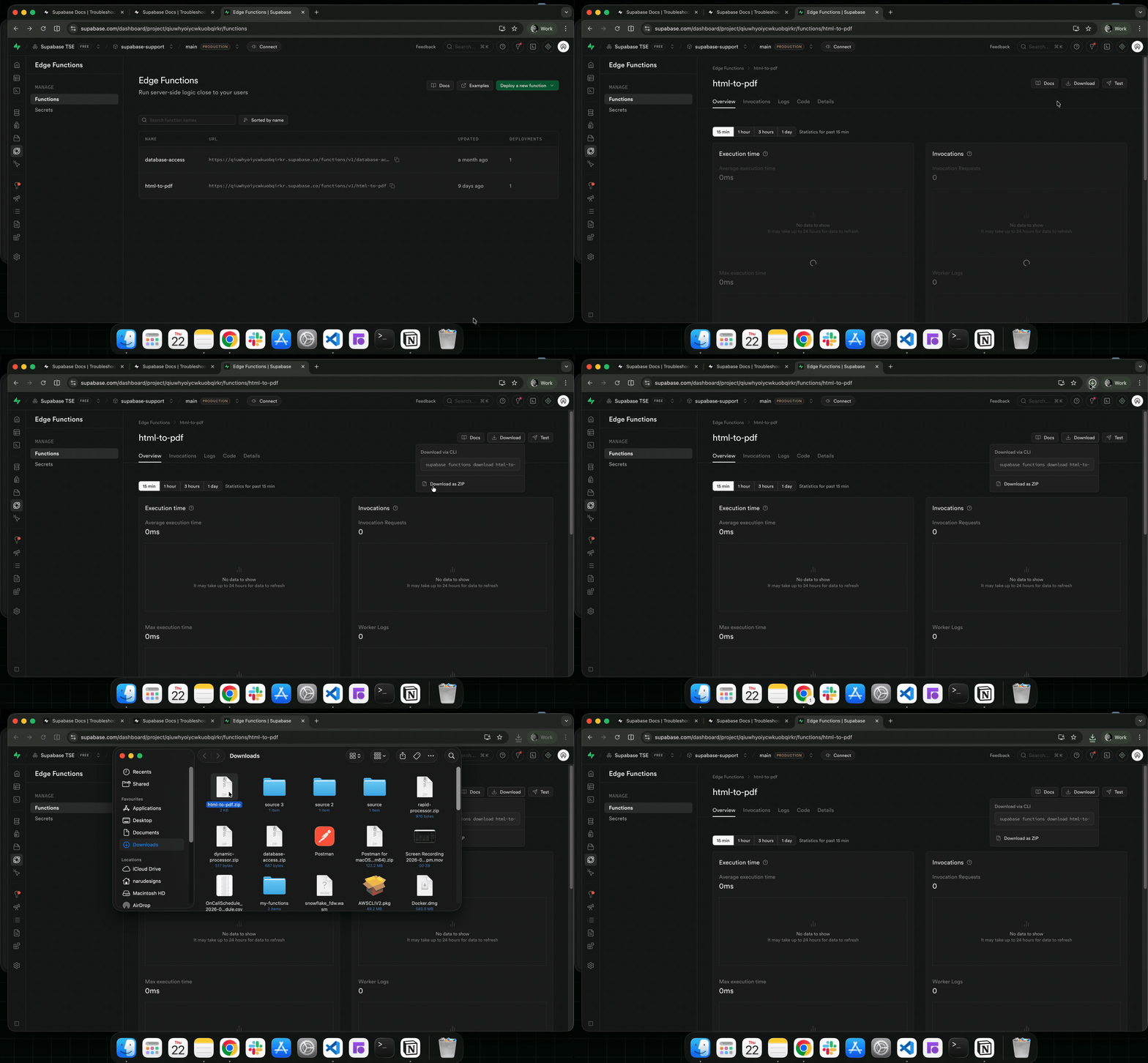
- 在目标项目中,从侧边菜单进入 Edge Functions
- 点击
Deploy a new function按钮,选择 通过编辑器 操作 - 将你下载的函数(步骤2中的zip函数)拖放到编辑器里
- 添加你的函数名,然后点击
Deploy function按钮来部署函数:
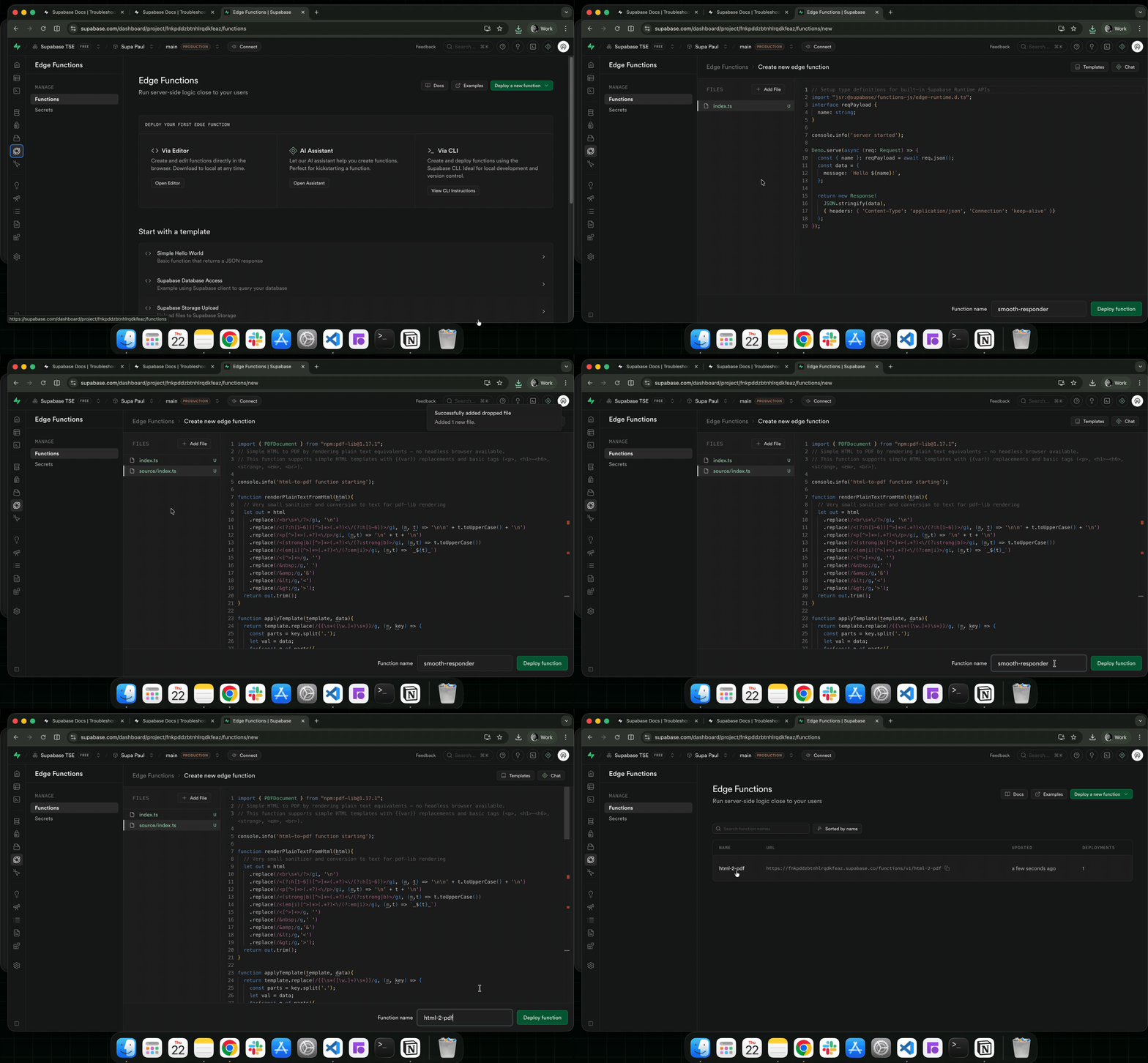
有了这个,你可以在你的 Supabase 项目之间转移 edge 函数。
🌐 With this, you can transfer your edge functions between your Supabase projects.