保护边缘功能
Authentication patterns for Edge Functions
@supabase/server(在 [https://github.com/supabase/server])中的 withSupabase 封装器会根据声明的 auth 模式验证调用者的凭据,并在 ctx 上为你提供一个预配置的 Supabase 客户端。下面的章节展示了如何在每种常见的认证场景下使用它。
🌐 The withSupabase wrapper from @supabase/server verifies the caller's credentials against a declared auth mode and hands you a pre-configured Supabase client on ctx. The sections below show how to use it for each common auth scenario.
关于授权头和 verify_jwt 平台背后是如何工作的,请参见 授权头。
🌐 For how authorization headers and the verify_jwt platform check work under the hood, see Authorization headers.
| 模式 | 接受 |
|---|---|
'user' | 在 Authorization 上有效的用户 JWT |
'secret' | 在 apikey 上的密钥 |
'publishable' | 在 apikey 上的可发布密钥 |
'none' | 任何调用者,无需检查(用于已签名的 Webhook) |
已认证用户调用 #
🌐 Authenticated user calls
已登录用户调用的函数——通常通过客户端的 supabase.functions.invoke ——会在 Authorization 头中发送用户的会话 JWT。保留 verify_jwt = true(默认设置),这样平台会在你的处理器运行前验证 JWT,然后使用 auth: 'user' 来获取已经根据调用者的 RLS 策略进行作用域限制的 ctx.supabase。
🌐 Functions called by signed-in users — typically through supabase.functions.invoke from the client — send the user's session JWT on the Authorization header. Keep verify_jwt = true (the default) so the platform validates the JWT before your handler runs, then use auth: 'user' to get ctx.supabase already scoped to the caller's RLS policies.
1import { withSupabase } from 'npm:@supabase/server'23export default {4 fetch: withSupabase({ auth: 'user' }, async (_req, ctx) => {5 const { supabase, supabaseAdmin, userClaims, jwtClaims, authMode } = ctx6 // supabase — RLS-scoped to the authenticated user7 // supabaseAdmin — bypasses RLS (service role)8 // userClaims — user identity from JWT (id, email, role)9 // jwtClaims — full JWT claims10 // authMode — which auth mode matched1112 // your business logic goes here13 return Response.json({ email: ctx.userClaims?.email })14 }),15}服务间调用 #
🌐 Service-to-service calls
Cron 任务、工作器、pg_net 或其他 Edge 函数会在 apikey 头上使用密钥进行调用,而不是用户 JWT。禁用 verify_jwt,并使用 auth: 'secret' 来验证密钥是否匹配你在 dashboard 上的任何密钥。这样你就可以获得 ctx.supabaseAdmin 来执行特权操作。
🌐 Cron jobs, workers, pg_net, or another Edge Function make calls with a secret key on the apikey header rather than a user JWT. Disable verify_jwt and use auth: 'secret' to validate the key against any secret key from your dashboard. You get ctx.supabaseAdmin for privileged work.
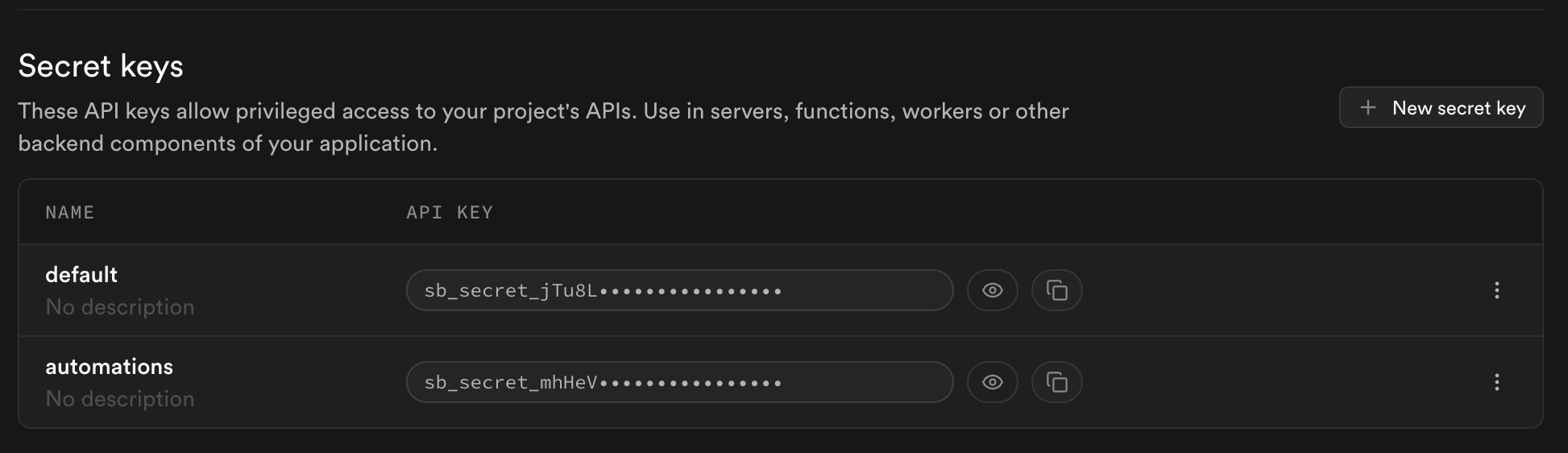
1import { withSupabase } from 'npm:@supabase/server'23export default {4 fetch: withSupabase({ auth: 'secret' }, async (_req, ctx) => {5 // your business logic. ctx.supabaseAdmin bypasses RLS6 return Response.json({ ok: true })7 }),8}要只接受一个特定的密钥,请使用 auth: 'secret:<name>'。例如,auth: 'secret:automations' 只接受你在仪表板的 设置 > API 密钥 部分命名为 “automations” 的密钥。相同的语法也适用于可发布密钥(auth: 'publishable:<name>')。
公共函数 #
🌐 Public functions
对于真正的公共功能,比如健康检查,使用 auth: 'none' 和 verify_jwt = false,这样匿名调用者就可以访问处理程序。
🌐 For a genuinely public function, like a health check, use auth: 'none' with verify_jwt = false so anonymous callers can reach the handler.
1[functions.health]2verify_jwt = false1import { withSupabase } from 'npm:@supabase/server'23export default {4 fetch: withSupabase({ auth: 'none' }, async () => {5 // your business logic6 return Response.json({ ok: true })7 }),8}auth: 'none' 会跳过所有凭证检查——在对任何读取或写入敏感数据的内容使用它之前,请先查看 外部 webhooks 下的注意事项。
外部网络钩子 #
🌐 External webhooks
像 Stripe 或 GitHub 这样的外部提供商不会发送 Supabase 凭证。他们会用自己的共享密钥对请求体进行签名。使用 auth: 'none' 来跳过 SDK 的凭证检查,然后在处理函数内验证提供商的签名。保留 verify_jwt = false。
🌐 External providers like Stripe or GitHub don't send Supabase credentials. They sign the request body with their own shared secret. Use auth: 'none' to skip the SDK's credential check, then verify the provider's signature inside the handler. Keep verify_jwt = false.
1import { withSupabase } from 'npm:@supabase/server'2import Stripe from 'npm:stripe'34const stripe = new Stripe(Deno.env.get('STRIPE_SECRET_KEY')!)56export default {7 fetch: withSupabase({ auth: 'none' }, async (req, ctx) => {8 const signature = req.headers.get('stripe-signature') ?? ''9 const body = await req.text()1011 try {12 stripe.webhooks.constructEvent(body, signature, Deno.env.get('STRIPE_WEBHOOK_SECRET')!)13 } catch {14 return new Response('bad signature', { status: 400 })15 }1617 // your business logic. ctx.supabaseAdmin available for db work18 return Response.json({ received: true })19 }),20}auth: 'none' 会禁用所有的凭证检查。你的处理器需要完全负责验证调用者。在没有通过其他方式验证调用者的情况下,绝不要在读取或写入敏感数据的端点上使用它。
组合模式 #
🌐 Combining modes
同时响应用户和内部调用者的函数在 auth 上接收一个数组。模式会按顺序尝试,第一个匹配的胜出,ctx.authMode 会告诉你是哪个匹配成功。
🌐 Functions that answer both users and internal callers take an array on auth. Modes are tried in order. The first match wins, and ctx.authMode tells you which matched.
1import { withSupabase } from 'npm:@supabase/server'23export default {4 fetch: withSupabase({ auth: ['user', 'secret'] }, async (req, ctx) => {5 if (ctx.authMode === 'user') {6 // your business logic for user calls. ctx.supabase is scoped to them7 return Response.json({ ok: true })8 }910 // your business logic for service calls. ctx.supabaseAdmin bypasses RLS11 return Response.json({ ok: true })12 }),13}自定义错误响应 #
🌐 Custom error responses
要自己处理 401 响应,使用 createSupabaseContext 替代 withSupabase。它会返回一个 { data, error } 元组,这样你就可以掌控全局。
🌐 To shape the 401 response yourself, use createSupabaseContext instead of withSupabase. It returns a { data, error } tuple so you stay in control.
1import { createSupabaseContext } from 'npm:@supabase/server'23export default {4 fetch: async (req: Request) => {5 const { data: ctx, error } = await createSupabaseContext(req, { auth: 'user' })6 if (error) {7 return Response.json({ message: error.message, code: error.code }, { status: error.status })8 }9 return Response.json({ message: `hello ${ctx.userClaims?.email}` })10 },11}环境变量 #
🌐 Environment variables
@supabase/server 从一组标准的环境变量中读取其配置。在 Supabase 平台以及使用 CLI 本地开发时,这些变量会自动提供。
| 变量 | 它是什么 |
|---|---|
SUPABASE_URL | 你的项目网址 |
SUPABASE_PUBLISHABLE_KEYS | 以 JSON 对象形式命名的可发布密钥 |
SUPABASE_SECRET_KEYS | 以 JSON 对象形式命名的秘密密钥 |
SUPABASE_JWKS | 用于验证用户 JWT 的 JSON Web 密钥集 |
使用 CLI 进行本地开发时采用单密钥设置,SDK 也可以作为备用接受这种设置:SUPABASE_PUBLISHABLE_KEY 和 SUPABASE_SECRET_KEY。
🌐 Local development with the CLI uses a single-key setup, which the SDK also accepts as a fallback: SUPABASE_PUBLISHABLE_KEY and SUPABASE_SECRET_KEY.
在其他运行时环境中也可以获得相同的零配置体验。在你的 Node.js、Bun、Cloudflare Workers 或自托管的 Deno 应用中安装 @supabase/server,并设置上面提到的环境变量。完整参考请查看该包的环境变量指南。
🌐 The same zero-config experience is available on other runtimes. Install @supabase/server in your Node.js, Bun, Cloudflare Workers, or self-hosted Deno app and set the environment variables above. See the package's environment variables guide for the full reference.