认证架构
The architecture behind Supabase Auth.
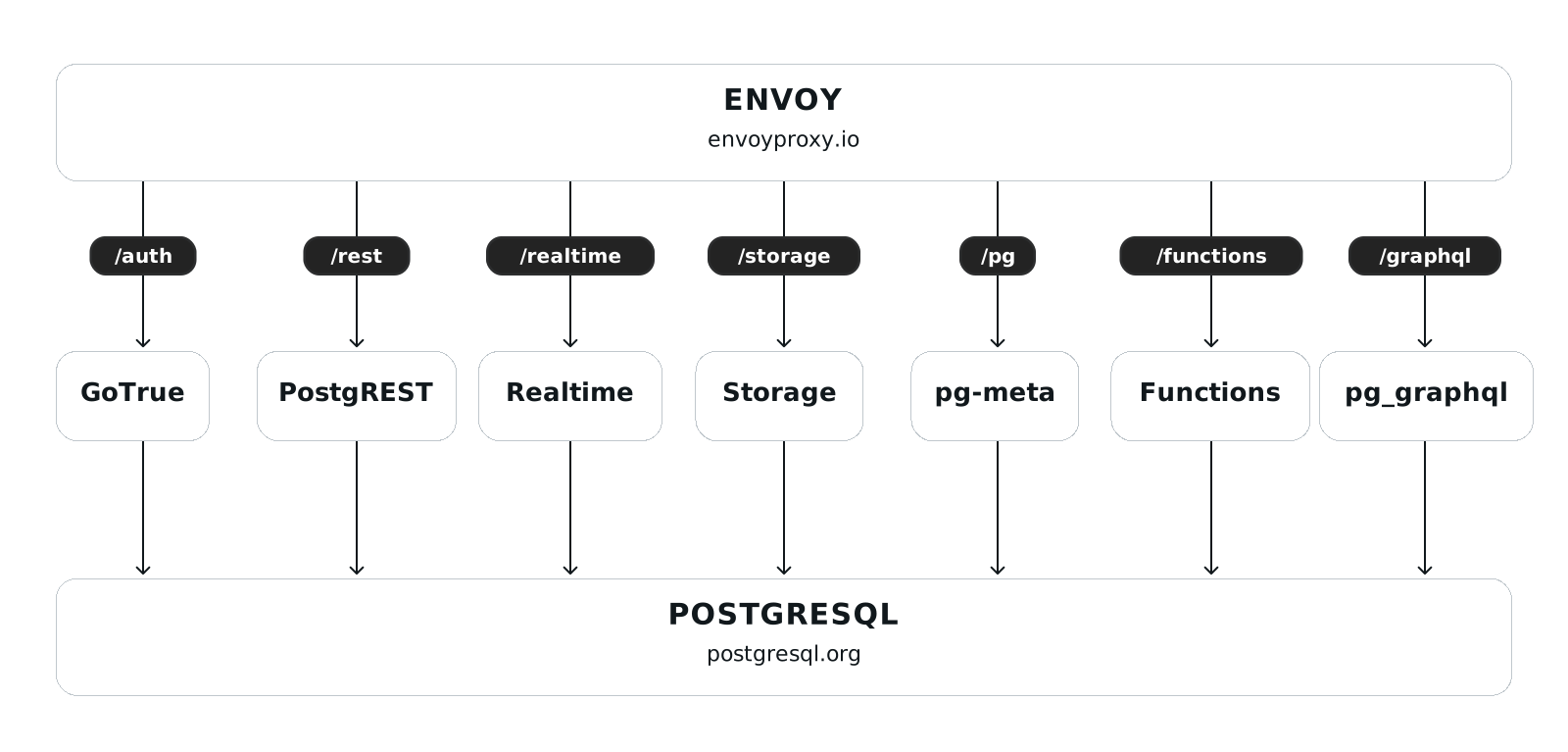
Supabase Auth 有四个主要层次:
🌐 There are four major layers to Supabase Auth:
- 客户端层。 这可以是 Supabase 客户端 SDK 之一,或者使用你选择的 HTTP 客户端手动发起的 HTTP 请求。
- Envoy API 网关。这在所有 Supabase 产品之间共享。
- Auth service(前称 GoTrue)。
- Postgres 数据库。 这是所有 Supabase 产品共享的。
客户端层 #
🌐 Client layer
客户端层在你的应用中运行。这可能在许多地方运行,包括:
🌐 The client layer runs in your app. This could be running in many places, including:
- 你的前端浏览器代码
- 你的后台服务器代码
- 你的原生应用
客户端层提供了用于登录和管理用户的功能。我们推荐使用 Supabase 客户端 SDK,它可以处理:
🌐 The client layer provides the functions that you use to sign in and manage users. We recommend using the Supabase client SDKs, which handle:
- 对 Supabase Auth 后端的 HTTP 调用进行配置和身份验证
- 在你应用的存储介质中持久化、刷新和移除认证令牌
- 与其他 Supabase 产品的整合
但从本质上讲,这一层负责处理 HTTP 调用,所以如果你愿意,你可以自己写一个客户端层。
🌐 But at its core, this layer manages the making of HTTP calls, so you could write your own client layer if you wanted to.
查看更多客户端 SDK 信息:
🌐 See the Client SDKs for more information:
认证服务 #
🌐 Auth service
Auth service 是由 Supabase 编写和维护的认证 API 服务器。它是 GoTrue 项目的一个分支,最初由 Netlify 创建。
🌐 The Auth service is an Auth API server written and maintained by Supabase. It is a fork of the GoTrue project, originally created by Netlify.
当你部署一个新的 Supabase 项目时,我们会在你的数据库旁边部署这个服务器的一个实例,并向你的数据库注入所需的身份验证架构。
🌐 When you deploy a new Supabase project, we deploy an instance of this server alongside your database, and inject your database with the required Auth schema.
认证服务负责以下内容:
🌐 The Auth service is responsible for:
- 验证、签发和刷新JWT
- 作为你的应用和数据库中身份验证信息之间的中介
- 与外部提供商沟通社交登录和单点登录
Postgres#
Supabase Auth 在你的 Postgres 数据库里使用 auth 模式来存储用户表和其他信息。出于安全考虑,这个模式在自动生成的 API 上是不会公开的。
🌐 Supabase Auth uses the auth schema in your Postgres database to store user tables and other information. For security, this schema is not exposed on the auto-generated API.
你可以使用数据库触发器和外键将身份验证信息连接到你自己的对象。确保你为身份验证数据创建的任何视图都通过启用RLS或撤销授权得到充分保护。
🌐 You can connect Auth information to your own objects using database triggers and foreign keys. Make sure that any views you create for Auth data are adequately protected by enabling RLS or revoking grants.
确保你为认证数据创建的任何视图都是受保护的。
🌐 Make sure any views you create for Auth data are protected.
从 Postgres 15 版本开始,如果使用 security_invoker 创建视图,视图会继承底层表的 RLS 策略。早期版本的视图,或者那些没有使用 security_invoker 创建的视图,会继承所有者的权限,所有者可以绕过 RLS 策略。
🌐 Starting in Postgres version 15, views inherit the RLS policies of the underlying tables if created with security_invoker. Views in earlier versions, or those created without security_invoker, inherit the permissions of the owner, who can bypass RLS policies.