列级安全
Postgres 的 行级安全 (RLS) 让你可以精细控制谁可以访问数据行。不过,它不能控制他们可以访问行中的哪些列。有时候你可能想限制对数据库中特定列的访问。列级权限就可以做到这一点。
🌐 Postgres's Row Level Security (RLS) gives you granular control over who can access rows of data. However, it doesn't give you control over which columns they can access within rows. Sometimes you want to restrict access to specific columns in your database. Column Level Privileges allows you to do that.
这是一个高级功能。我们不建议大多数用户使用列级权限。相反,我们建议结合专用表使用 RLS 策略来处理用户角色。
🌐 This is an advanced feature. We do not recommend using column-level privileges for most users. Instead, we recommend using RLS policies in combination with a dedicated table for handling user roles.
受限制的角色不能在受影响的表上使用通配符操作符(*)。你必须明确指定列名,而不能使用 SELECT * FROM <restricted_table>; 或它的 API 等效项。
行级策略 #
🌐 Policies at the row level
行级安全(RLS)中的策略用于限制对表中行的访问。可以把它们想象成在每个查询中都加了一个 WHERE 子句。
🌐 Policies in Row Level Security (RLS) are used to restrict access to rows in a table. Think of them like adding a WHERE clause to every query.
例如,假设你有一个 posts 表,里面有以下列:
🌐 For example, assume you have a posts table with the following columns:
iduser_idtitlecontentcreated_atupdated_at
你可以使用 RLS 限制只有创建它的用户才能更新,具体策略如下:
🌐 You can restrict updates to the user who created it using RLS, with the following policy:
1create policy "Allow update for owners" on posts for2update3 using ((select auth.uid()) = user_id);不过,这会让帖子拥有者可以完全访问并更新这一行,包括所有列。
🌐 However, this gives the post owner full access to update the row, including all of the columns.
列级别的权限 #
🌐 Privileges at the column level
要限制对列的访问,你可以使用 权限。
🌐 To restrict access to columns, you can use Privileges.
在 Postgres 中有两种权限:
🌐 There are two types of privileges in Postgres:
- 表级:授予表中所有列的权限。
- 列级 授予表中某个特定列的权限。
你可以在同一张表上拥有两种类型的权限。如果你两种都有,并且你撤销了列级权限,表级权限仍然会有效。
🌐 You can have both types of privileges on the same table. If you have both, and you revoke the column-level privilege, the table-level privilege will still be in effect.
默认情况下,我们的表将拥有表级别的 UPDATE 权限,这意味着 authenticated 角色可以更新表中的所有列。
🌐 By default, our table will have a table-level UPDATE privilege, which means that the authenticated role can update all the columns in the table.
1revoke2update3 on table public.posts4from5 authenticated;67grant8update9 (title, content) on table public.posts to authenticated;在上面的例子中,我们正在从 authenticated 角色撤销表级别的 UPDATE 权限,并在 title 和 content 列上授予列级别的 UPDATE 权限。
🌐 In the above example, we are revoking the table-level UPDATE privilege from the authenticated role and granting a column-level UPDATE privilege on the title and content columns.
如果我们想限制对更新 title 列的访问:
🌐 If we want to restrict access to updating the title column:
1revoke2update3 (title) on table public.posts4from5 authenticated;这次,我们要从 authenticated 角色撤销 title 列的列级 UPDATE 权限。我们不需要撤销表级的 UPDATE 权限,因为它已经被撤销了。
🌐 This time, we are revoking the column-level UPDATE privilege of the title column from the authenticated role. We didn't need to revoke the table-level UPDATE privilege because it's already revoked.
在仪表板中管理列权限 #
🌐 Manage column privileges in the Dashboard
列级权限是一个强大的工具,但它们也相当高级,在很多情况下,并不是满足常见访问控制需求的最佳选择。因此,我们有意将该功能的界面移到了仪表板的功能预览部分。
🌐 Column-level privileges are a powerful tool, but they're also quite advanced and in many cases, not the best fit for common access control needs. For that reason, we've intentionally moved the UI for this feature under the Feature Preview section in the dashboard.
你可以在 Supabase Studio 查看和编辑权限。
🌐 You can view and edit the privileges in the Supabase Studio.
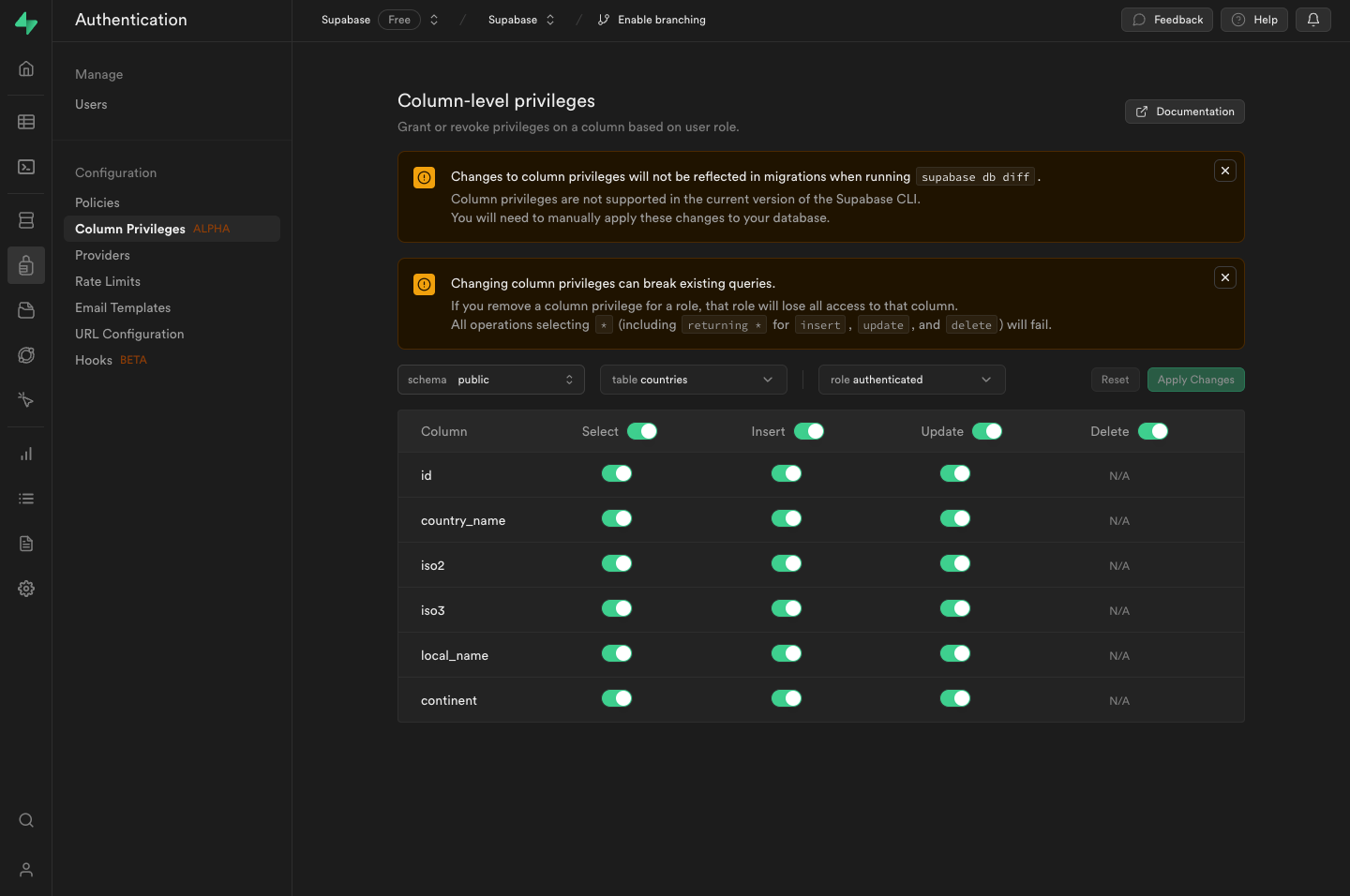
在迁移中管理列权限 #
🌐 Manage column privileges in migrations
虽然你可以直接在仪表板上管理权限,但随着你的项目增长,你可能想在迁移中管理它们。关于数据库迁移,请阅读本地开发指南。
🌐 While you can manage privileges directly from the Dashboard, as your project grows you may want to manage them in your migrations. Read about database migrations in the Local Development guide.
要开始,先生成一个 新迁移 来存储创建你的表所需的 SQL 以及行和列级权限。
1supabase migration new create_posts_table这将创建一个新的迁移:supabase/migrations/<timestamp> _create_posts_table.sql。
在那个文件里,添加创建这个 posts 表的 SQL,并包含行和列级别的权限。
1create table2posts (3id bigint primary key generated always as identity,4user_id text,5title text,6content text,7created_at timestamptz default now(),8updated_at timestamptz default now()9);1011-- Add row-level security12create policy "Allow update for owners" on posts for13update14using ((select auth.uid()) = user_id);1516-- Add column-level security17revoke18update19(title) on table public.posts20from21authenticated;使用列级权限时的注意事项 #
🌐 Considerations when using column-level privileges
- 如果你关闭某列的权限,你就完全无法使用那一列了。
- 所有操作(插入、更新、删除)以及使用
select *都会失败。