连接到你的数据库
Supabase provides multiple methods to connect to your Postgres database, whether you’re working on the frontend, backend, or using serverless functions.
如何连接到你的 Postgres 数据库 #
🌐 How to connect to your Postgres databases
你怎么连接到你的数据库取决于你是从哪里连接的:
🌐 How you connect to your database depends on where you're connecting from:
- 对于前端应用,请使用 Data API
- 对于 Postgres 客户端,使用连接字符串
- 对单次会话或使用 Postgres 原生命令,请使用 直接连接字符串。例如,数据库 GUI、像 pg_dump 这样的客户端应用、迁移、备份恢复,或为 复制 指定连接。直接端点是 IPv6,如果项目有 IPv4 附加组件,也可以通过 IPv4 访问。
- 对于来自仅支持 IPv4 的持久客户端的应用流量,请使用 pooler 会话模式,
- 对来自临时客户端(例如无服务器或边缘函数)的应用流量使用 pooler 事务模式。
下表总结了每种模式、它的主机和端口、每个项目等级支持的 IP 版本,以及它的最佳用途:
🌐 The table below summarizes each mode, its host and port, IP version support per project tier, and what it's best used for:
| 模式 | 主机:端口 | 免费 | 付费 | 付费 + IPv4 附加 | 最适合 |
|---|---|---|---|---|---|
| 直接连接 | db.[project-id].supabase.co:5432 | IPv6 | IPv6 | IPv4 | 迁移、pg_dump、长期后端 |
| 共享连接池 (Supavisor) - 会话模式 | aws-[region].pooler.supabase.com:5432 | IPv4 | IPv4 | IPv4 | 仅 IPv4 网络上的持久后端 |
| 共享连接池 (Supavisor) - 事务模式 | aws-[region].pooler.supabase.com:6543 | IPv4 | IPv4 | IPv4 | 无服务器和边缘功能 |
| 专属连接池 (PgBouncer) - 事务模式 | db.[project-id].supabase.co:6543 | - | IPv6 | IPv4 | 付费套餐中的高性能应用流量 |
IPv4 插件不是双栈的:启用它会把项目的 IPv6 (AAAA) DNS 记录换成 IPv4 (A) 记录,所以项目的终端现在只能通过 IPv4 访问。
🌐 The IPv4 add-on is not dual-stack: enabling it swaps the project's IPv6 (AAAA) DNS record for an IPv4 (A) record, so the project endpoint becomes reachable only over IPv4.
快速入门 #
🌐 Quickstarts
数据 API 和客户端库 #
🌐 Data APIs and client libraries
数据 API 允许你通过 REST 或 GraphQL 请求与数据库进行交互。只要你启用了 RLS,就可以使用这些 API 从前端获取和插入数据。
🌐 The Data APIs allow you to interact with your database using REST or GraphQL requests. You can use these APIs to fetch and insert data from the frontend, as long as you have RLS enabled.
为了方便,你也可以使用 Supabase 客户端库,它们用一个对开发者友好的界面封装了数据 API,并自动处理认证:
🌐 For convenience, you can also use the Supabase client libraries, which wrap the Data APIs with a developer-friendly interface and automatically handle authentication:
直接连接 #
🌐 Direct connection
直接连接字符串可以直接连接到你的 Postgres 实例。它非常适合持续运行的服务器,比如虚拟机(VM)和长期运行的容器。例子包括 AWS EC2 机器、Fly.io 虚拟机和 DigitalOcean Droplets。
🌐 The direct connection string connects directly to your Postgres instance. It is ideal for persistent servers, such as virtual machines (VMs) and long-lasting containers. Examples include AWS EC2 machines, Fly.io VMs, and DigitalOcean Droplets.
直接连接使用的是 IPv6,或者如果项目有 IPv4 附加功能 就用 IPv4。如果你的网络只有 IPv4 并且没有这个附加功能,就改用 pooler 会话模式 吧。
🌐 Direct connections are on IPv6, or on IPv4 if the project has the IPv4 add-on. If your network is IPv4-only and you don't have the add-on, use pooler session mode instead.
连接字符串看起来像这样:
🌐 The connection string looks like this:
1postgresql://postgres:[YOUR-PASSWORD]@db.abcdefghijklmnopqrst.supabase.co:5432/postgres通过点击 连接,在你的项目仪表板上获取项目的直接连接字符串。
🌐 Get your project's direct connection string from your project dashboard by clicking Connect.
拼车的人 #
🌐 Poolers
Supabase 提供两种连接池。共享连接池(Supavisor)是多租户的,每个项目都可以使用,并且仅支持 IPv4。专用连接池(PgBouncer)只在付费计划中提供,并与你的 Postgres 实例同地;像直接连接一样,它支持 IPv6,或者如果项目有 IPv4 附加功能 就支持 IPv4。
🌐 Supabase offers two poolers. The Shared Pooler (Supavisor) is multi-tenant, available on every project, and IPv4-only. The Dedicated Pooler (PgBouncer) is available on paid plans and co-located with your Postgres instance; like the direct connection, it is on IPv6, or on IPv4 if the project has the IPv4 add-on.
Pooler 会话模式 #
🌐 Pooler session mode
会话模式连接字符串通过共享连接池(Supavisor)连接到你的 Postgres 实例。只有在从仅有 IPv4 的网络连接时,才建议作为直接连接的替代方案。
🌐 The session mode connection string connects to your Postgres instance via the Shared Pooler (Supavisor). This is only recommended as an alternative to a Direct Connection when connecting from an IPv4-only network.
连接字符串看起来像这样:
🌐 The connection string looks like this:
1postgres://postgres.apbkobhfnmcqqzqeeqss:[YOUR-PASSWORD]@aws-[REGION].pooler.supabase.com:5432/postgres通过点击你的项目仪表板上的 连接 获取你项目的 Session 池连接字符串。
🌐 Get your project's Session pooler connection string from your project dashboard by clicking Connect.
汇聚器交易模式 #
🌐 Pooler transaction mode
事务模式连接字符串通过共享连接池(Supavisor)的事务池模式连接到你的 Postgres 实例。这对于需要大量临时连接的无服务器或边缘功能非常理想。
🌐 The transaction mode connection string connects to your Postgres instance via the Shared Pooler (Supavisor) in transaction-pooling mode. This is ideal for serverless or edge functions, which require many transient connections.
事务模式不支持预处理语句。为了避免错误,请为你的连接库关闭预处理语句。
🌐 Transaction mode does not support prepared statements. To avoid errors, turn off prepared statements for your connection library.
连接字符串看起来像这样:
🌐 The connection string looks like this:
1postgres://postgres.apbkobhfnmcqqzqeeqss:[YOUR-PASSWORD]@aws-[REGION].pooler.supabase.com:6543/postgres通过点击 Connect,从你的项目仪表板获取项目的交易池连接字符串。
🌐 Get your project's Transaction pooler connection string from your project dashboard by clicking Connect.
专用挖矿者 #
🌐 Dedicated pooler
对于付费用户,我们提供一个专用连接池器(PgBouncer),它与你的 Postgres 数据库同地点部署。专用连接池器只在事务模式下运行——如果需要会话模式,请使用共享连接池器。它可以通过 IPv6 访问,如果项目有IPv4 附加组件,也可以通过 IPv4 访问。
🌐 For paying customers, we provision a Dedicated Pooler (PgBouncer) that's co-located with your Postgres database. The Dedicated Pooler runs in transaction mode only - for session mode, use the Shared Pooler. It is reachable over IPv6, or over IPv4 if the project has the IPv4 add-on.
连接字符串看起来像这样:
🌐 The connection string looks like this:
1postgres://postgres:[YOUR-PASSWORD]@db.abcdefghijklmnopqrst.supabase.co:6543/postgres专用池化器能保证最佳性能和延迟,但会占用更多你的项目计算资源。如果你的网络支持 IPv6 或者你有 IPv4 插件,我们建议你使用专用池化器而不是共享池化器。
🌐 The Dedicated Pooler ensures best performance and latency, while using up more of your project's compute resources. If your network supports IPv6 or you have the IPv4 add-on, we encourage you to use the Dedicated Pooler over the Shared Pooler.
通过点击 Connect,从你的项目仪表板获取你项目的专用池连接字符串。
🌐 Get your project's Dedicated pooler connection string from your project dashboard by clicking Connect.
更多关于连接池的内容 #
🌐 More about connection pooling
连接池通过在查询之间重用现有连接来提升数据库性能。这减少了建立连接的开销,也提高了可扩展性。
🌐 Connection pooling improves database performance by reusing existing connections between queries. This reduces the overhead of establishing connections and improves scalability.
你可以使用应用端的连接池或服务器端的连接池(Supabase 会自动提供一个叫 Supavisor 的),这取决于你的后端是持久化的还是无服务器的。
🌐 You can use an application-side pooler or a server-side pooler (Supabase automatically provides one called Supavisor), depending on whether your backend is persistent or serverless.
应用端池化器 #
🌐 Application-side poolers
应用端的连接池器内置在连接库和 API 服务器中,比如 Prisma、SQLAlchemy 和 PostgREST。它们会保持与 Postgres 或服务器端连接池的多个活动连接,从而减少查询之间建立连接的开销。在部署到静态架构时,比如长期运行的容器或虚拟机,应用端的连接池器本身就已经够用了。
🌐 Application-side poolers are built into connection libraries and API servers, such as Prisma, SQLAlchemy, and PostgREST. They maintain several active connections with Postgres or a server-side pooler, reducing the overhead of establishing connections between queries. When deploying to static architecture, such as long-standing containers or VMs, application-side poolers are satisfactory on their own.
服务器端池化器 #
🌐 Server-side poolers
Postgres 连接就像 WebSocket。一旦建立,它们会一直保留,直到客户端(应用服务器)断开连接。服务器可能只做一次 10 毫秒的查询,但却不必要地将数据库连接占用几秒甚至更长时间。
🌐 Postgres connections are like a WebSocket. Once established, they are preserved until the client (application server) disconnects. A server might only make a single 10 ms query, but needlessly reserve its database connection for seconds or longer.
服务器端的连接池器,比如 Supabase 的 Supavisor 在事务模式下,会位于客户端和数据库之间,可以把它们看作 Postgres 连接的负载均衡器。
🌐 Server-side poolers, such as Supabase's Supavisor in transaction mode, sit between clients and the database and can be thought of as load balancers for Postgres connections.

它们会保持与数据库的热连接,并且只在需要时智能地与客户端共享,从而最大化单个连接能够处理的查询数量。它们最适合用来管理来自自动扩展系统的查询,比如边缘计算和无服务器函数。
🌐 They maintain hot connections with the database and intelligently share them with clients only when needed, maximizing the amount of queries a single connection can service. They're best used to manage queries from auto-scaling systems, such as edge and serverless functions.
连接到 SSL #
🌐 Connecting with SSL
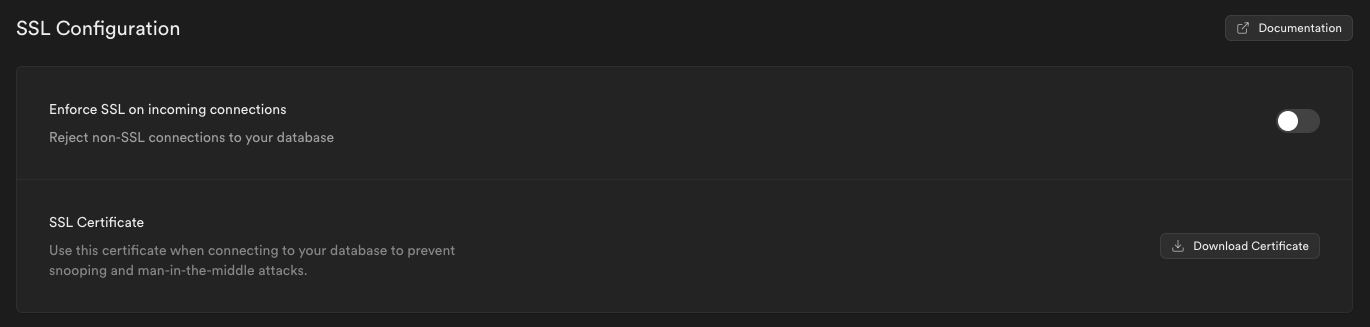
你应该尽可能使用 SSL 连接你的数据库,以防止窃听和中间人攻击。
🌐 You should connect to your database using SSL wherever possible, to prevent snooping and man-in-the-middle attacks.
你可以从你应用的仪表板获取连接信息和服务器根证书:
🌐 You can obtain your connection info and Server root certificate from your application's dashboard:
资源 #
🌐 Resources
故障排除和 Postgres 连接字符串常见问题 #
🌐 Troubleshooting and Postgres connection string FAQs
下面是对常见问题和困扰的解答。
🌐 Below are answers to common challenges and queries.
“连接被拒绝”错误是什么意思? #
🌐 What is a “connection refused” error?
“连接被拒绝”错误通常意味着你的数据库无法访问。确保你的 Supabase 项目正在运行,确认数据库的连接字符串,检查防火墙设置,并验证网络权限。
🌐 A “Connection refused” error typically means your database isn’t reachable. Ensure your Supabase project is running, confirm your database’s connection string, check firewall settings, and validate network permissions.
‘FATAL: 密码验证失败’ 错误是什么? #
🌐 What is the “FATAL: Password authentication failed” error?
当你的凭证不正确时,会发生这个错误。请从 Supabase 控制面板仔细检查你的用户名和密码。如果问题仍然存在,可以在项目设置中重置数据库密码。
🌐 This error occurs when your credentials are incorrect. Double-check your username and password from the Supabase dashboard. If the problem persists, reset your database password from the project settings.
你怎么用 IPv4 连接? #
🌐 How do you connect using IPv4?
你有两个选择。共享连接池(Supavisor)在每个项目等级上只支持 IPv4——可以在会话模式或事务模式下使用。或者,你可以给项目添加 IPv4 插件,这样直接连接和专用连接池就可以通过 IPv4 而不是 IPv6 访问了。
🌐 You have two options. The Shared Pooler (Supavisor) is IPv4-only on every project tier - use it in either session or transaction mode. Alternatively, add the IPv4 add-on to your project, which makes the direct connection and Dedicated Pooler reachable over IPv4 instead of IPv6.
Supabase里的Postgres连接字符串在哪里? #
🌐 Where is the Postgres connection string in Supabase?
你的连接字符串位于 Supabase 控制面板中。点击页面顶部的 Connect 按钮。
🌐 Your connection string is located in the Supabase Dashboard. Click the Connect button at the top of the page.
你可以同时使用 Supavisor 和 PgBouncer 吗? #
🌐 Can you use Supavisor and PgBouncer together?
从技术上讲,你可以同时使用两者,但除非你特别想增加并发客户端连接的总数,否则不推荐这样做。在大多数情况下,对于池化或基于事务的流量,最好选择 PgBouncer 或 Supavisor 之一。对于长时间的会话,直接连接仍然是最佳选择,如果这些会话需要 IPv4,也可以使用 Supavisor 的会话模式作为替代。在小规范计算层上同时运行两个连接池器,会增加触发数据库最大连接数限制的风险。
🌐 You can technically use both, but it’s not recommended unless you’re specifically trying to increase the total number of concurrent client connections. In most cases, it is better to choose either PgBouncer or Supavisor for pooled or transaction-based traffic. Direct connections remain the best choice for long-lived sessions, and, if IPv4 is required for those sessions, Supavisor session mode can be used as an alternative. Running both poolers simultaneously increases the risk of hitting your database’s maximum connection limit on smaller compute tiers.
默认池大小是怎么工作的? #
🌐 How does the default pool size work?
Supavisor 和 PgBouncer 独立工作,但两者都引用相同的连接池大小设置。例如,如果你设置连接池大小为 30,Supavisor 最多可以打开 30 个到 Postgres 的服务端连接。这些连接会在会话模式端口(5432)和事务模式端口(6543)之间共享。每种模式最多可以独立使用 30 个连接,或者在两者之间分配,但两种模式的总连接数不能超过 30。PgBouncer 在相同的限制下也最多可以打开 30 个连接。如果两个连接池同时处于活动状态并且各自达到模式限制,你的数据库可能会有多达 60 个后端连接,再加上任何直接连接。你可以在仪表盘的 数据库设置 中调整连接池大小。
🌐 Supavisor and PgBouncer work independently, but both reference the same pool size setting. For example, If you set the pool size to 30, Supavisor can open up to 30 server side connections to Postgres. These connections are shared between the session mode port (5432) and the transaction mode port (6543). Each mode can use up to 30 connections independently, or split them between both, but the total combined connections across both modes cannot exceed 30. PgBouncer can also open up to 30 connections under the same limit. If both poolers are active and reach their roles/modes limits at the same time, you could have as many as 60 backend connections hitting your database, in addition to any direct connections. You can adjust the pool size in Database settings in the dashboard.
客户端连接和后端连接有什么区别? #
🌐 What is the difference between client connections and backend connections?
在使用连接池时,有两个不同的限制需要了解。第一个是客户端连接数,指的是有多少客户端可以同时连接到一个连接池。这个数字受你计算等级的“最大连接池客户端”限制的限制,并且对 Supavisor 和 PgBouncer 独立适用。第二个是后端连接数,即连接池打开到 Postgres 的活动连接数量。这个数字由该连接池的池大小决定。
🌐 There are two different limits to understand when working with poolers. The first is client connections, which refers to how many clients can connect to a pooler at the same time. This number is capped by your compute tier’s “max pooler clients” limit, and it applies independently to Supavisor and PgBouncer. The second is backend connections, which is the number of active connections a pooler opens to Postgres. This number is set by the pool size for that pooler.
1Total backend load on Postgres =2 Direct connections +3 Supavisor backend connections (≤ supavisor_pool_size) +4 PgBouncer backend connections (≤ pgbouncer_pool_size)5≤ Postgres max connections for your compute instance最大连接池客户端数量限制是多少? #
🌐 What is the max pooler clients limit?
你计算层的“最大连接池客户端”限制是分别适用于 Supavisor 和 PgBouncer 的。一个连接池达到客户端限制不会影响另一个。当一个连接池达到限制时,它会停止接受新的客户端连接,直到现有连接关闭,但另一个连接池不受影响。你可以在计算和磁盘限制文档中查看你层的连接限制。
🌐 The “max pooler clients” limit for your compute tier applies separately to Supavisor and PgBouncer. One pooler reaching its client limit does not affect the other. When a pooler reaches this limit, it stops accepting new client connections until existing ones are closed, but the other pooler remains unaffected. You can check your tier’s connection limits in the compute and disk limits documentation.
你可以在哪儿看到当前的连接使用情况? #
🌐 Where can you see current connection usage?
你可以在项目仪表板的可观察性部分跟踪连接使用情况。有三个关键报告:
🌐 You can track connection usage from the Observability section in your project dashboard. There are three key reports:
- 数据库连接: 显示按角色划分的总活跃连接数(包括直接连接和连接池连接)。
- **专用连接池客户端连接数:**显示到 PgBouncer 的活跃客户端连接数。
- 共享池 (Supavisor) 客户端连接数: 显示与 Supavisor 的活动客户端连接数。
记住,角色页面不是实时的,它显示的是上次刷新时的连接数。如果你需要实时数据,可以设置 Grafana,或者直接在 SQL 编辑器中对 pg_stat_activity 运行查询。我们有一些检查连接的有用查询。
🌐 Keep in mind that the Roles page is not real-time, it shows the connection count from the last refresh. If you need up-to-the-second data, set up Grafana or run the query against pg_stat_activity directly in SQL Editor. We have a few helpful queries for checking connections.
1-- Count connections by application and user name2select3 count(usename),4 count(application_name),5 application_name,6 usename7from8 pg_stat_ssl9 join pg_stat_activity on pg_stat_ssl.pid = pg_stat_activity.pid10group by usename, application_name;1-- View all connections2 SELECT3 pg_stat_activity.pid,4 ssl AS ssl_connection,5 datname AS database,6 usename AS connected_role,7 application_name,8 client_addr,9 query,10 query_start,11 state,12 backend_start13FROM pg_stat_ssl14JOIN pg_stat_activity15 ON pg_stat_ssl.pid = pg_stat_activity.pid;应用处于空闲状态时为什么会有活动连接? #
🌐 Why are there active connections when the app is idle?
即使你的应用没有发起查询,一些 Supabase 服务仍会与数据库保持持久连接。例如,存储、PostgREST 和我们的健康检查器都会维持长期连接。你通常会看到这些服务保持一些基础的活跃连接。
🌐 Even if your application isn’t making queries, some Supabase services keep persistent connections to your database. For example, Storage, PostgREST, and our health checker all maintain long-lived connections. You usually see a small baseline of active connections from these services.
为什么连接字符串有不同的端口? #
🌐 Why do connection strings have different ports?
不同模式使用不同的端口:
🌐 Different modes use different ports:
- 直接连接:
5432(你项目实例上的 Postgres) - 专用连接池,事务模式:
6543(你项目实例上的 PgBouncer) - 共享连接池,事务模式:
6543(Supavisor,多租户) - 共享连接池,会话模式:
5432(Supavisor,多租户)
这个端口有助于把连接路由到正确的连接池/模式。
🌐 The port helps route the connection to the right pooler/mode.
连接池会影响延迟吗? #
🌐 Does connection pooling affect latency?
因为专用连接池器和你的数据库在同一台机器上,所以它的连接延迟比托管在单独服务器上的共享连接池器要低。直接连接没有连接池的开销,但需要 IPv6,除非你有 IPv4 插件。
🌐 Because the dedicated pooler is hosted on the same machine as your database, it connects with lower latency than the shared pooler, which is hosted on a separate server. Direct connections have no pooler overhead but require IPv6 unless you have the IPv4 add-on.
如何选择合适的连接方式? #
🌐 How to choose the right connection method?
直接连接:
- 适合:持久运行的后端服务
- 用于迁移、pg_dump、备份和管理工具
- 网络:通过 IPv6 可访问,如果项目有 IPv4 附加组件,也可以通过 IPv4 访问。
共享池管理器 (Supavisor):
- 最适合:来自 IPv4 网络的连接(每个层级仅支持 IPv4)
- Supavisor 会话模式 → 在 IPv4 网络上保持后端连接
- Supavisor 事务模式 → 无服务器函数或短期任务
- 用于应用运行时流量(查询、写入)
专用连接池(PgBouncer,付费版):
- 最适合:需要专用资源的高性能应用
- 用于应用运行时流量(查询、写入)
- 仅交易模式——如果需要会话模式,请使用共享池
- 网络:可以通过 IPv6 访问,如果项目有 IPv4 附加组件,也可以通过 IPv4 访问
查看本页顶部的连接方式矩阵以快速参考,或者按照下方的流程图选择适合你环境的选项。
🌐 See the connection method matrix at the top of this page for a quick reference, or follow the decision flow in the diagram below to choose the right option for your environment.
这个决定取决于你从哪里连接。对于 持久后端,如果你能通过 IPv6 访问数据库(或有 IPv4 附加服务),就用直接连接;否则就用会话模式的 Supavisor。对于 无服务器或边缘 环境,如果有 IPv6 或 IPv4 附加服务,使用专用连接池(PgBouncer,Pro 计划);如果需要 IPv4,则用事务模式的 Supavisor。
🌐 The decision depends on where you connect from. For a persistent backend, use a direct connection if you can reach the database over IPv6 (or have the IPv4 add-on); otherwise use Supavisor in session mode. For serverless or edge environments, use the dedicated pooler (PgBouncer, Pro plan) when IPv6 or the IPv4 add-on is available, or Supavisor in transaction mode when you need IPv4.