构建 ChatGPT 插件
Use Supabase as a Retrieval Store for your ChatGPT plugin.
ChatGPT 最近发布了 插件,可以帮助 ChatGPT 获取最新信息、运行计算或使用第三方服务。如果你正在为 ChatGPT 开发插件,你可能希望它能回答来自特定来源的问题。我们可以通过“检索插件”来解决这个问题,这样 ChatGPT 就可以从数据库中获取信息。
🌐 ChatGPT recently released Plugins which help ChatGPT access up-to-date information, run computations, or use third-party services. If you're building a plugin for ChatGPT, you'll probably want to answer questions from a specific source. We can solve this with “retrieval plugins”, which allow ChatGPT to access information from a database.
什么是 ChatGPT 检索插件? #
🌐 What is ChatGPT Retrieval Plugin?
一个 检索插件 是一个 Python 项目,旨在将外部数据注入到 ChatGPT 对话中。它做几件事:
🌐 A Retrieval Plugin is a Python project designed to inject external data into a ChatGPT conversation. It does a few things:
- 把文档分成更小的块。
- 使用 OpenAI 的
text-embedding-ada-002模型将文本块转换为向量表示。 - 把嵌入存到向量数据库里。
- 当有人提问时,它会查询向量数据库以获取相关文档。
它可以让 ChatGPT 从你的数据源中动态地获取相关信息加入到对话中。这些数据源可以是 PDF 文档、Confluence 或 Notion 知识库。
🌐 It allows ChatGPT to dynamically pull relevant information into conversations from your data sources. This could be PDF documents, Confluence, or Notion knowledge bases.
示例:与 Postgres 文档聊天 #
🌐 Example: Chat with Postgres docs
构建一个示例,我们可以在其中“向 ChatGPT 提问”关于 Postgres 文档的问题。虽然 ChatGPT 已经知道 Postgres 文档的内容,因为它是公开可用的,但这是一个演示如何处理 PDF 文件的基础示例。
🌐 Build an example where we can “ask ChatGPT questions” about the Postgres documentation. Although ChatGPT already knows about the Postgres documentation because it is publicly available, this is a basic example which demonstrates how to work with PDF files.
这个插件需要几个步骤:
🌐 This plugin requires several steps:
- 下载所有 Postgres 文档的 PDF
- 把文档转换成嵌入文本块,然后存储到 Supabase 里
- 本地运行我们的插件,这样我们就可以针对 Postgres 文档提问了。
我们会把 Postgres 文档保存在 Postgres 中,然后每当用户提问时,ChatGPT 就会检索这些文档:
🌐 We'll be saving the Postgres documentation in Postgres, and ChatGPT will be retrieving the documentation whenever a user asks a question:

步骤1:分叉 ChatGPT 检索插件仓库 #
🌐 Step 1: Fork the ChatGPT Retrieval Plugin repository
将 ChatGPT Retrieval 插件仓库分叉到你的 GitHub 账号,然后克隆到本地。阅读 README.md 文件以了解项目结构。
🌐 Fork the ChatGPT Retrieval Plugin repository to your GitHub account and clone it to your local machine. Read through the README.md file to understand the project structure.
步骤 2:安装依赖 #
🌐 Step 2: Install dependencies
选择你想要的数据库提供商,并从 pyproject.toml 中移除未使用的依赖。这个例子中,我们使用 Supabase。然后用 Poetry 安装依赖:
🌐 Choose your desired datastore provider and remove unused dependencies from pyproject.toml. For this example, we'll use Supabase. And install dependencies with Poetry:
1poetry install步骤 3:创建一个 Supabase 项目 #
🌐 Step 3: Create a Supabase project
按照这里的说明创建一个Supabase 项目和数据库。导出检索插件所需的环境变量:
🌐 Create a Supabase project and database by following the instructions here. Export the environment variables required for the retrieval plugin to work:
1export OPENAI_API_KEY=<open_ai_api_key>2export DATASTORE=supabase3export SUPABASE_URL=<supabase_url>4export SUPABASE_SECRET_KEY=<supabase_secret_key>对于 Postgres 数据存储,你需要导出这些环境变量:
🌐 For Postgres datastore, you'll need to export these environment variables instead:
1export OPENAI_API_KEY=<open_ai_api_key>2export DATASTORE=postgres3export PG_HOST=<postgres_host_url>4export PG_PASSWORD=<postgres_password>第4步:在本地运行Postgres #
🌐 Step 4: Run Postgres locally
要更快地开始,你可以使用 Supabase CLI 在本地启动所有东西,因为它从一开始就包含了 pgvector。安装 supabase-cli,然后进入仓库里的 examples/providers 文件夹并运行:
🌐 To start quicker you may use Supabase CLI to spin everything up locally as it already includes pgvector from the start. Install supabase-cli, go to the examples/providers folder in the repo and run:
1supabase start这将拉取所有 Docker 镜像并在你的本地电脑上运行 Supabase 堆栈的 Docker 环境。它还会应用所有必要的迁移来完成整个设置。然后你就可以像平时一样使用本地环境:导出环境变量并按照下一步操作即可。
🌐 This will pull all docker images and run Supabase stack in docker on your local machine. It will also apply all the necessary migrations to set the whole thing up. You can then use your local setup the same way: export the environment variables and follow to the next steps.
使用 supabase-cli 并不是必须的,你可以使用任何包含 pgvector 的其他 Docker 镜像或托管版 Postgres。确保你从 examples/providers/supabase/migrations/20230414142107_init_pg_vector.sql 运行迁移。
🌐 Using supabase-cli is not required and you can use any other docker image or hosted version of Postgres that includes pgvector. Make sure you run migrations from examples/providers/supabase/migrations/20230414142107_init_pg_vector.sql.
步骤5:获取OpenAI API密钥 #
🌐 Step 5: Obtain OpenAI API key
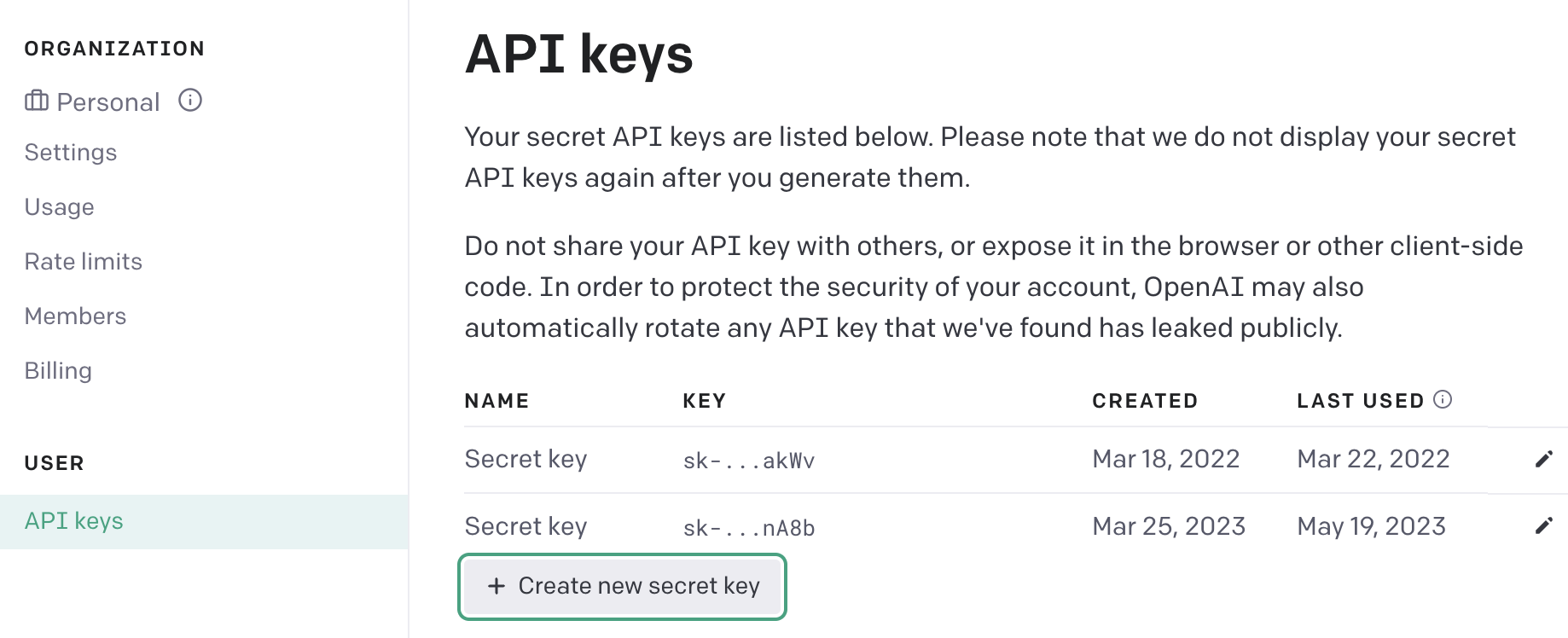
要创建嵌入,插件使用 OpenAI API 和 text-embedding-ada-002 模型。每次我们向数据存储中添加数据,或尝试从中查询相关信息时,都会为插入的数据块或查询本身创建嵌入。要使其工作,我们需要导出 OPENAI_API_KEY。如果你已经有 OpenAI 账号,前往 用户设置 - API 密钥 并创建一个新的密钥。
🌐 To create embeddings Plugin uses OpenAI API and text-embedding-ada-002 model. Each time we add some data to our datastore, or try to query relevant information from it, embedding will be created either for inserted data chunk, or for the query itself. To make it work we need to export OPENAI_API_KEY. If you already have an account in OpenAI, go to User Settings - API keys and Create new secret key.
步骤6:运行插件 #
🌐 Step 6: Run the plugin
执行以下命令来运行插件:
🌐 Execute the following command to run the plugin:
1poetry run dev2# output3INFO: Will watch for changes in these directories: ['./chatgpt-retrieval-plugin']4INFO: Uvicorn running on http://localhost:3333 (Press CTRL+C to quit)5INFO: Started reloader process [87843] using WatchFiles6INFO: Started server process [87849]7INFO: Waiting for application startup.8INFO: Application startup complete.插件默认会在你的本地主机上启动,端口是 :3333。
🌐 The plugin will start on your localhost - port :3333 by default.
第6步:在数据存储中填充数据 #
🌐 Step 6: Populating data in the datastore
在这个例子中,我们将把 Postgres 文档上传到数据存储。下载 Postgres 文档,然后使用 /upsert-file 接口来上传它:
🌐 For this example, we'll upload Postgres documentation to the datastore. Download the Postgres documentation and use the /upsert-file endpoint to upload it:
1curl -X POST -F \\"file=@./postgresql-15-US.pdf\\" <http://localhost:3333/upsert-file>这个插件会自动把你的数据和文档分成更小的块。你可以通过 Supabase 控制板或者你喜欢的任何其他 SQL 客户端查看这些块。整个 Postgres 文档生成了 7,904 条记录,这不算多,但我们可以尝试为 embedding 列添加索引,让速度稍微快一点。要做到这一点,你需要运行以下 SQL 命令:
🌐 The plugin will split your data and documents into smaller chunks automatically. You can view the chunks using the Supabase dashboard or any other SQL client you prefer. The entire Postgres Documentation yielded 7,904 records, which is not a lot, but we can try to add index for embedding column to speed things up by a little. To do so, you should run the following SQL command:
1create index on documents2using hnsw (embedding vector_ip_ops)3with (lists = 10);这将为内积距离函数创建一个索引。需要注意的是,这是一个近似索引。它会将逻辑从执行精确最近邻搜索改为近似最近邻搜索。
🌐 This will create an index for the inner product distance function. Important to note that it is an approximate index. It will change the logic from performing the exact nearest neighbor search to the approximate nearest neighbor search.
我们使用 lists = 10,因为一般来说,当你的表中记录少于一百万条时,你应该开始使用公式 rows / 1000 来寻找最优列表的常数值。
🌐 We are using lists = 10, because as a general guideline, you should start looking for optimal lists constant value with the formula: rows / 1000 when you have less than 1 million records in your table.
第7步:在ChatGPT中使用我们的插件 #
🌐 Step 7: Using our plugin within ChatGPT
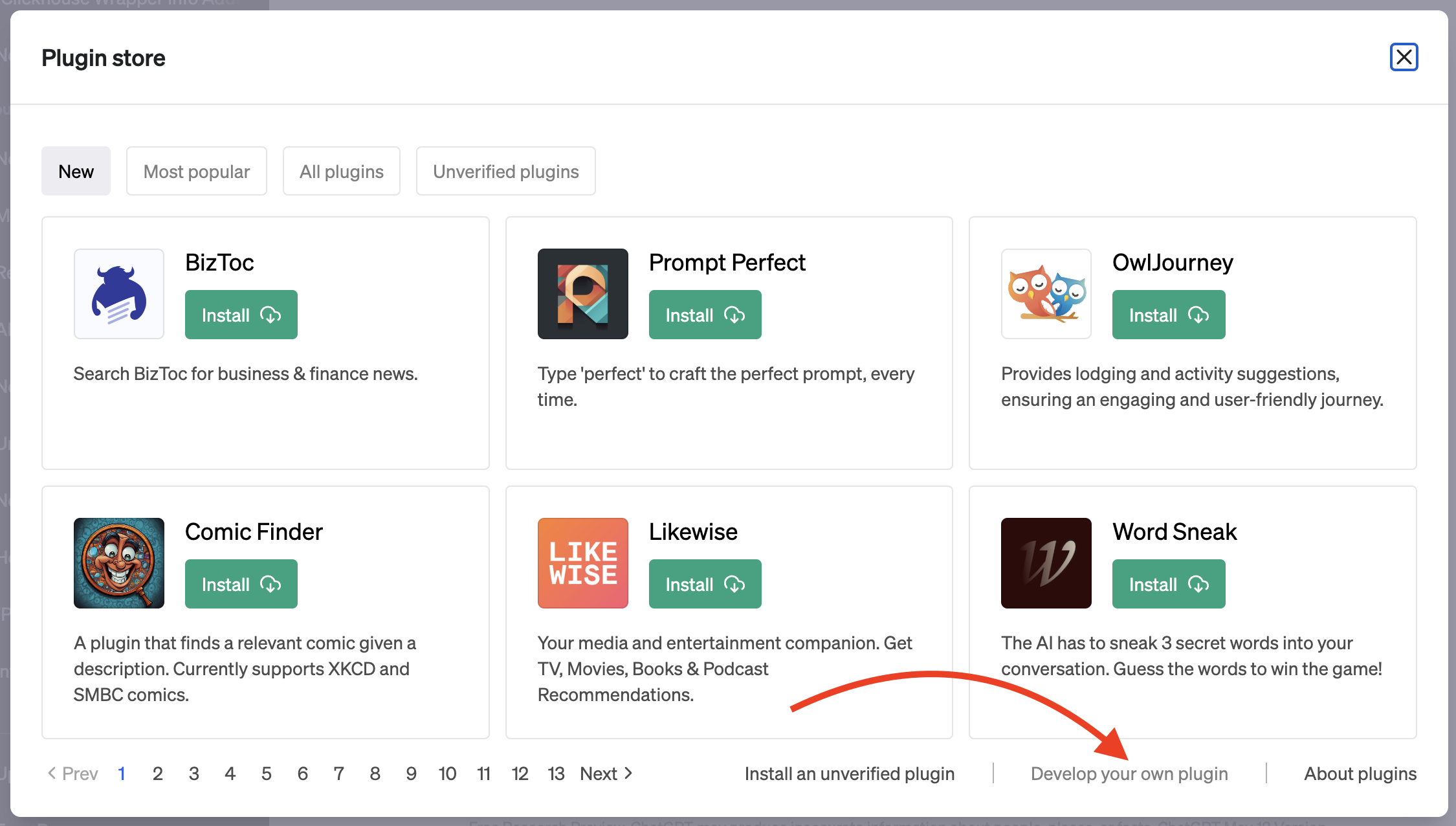
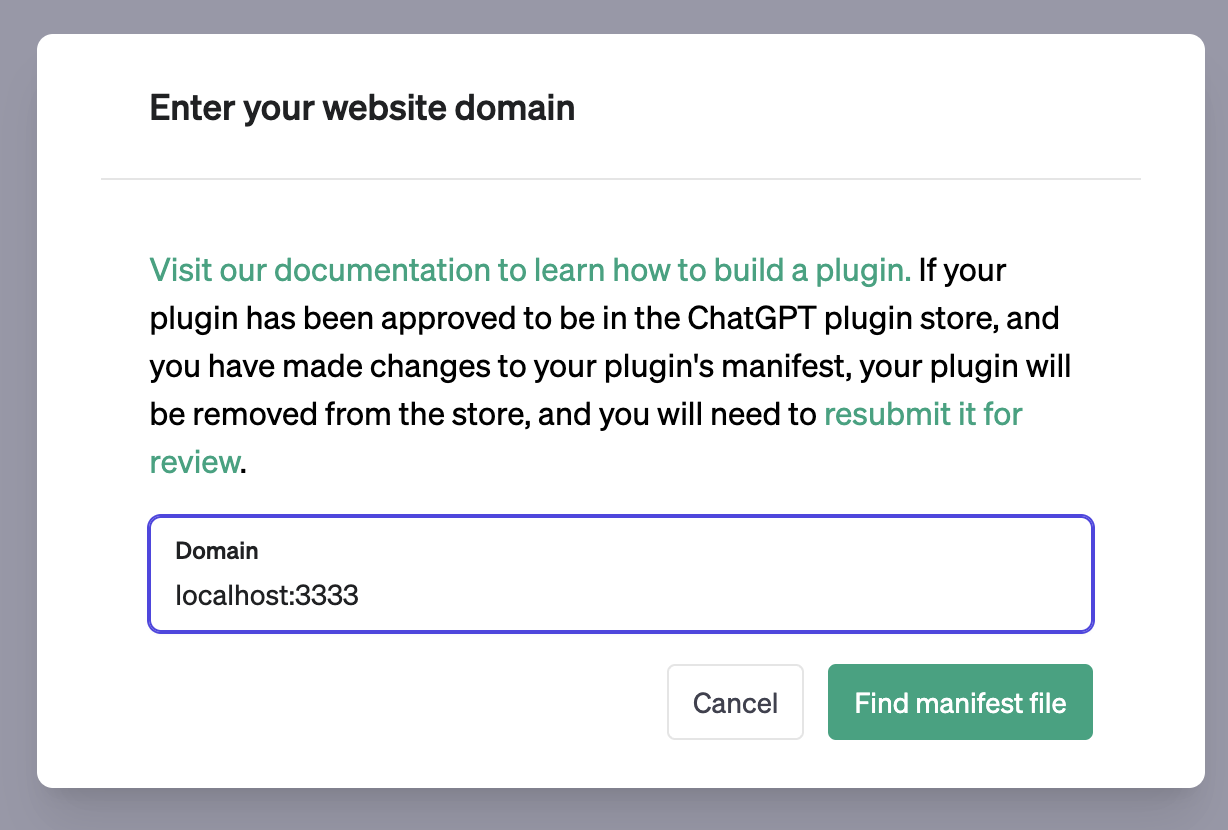
要将我们的插件与 ChatGPT 集成,请在 ChatGPT 控制台注册它。假设你有 ChatGPT 插件访问权限和插件开发权限,在新聊天中选择插件模型,然后选择“插件商店”和“开发你自己的插件”。在域名输入框中输入 localhost:3333,你的插件现在就成为 ChatGPT 的一部分了。
🌐 To integrate our plugin with ChatGPT, register it in the ChatGPT dashboard. Assuming you have access to ChatGPT Plugins and plugin development, select the Plugins model in a new chat, then choose "Plugin store" and "Develop your own plugin." Enter localhost:3333 into the domain input, and your plugin is now part of ChatGPT.
你现在可以提问关于 Postgres 的问题,并获得基于文档的回答。
🌐 You can now ask questions about Postgres and receive answers derived from the documentation.
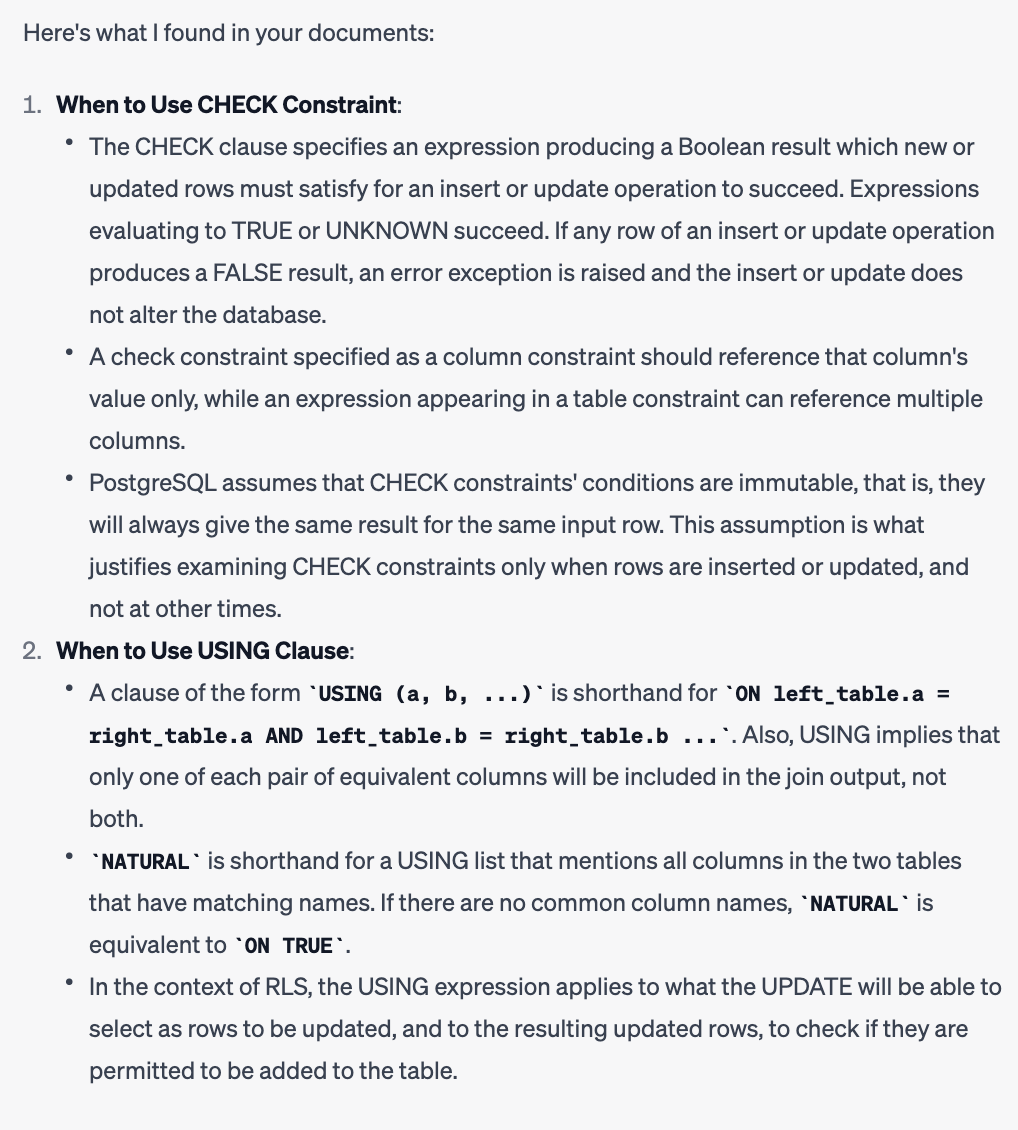
试试看:让 ChatGPT 查一下什么时候用 check,什么时候用 using。你将能够看到发送到我们插件的查询内容以及它的回应。
🌐 Try it out: ask ChatGPT to find out when to use check and when to use using. You will be able to see what queries were sent to our plugin and what it responded to.
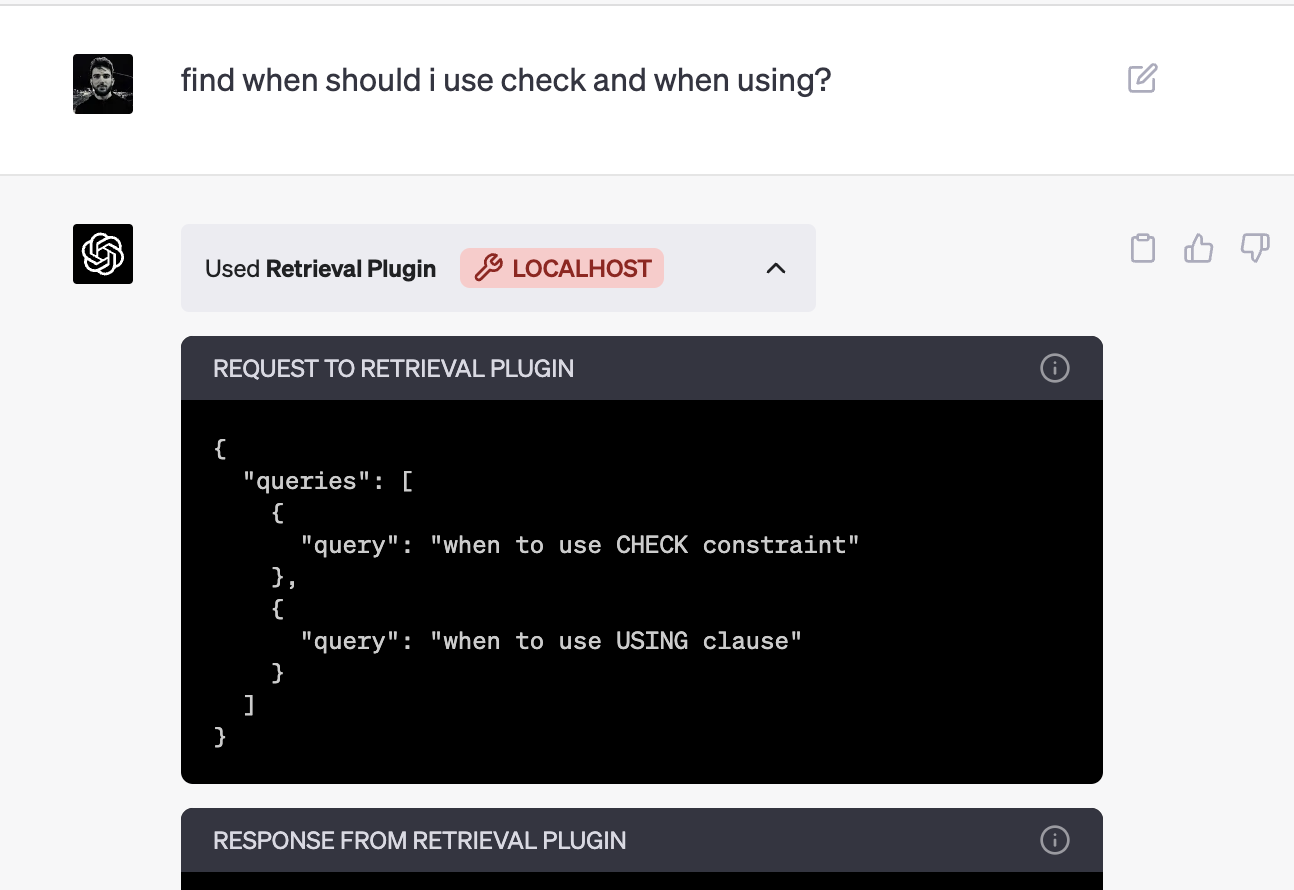
在 ChatGPT 从插件收到回复后,它会用文档中的数据回答你的问题。
🌐 And after ChatGPT receives a response from the plugin it will answer your question with the data from the documentation.
资源 #
🌐 Resources
- ChatGPT 检索插件: github.com/openai/chatgpt-retrieval-plugin
- ChatGPT 插件:官方文档