用 Flutter 构建一个用户管理应用
本教程演示了如何构建一个基本的用户管理应用。该应用可以进行用户认证和识别,将用户的个人资料信息存储在数据库中,并允许用户登录、更新他们的个人资料信息以及上传头像。该应用使用了:
🌐 This tutorial demonstrates how to build a basic user management app. The app authenticates and identifies the user, stores their profile information in the database, and allows the user to log in, update their profile details, and upload a profile photo. The app uses:
- Supabase 数据库 - 一个用于存储用户数据的 Postgres 数据库,并且有 行级安全,所以数据是受保护的,用户只能访问自己的信息。
- Supabase Auth - 允许用户注册和登录。
- Supabase 存储 - 允许用户上传个人头像。
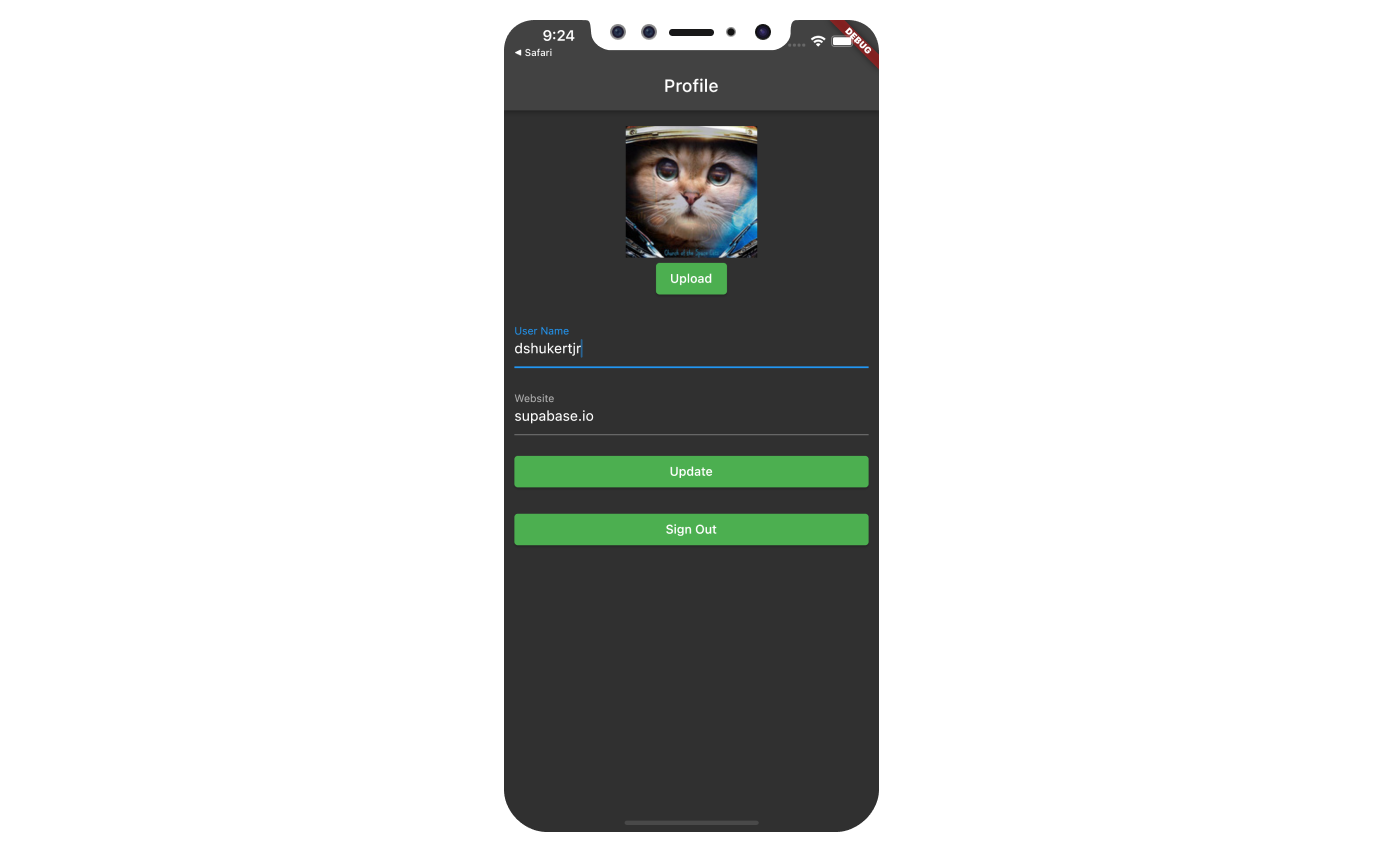
如果你在使用本指南的过程中遇到困难,可以参考 GitHub 上的完整示例。
🌐 If you get stuck while working through this guide, refer to the full example on GitHub.
项目设置 #
🌐 Project setup
在你开始构建之前,你需要先设置数据库和 API。你可以通过在 Supabase 中启动一个新项目,然后在数据库中创建一个“架构”来完成这一步。
🌐 Before you start building you need to set up the Database and API. You can do this by starting a new Project in Supabase and then creating a "schema" inside the database.
创建一个项目 #
🌐 Create a project
- 在 Supabase 仪表板中创建一个新项目。
- 输入你的项目详情。
- 等新数据库上线。
设置数据库模式 #
🌐 Set up the database schema
现在设置数据库模式。你可以在 SQL 编辑器中使用“用户管理入门”快速开始,也可以复制粘贴下面的 SQL 并运行。
🌐 Now set up the database schema. You can use the "User Management Starter" quickstart in the SQL Editor, or you can copy/paste the SQL from below and run it.
- 在仪表板中转到SQL 编辑器页面。
- 点击 社区 > 快速入门 标签下的 用户管理入门。
- 点击运行。
你可以通过运行 db pull 命令将数据库架构拉到本地项目。查看本地开发文档获取详细说明。
🌐 You can pull the database schema down to your local project by running the db pull command. Read the local development docs for detailed instructions.
1supabase link --project-ref <project-id>2# You can get <project-id> from your project's dashboard URL: https://supabase.com/dashboard/project/<project-id>3supabase db pull获取 API 详情 #
🌐 Get API details
要与数据库表中的数据进行交互,你可以使用封装了自动生成的数据 API 端点的客户端库,并使用来自项目 Connect 对话框的项目 URL 和密钥进行认证。
🌐 To interact with data in database tables, you use the client libraries that wrap the auto-generated Data API endpoints, authenticating using the Project URL and key from the project Connect dialog.
阅读 API 密钥文档 以全面了解所有密钥类型、用途以及在哪里可以找到它们。
正在构建应用 #
🌐 Building the app
从零开始构建 Flutter 应用。
🌐 Build the Flutter app from scratch.
初始化一个 Flutter 应用 #
🌐 Initialize a Flutter app
我们可以使用flutter create来初始化一个名为supabase_quickstart的应用:
🌐 We can use flutter create to initialize
an app called supabase_quickstart:
1flutter create supabase_quickstart然后安装唯一的额外依赖:supabase_flutter
🌐 Then install the only additional dependency: supabase_flutter
将以下内容复制并粘贴到你的 pubspec.yaml 中以安装该包:
🌐 Copy and paste the following line in your pubspec.yaml to install the package:
1supabase_flutter: ^2.0.0运行 flutter pub get 来安装依赖。
🌐 Run flutter pub get to install the dependencies.
设置深度链接 #
🌐 Setup deep links
安装依赖后,设置深度链接。 设置深度链接是必要的,当用户点击魔法链接登录时,能够把他们带回应用。 我们可以通过在 Flutter 应用上做一个小调整来设置深度链接。
🌐 With dependencies installed, set up deep links. Setting up deep links is required to bring back the user to the app when they click on the magic link to sign in. We can setup deep links with a minor tweak on our Flutter application.
我们必须使用 io.supabase.flutterquickstart 作为方案。在这个例子中,我们将使用 login-callback 作为深度链接的主机,但你可以随意更改它。
🌐 We have to use io.supabase.flutterquickstart as the scheme. In this example, we will use login-callback as the host for our deep link, but you can change it to whatever you would like.
首先,在控制面板中将 io.supabase.flutterquickstart://login-callback/ 添加为新的重定向网址。
🌐 First, add io.supabase.flutterquickstart://login-callback/ as a new redirect URL in the Dashboard.
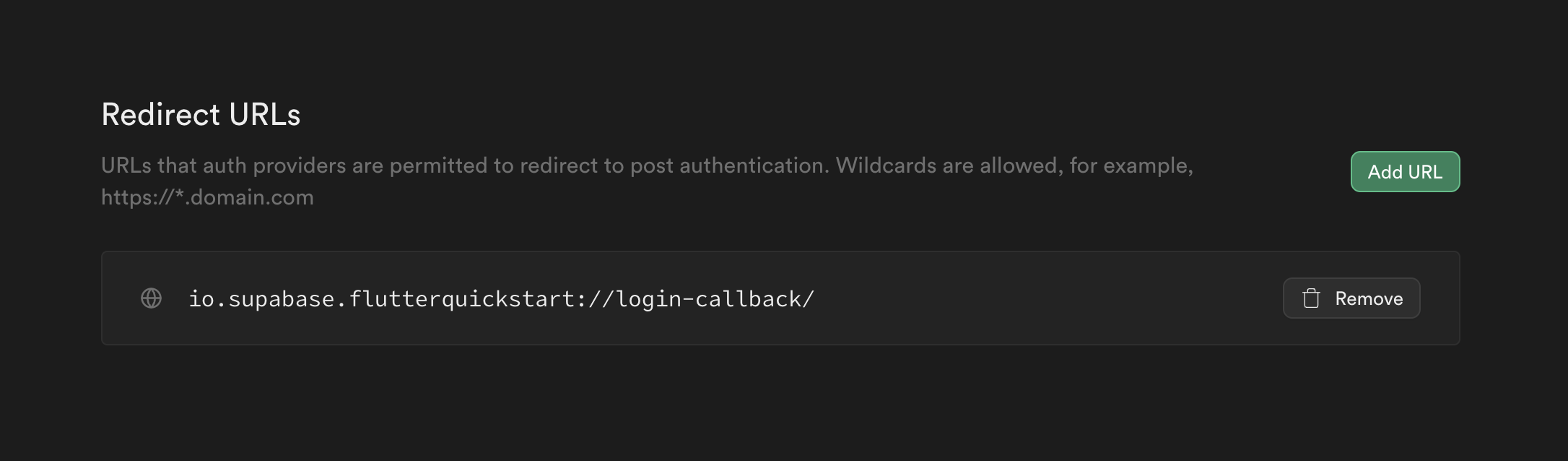
Supabase 这边就这样,剩下的都是平台特定的设置:
🌐 That is it on Supabase's end and the rest are platform specific settings:
Edit the ios/Runner/Info.plist file.
添加 CFBundleURLTypes 来启用深度链接:
🌐 Add CFBundleURLTypes to enable deep linking:
1<!-- ... other tags -->2<plist>3<dict>4 <!-- ... other tags -->56 <!-- Add this array for Deep Links -->7 <key>CFBundleURLTypes</key>8 <array>9 <dict>10 <key>CFBundleTypeRole</key>11 <string>Editor</string>12 <key>CFBundleURLSchemes</key>13 <array>14 <string>io.supabase.flutterquickstart</string>15 </array>16 </dict>17 </array>18 <!-- ... other tags -->19</dict>20</plist>主函数 #
🌐 Main function
在配置好深层链接后,在 main 函数中使用你之前 复制 的 API 凭据初始化 Supabase 客户端。这些变量会在应用中暴露出来,这完全没问题,因为我们的数据库已经启用了 行级安全。
🌐 With deep links configured, initialize the Supabase client inside the main function with the API credentials that you copied earlier. These variables will be exposed on the app, and that's completely fine since we have Row Level Security enabled on our Database.
1import 'package:flutter/material.dart';2import 'package:supabase_flutter/supabase_flutter.dart';34Future<void> main() async {5 await Supabase.initialize(6 url: 'YOUR_SUPABASE_URL',7 publishableKey: 'YOUR_SUPABASE_PUBLISHABLE_KEY',8 );9 runApp(const MyApp());10}1112final supabase = Supabase.instance.client;1314class MyApp extends StatelessWidget {15 const MyApp({super.key});1617 @override18 Widget build(BuildContext context) {19 return const MaterialApp(title: 'Supabase Flutter');20 }21}2223extension ContextExtension on BuildContext {24 void showSnackBar(String message, {bool isError = false}) {25 ScaffoldMessenger.of(this).showSnackBar(26 SnackBar(27 content: Text(message),28 backgroundColor: isError29 ? Theme.of(this).colorScheme.error30 : Theme.of(this).snackBarTheme.backgroundColor,31 ),32 );33 }34}注意,我们有一个 showSnackBar 扩展方法,将用来在应用中显示小吃条。你可以在一个单独的文件中定义这个方法,并在需要的地方导入,但为了简单起见,我们将在这里定义它。
🌐 Notice that we have a showSnackBar extension method that we will use to show snack bars in the app. You could define this method in a separate file and import it where needed, but for simplicity, we will define it here.
设置一个登录页面 #
🌐 Set up a login page
创建一个 Flutter 小部件来管理登录和注册。我们将使用魔法链接,这样用户可以通过电子邮件登录,而无需使用密码。
🌐 Create a Flutter widget to manage logins and sign ups. We will use Magic Links, so users can sign in with their email without using passwords.
注意,这个页面使用 onAuthStateChange 设置了一个监听器来监听用户的认证状态。当用户通过点击他们的魔法链接重新回到应用时,会触发一个新事件,这个页面可以捕捉到并相应地重定向用户。
🌐 Notice that this page sets up a listener on the user's auth state using onAuthStateChange. A new event will fire when the user comes back to the app by clicking their magic link, which this page can catch and redirect the user accordingly.
1import 'dart:async';23import 'package:flutter/foundation.dart';4import 'package:flutter/material.dart';5import 'package:supabase_flutter/supabase_flutter.dart';6import 'package:supabase_quickstart/main.dart';7import 'package:supabase_quickstart/pages/account_page.dart';89class LoginPage extends StatefulWidget {10 const LoginPage({super.key});1112 @override13 State<LoginPage> createState() => _LoginPageState();14}1516class _LoginPageState extends State<LoginPage> {17 bool _isLoading = false;18 bool _redirecting = false;19 late final TextEditingController _emailController = TextEditingController();20 late final StreamSubscription<AuthState> _authStateSubscription;2122 Future<void> _signIn() async {23 try {24 setState(() {25 _isLoading = true;26 });27 await supabase.auth.signInWithOtp(28 email: _emailController.text.trim(),29 emailRedirectTo:30 kIsWeb ? null : 'io.supabase.flutterquickstart://login-callback/',31 );32 if (mounted) {33 context.showSnackBar('Check your email for a login link!');3435 _emailController.clear();36 }37 } on AuthException catch (error) {38 if (mounted) context.showSnackBar(error.message, isError: true);39 } catch (error) {40 if (mounted) {41 context.showSnackBar('Unexpected error occurred', isError: true);42 }43 } finally {44 if (mounted) {45 setState(() {46 _isLoading = false;47 });48 }49 }50 }5152 @override53 void initState() {54 _authStateSubscription = supabase.auth.onAuthStateChange.listen(55 (data) {56 if (_redirecting) return;57 final session = data.session;58 if (session != null) {59 _redirecting = true;60 Navigator.of(context).pushReplacement(61 MaterialPageRoute(builder: (context) => const AccountPage()),62 );63 }64 },65 onError: (error) {66 if (error is AuthException) {67 context.showSnackBar(error.message, isError: true);68 } else {69 context.showSnackBar('Unexpected error occurred', isError: true);70 }71 },72 );73 super.initState();74 }7576 @override77 void dispose() {78 _emailController.dispose();79 _authStateSubscription.cancel();80 super.dispose();81 }8283 @override84 Widget build(BuildContext context) {85 return Scaffold(86 appBar: AppBar(title: const Text('Sign In')),87 body: ListView(88 padding: const EdgeInsets.symmetric(vertical: 18, horizontal: 12),89 children: [90 const Text('Sign in via the magic link with your email below'),91 const SizedBox(height: 18),92 TextFormField(93 controller: _emailController,94 decoration: const InputDecoration(labelText: 'Email'),95 ),96 const SizedBox(height: 18),97 ElevatedButton(98 onPressed: _isLoading ? null : _signIn,99 child: Text(_isLoading ? 'Sending...' : 'Send Magic Link'),100 ),101 ],102 ),103 );104 }105}设置账户页面 #
🌐 Set up account page
用户登录后,我们可以允许他们编辑个人资料信息并管理账户。创建一个名为 account_page.dart 的新小部件。
🌐 After a user is signed in we can allow them to edit their profile details and manage their account.
Create a new widget called account_page.dart.
1import 'package:flutter/material.dart';2import 'package:supabase_flutter/supabase_flutter.dart';3import 'package:supabase_quickstart/main.dart';4import 'package:supabase_quickstart/pages/login_page.dart';56class AccountPage extends StatefulWidget {7 const AccountPage({super.key});89 @override10 State<AccountPage> createState() => _AccountPageState();11}1213class _AccountPageState extends State<AccountPage> {14 final _usernameController = TextEditingController();15 final _websiteController = TextEditingController();1617 String? _avatarUrl;18 var _loading = true;1920 /// Called once a user id is received within `onAuthenticated()`21 Future<void> _getProfile() async {22 setState(() {23 _loading = true;24 });2526 try {27 final userId = supabase.auth.currentSession!.user.id;28 final data =29 await supabase.from('profiles').select().eq('id', userId).single();30 _usernameController.text = (data['username'] ?? '') as String;31 _websiteController.text = (data['website'] ?? '') as String;32 _avatarUrl = (data['avatar_url'] ?? '') as String;33 } on PostgrestException catch (error) {34 if (mounted) context.showSnackBar(error.message, isError: true);35 } catch (error) {36 if (mounted) {37 context.showSnackBar('Unexpected error occurred', isError: true);38 }39 } finally {40 if (mounted) {41 setState(() {42 _loading = false;43 });44 }45 }46 }4748 /// Called when user taps `Update` button49 Future<void> _updateProfile() async {50 setState(() {51 _loading = true;52 });53 final userName = _usernameController.text.trim();54 final website = _websiteController.text.trim();55 final user = supabase.auth.currentUser;56 final updates = {57 'id': user!.id,58 'username': userName,59 'website': website,60 'updated_at': DateTime.now().toIso8601String(),61 };62 try {63 await supabase.from('profiles').upsert(updates);64 if (mounted) context.showSnackBar('Successfully updated profile!');65 } on PostgrestException catch (error) {66 if (mounted) context.showSnackBar(error.message, isError: true);67 } catch (error) {68 if (mounted) {69 context.showSnackBar('Unexpected error occurred', isError: true);70 }71 } finally {72 if (mounted) {73 setState(() {74 _loading = false;75 });76 }77 }78 }7980 Future<void> _signOut() async {81 try {82 await supabase.auth.signOut();83 } on AuthException catch (error) {84 if (mounted) context.showSnackBar(error.message, isError: true);85 } catch (error) {86 if (mounted) {87 context.showSnackBar('Unexpected error occurred', isError: true);88 }89 } finally {90 if (mounted) {91 Navigator.of(context).pushReplacement(92 MaterialPageRoute(builder: (_) => const LoginPage()),93 );94 }95 }96 }9798 @override99 void initState() {100 super.initState();101 _getProfile();102 }103104 @override105 void dispose() {106 _usernameController.dispose();107 _websiteController.dispose();108 super.dispose();109 }110111 @override112 Widget build(BuildContext context) {113 return Scaffold(114 appBar: AppBar(title: const Text('Profile')),115 body: ListView(116 padding: const EdgeInsets.symmetric(vertical: 18, horizontal: 12),117 children: [118 TextFormField(119 controller: _usernameController,120 decoration: const InputDecoration(labelText: 'User Name'),121 ),122 const SizedBox(height: 18),123 TextFormField(124 controller: _websiteController,125 decoration: const InputDecoration(labelText: 'Website'),126 ),127 const SizedBox(height: 18),128 ElevatedButton(129 onPressed: _loading ? null : _updateProfile,130 child: Text(_loading ? 'Saving...' : 'Update'),131 ),132 const SizedBox(height: 18),133 TextButton(onPressed: _signOut, child: const Text('Sign Out')),134 ],135 ),136 );137 }138}触发! #
🌐 Launch!
所有组件就位后,更新 lib/main.dart。
MaterialApp 的 home,也就是显示给用户的初始页面,如果用户未认证,将是 LoginPage,如果用户已认证,则为 AccountPage。
我们还加入了一些主题,让应用看起来更好看一些。
🌐 With all components in place, update lib/main.dart.
The home of the MaterialApp, meaning the initial page shown to the user, will be the LoginPage if the user is not authenticated, and the AccountPage if the user is authenticated.
We also included some theming to make the app look a bit nicer.
1import 'package:flutter/material.dart';2import 'package:supabase_flutter/supabase_flutter.dart';3import 'package:supabase_quickstart/pages/account_page.dart';4import 'package:supabase_quickstart/pages/login_page.dart';56Future<void> main() async {7 await Supabase.initialize(8 url: 'YOUR_SUPABASE_URL',9 publishableKey: 'YOUR_SUPABASE_PUBLISHABLE_KEY',10 );11 runApp(const MyApp());12}1314final supabase = Supabase.instance.client;1516class MyApp extends StatelessWidget {17 const MyApp({super.key});1819 @override20 Widget build(BuildContext context) {21 return MaterialApp(22 title: 'Supabase Flutter',23 theme: ThemeData.dark().copyWith(24 primaryColor: Colors.green,25 textButtonTheme: TextButtonThemeData(26 style: TextButton.styleFrom(27 foregroundColor: Colors.green,28 ),29 ),30 elevatedButtonTheme: ElevatedButtonThemeData(31 style: ElevatedButton.styleFrom(32 foregroundColor: Colors.white,33 backgroundColor: Colors.green,34 ),35 ),36 ),37 home: supabase.auth.currentSession == null38 ? const LoginPage()39 : const AccountPage(),40 );41 }42}4344extension ContextExtension on BuildContext {45 void showSnackBar(String message, {bool isError = false}) {46 ScaffoldMessenger.of(this).showSnackBar(47 SnackBar(48 content: Text(message),49 backgroundColor: isError50 ? Theme.of(this).colorScheme.error51 : Theme.of(this).snackBarTheme.backgroundColor,52 ),53 );54 }55}一旦完成,就在终端窗口运行这个来在 Android 或 iOS 上启动:
🌐 Once that's done, run this in a terminal window to launch on Android or iOS:
1flutter run或者对于网页,运行以下命令在 localhost:3000 上启动它
🌐 Or for web, run the following command to launch it on localhost:3000
1flutter run -d web-server --web-hostname localhost --web-port 3000然后打开浏览器访问 localhost:3000,你应该能看到完成的应用。
🌐 And then open the browser to localhost:3000 and you should see the completed app.
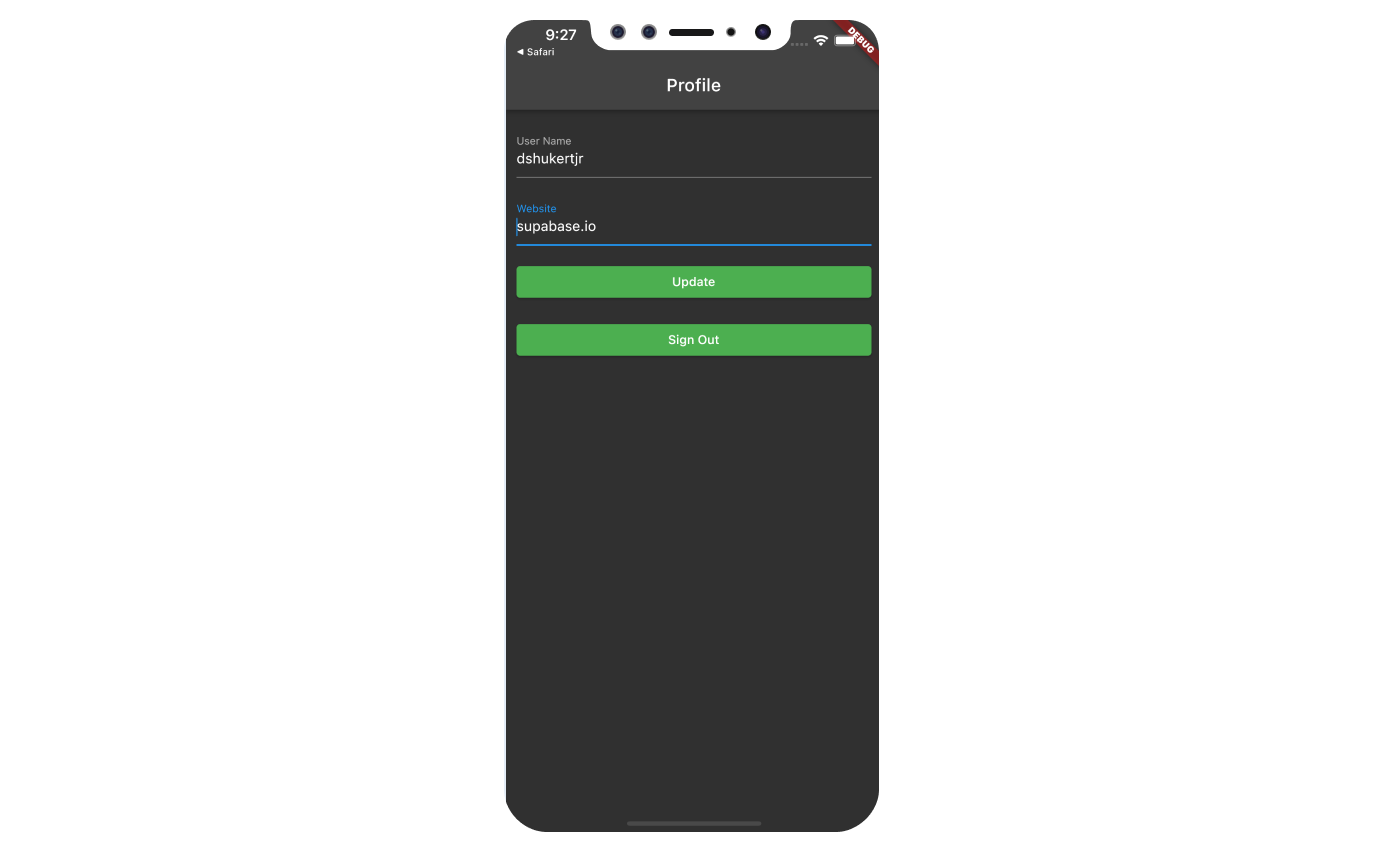
额外奖励:头像 #
🌐 Bonus: Profile photos
每个 Supabase 项目都配置了 Storage,用于管理像照片和视频这样的大文件。
🌐 Every Supabase project is configured with Storage for managing large files like photos and videos.
确保我们有一个公共存储桶 #
🌐 Making sure we have a public bucket
我们会将图片存储为可公开分享的图片。
确保你的 avatars 桶已设置为公开,如果没有,可以通过将鼠标悬停在桶名上出现的点菜单来更改公开设置。
如果你的桶已设置为公开,你应该会在桶名旁看到一个橙色的 Public 徽章。
🌐 We will be storing the image as a publicly sharable image.
Make sure your avatars bucket is set to public, and if it is not, change the publicity by clicking the dot menu that appears when you hover over the bucket name.
You should see an orange Public badge next to your bucket name if your bucket is set to public.
在账户页面添加图片上传功能 #
🌐 Adding image uploading feature to account page
我们将使用image_picker 插件从设备中选择一张图片。
🌐 We will use image_picker plugin to select an image from the device.
在你的 pubspec.yaml 文件中添加以下这一行来安装 image_picker:
🌐 Add the following line in your pubspec.yaml file to install image_picker:
1image_picker: ^1.0.5使用 image_picker 需要根据不同平台做一些额外的准备。按照 image_picker 的 README.md 中的说明,了解如何为你使用的平台进行设置。
🌐 Using image_picker requires some additional preparation depending on the platform.
Follow the instruction on README.md of image_picker on how to set it up for the platform you are using.
一旦把上面所有的都做完,就可以开始写代码了。
🌐 Once you are done with all of the above, it is time to dive into coding.
创建一个上传小工具 #
🌐 Create an upload widget
创建一个头像,这样用户就可以上传个人照片。我们可以先从创建一个新组件开始:
🌐 Create an avatar so the user can upload a profile photo. We can start by creating a new component:
1import 'package:flutter/material.dart';2import 'package:image_picker/image_picker.dart';3import 'package:supabase_flutter/supabase_flutter.dart';4import 'package:supabase_quickstart/main.dart';56class Avatar extends StatefulWidget {7 const Avatar({8 super.key,9 required this.imageUrl,10 required this.onUpload,11 });1213 final String? imageUrl;14 final void Function(String) onUpload;1516 @override17 State<Avatar> createState() => _AvatarState();18}1920class _AvatarState extends State<Avatar> {21 bool _isLoading = false;2223 @override24 Widget build(BuildContext context) {25 return Column(26 children: [27 if (widget.imageUrl == null || widget.imageUrl!.isEmpty)28 Container(29 width: 150,30 height: 150,31 color: Colors.grey,32 child: const Center(33 child: Text('No Image'),34 ),35 )36 else37 Image.network(38 widget.imageUrl!,39 width: 150,40 height: 150,41 fit: BoxFit.cover,42 ),43 ElevatedButton(44 onPressed: _isLoading ? null : _upload,45 child: const Text('Upload'),46 ),47 ],48 );49 }5051 Future<void> _upload() async {52 final picker = ImagePicker();53 final imageFile = await picker.pickImage(54 source: ImageSource.gallery,55 maxWidth: 300,56 maxHeight: 300,57 );58 if (imageFile == null) {59 return;60 }61 setState(() => _isLoading = true);6263 try {64 final bytes = await imageFile.readAsBytes();65 final fileExt = imageFile.path.split('.').last;66 final fileName = '${DateTime.now().toIso8601String()}.$fileExt';67 final filePath = fileName;68 await supabase.storage.from('avatars').uploadBinary(69 filePath,70 bytes,71 fileOptions: FileOptions(contentType: imageFile.mimeType),72 );73 final imageUrlResponse = await supabase.storage74 .from('avatars')75 .createSignedUrl(filePath, 60 * 60 * 24 * 365 * 10);76 widget.onUpload(imageUrlResponse);77 } on StorageException catch (error) {78 if (mounted) {79 context.showSnackBar(error.message, isError: true);80 }81 } catch (error) {82 if (mounted) {83 context.showSnackBar('Unexpected error occurred', isError: true);84 }85 }8687 setState(() => _isLoading = false);88 }89}添加新小部件 #
🌐 Add the new widget
然后我们可以把这个小部件添加到账户页面上,并加入一些逻辑,以便用户上传新头像时更新 avatar_url。
🌐 And then we can add the widget to the Account page as well as some logic to update the avatar_url whenever the user uploads a new avatar.
1import 'package:flutter/material.dart';2import 'package:supabase_flutter/supabase_flutter.dart';3import 'package:supabase_quickstart/components/avatar.dart';4import 'package:supabase_quickstart/main.dart';5import 'package:supabase_quickstart/pages/login_page.dart';67class AccountPage extends StatefulWidget {8 const AccountPage({super.key});910 @override11 State<AccountPage> createState() => _AccountPageState();12}1314class _AccountPageState extends State<AccountPage> {15 final _usernameController = TextEditingController();16 final _websiteController = TextEditingController();1718 String? _avatarUrl;19 var _loading = true;2021 /// Called once a user id is received within `onAuthenticated()`22 Future<void> _getProfile() async {23 setState(() {24 _loading = true;25 });2627 try {28 final userId = supabase.auth.currentSession!.user.id;29 final data =30 await supabase.from('profiles').select().eq('id', userId).single();31 _usernameController.text = (data['username'] ?? '') as String;32 _websiteController.text = (data['website'] ?? '') as String;33 _avatarUrl = (data['avatar_url'] ?? '') as String;34 } on PostgrestException catch (error) {35 if (mounted) context.showSnackBar(error.message, isError: true);36 } catch (error) {37 if (mounted) {38 context.showSnackBar('Unexpected error occurred', isError: true);39 }40 } finally {41 if (mounted) {42 setState(() {43 _loading = false;44 });45 }46 }47 }4849 /// Called when user taps `Update` button50 Future<void> _updateProfile() async {51 setState(() {52 _loading = true;53 });54 final userName = _usernameController.text.trim();55 final website = _websiteController.text.trim();56 final user = supabase.auth.currentUser;57 final updates = {58 'id': user!.id,59 'username': userName,60 'website': website,61 'updated_at': DateTime.now().toIso8601String(),62 };63 try {64 await supabase.from('profiles').upsert(updates);65 if (mounted) context.showSnackBar('Successfully updated profile!');66 } on PostgrestException catch (error) {67 if (mounted) context.showSnackBar(error.message, isError: true);68 } catch (error) {69 if (mounted) {70 context.showSnackBar('Unexpected error occurred', isError: true);71 }72 } finally {73 if (mounted) {74 setState(() {75 _loading = false;76 });77 }78 }79 }8081 Future<void> _signOut() async {82 try {83 await supabase.auth.signOut();84 } on AuthException catch (error) {85 if (mounted) context.showSnackBar(error.message, isError: true);86 } catch (error) {87 if (mounted) {88 context.showSnackBar('Unexpected error occurred', isError: true);89 }90 } finally {91 if (mounted) {92 Navigator.of(context).pushReplacement(93 MaterialPageRoute(builder: (_) => const LoginPage()),94 );95 }96 }97 }9899 /// Called when image has been uploaded to Supabase storage from within Avatar widget100 Future<void> _onUpload(String imageUrl) async {101 try {102 final userId = supabase.auth.currentUser!.id;103 await supabase.from('profiles').upsert({104 'id': userId,105 'avatar_url': imageUrl,106 });107 if (mounted) {108 const SnackBar(109 content: Text('Updated your profile image!'),110 );111 }112 } on PostgrestException catch (error) {113 if (mounted) context.showSnackBar(error.message, isError: true);114 } catch (error) {115 if (mounted) {116 context.showSnackBar('Unexpected error occurred', isError: true);117 }118 }119 if (!mounted) {120 return;121 }122123 setState(() {124 _avatarUrl = imageUrl;125 });126 }127128 @override129 void initState() {130 super.initState();131 _getProfile();132 }133134 @override135 void dispose() {136 _usernameController.dispose();137 _websiteController.dispose();138 super.dispose();139 }140141 @override142 Widget build(BuildContext context) {143 return Scaffold(144 appBar: AppBar(title: const Text('Profile')),145 body: ListView(146 padding: const EdgeInsets.symmetric(vertical: 18, horizontal: 12),147 children: [148 Avatar(149 imageUrl: _avatarUrl,150 onUpload: _onUpload,151 ),152 const SizedBox(height: 18),153 TextFormField(154 controller: _usernameController,155 decoration: const InputDecoration(labelText: 'User Name'),156 ),157 const SizedBox(height: 18),158 TextFormField(159 controller: _websiteController,160 decoration: const InputDecoration(labelText: 'Website'),161 ),162 const SizedBox(height: 18),163 ElevatedButton(164 onPressed: _loading ? null : _updateProfile,165 child: Text(_loading ? 'Saving...' : 'Update'),166 ),167 const SizedBox(height: 18),168 TextButton(onPressed: _signOut, child: const Text('Sign Out')),169 ],170 ),171 );172 }173}恭喜你,你已经用 Flutter 和 Supabase 搭建了一个功能齐全的用户管理应用!
🌐 Congratulations, you've built a fully functional user management app using Flutter and Supabase!
另请参阅 #
🌐 See also