数据库备份
我们会每天自动备份所有 Pro、团队和企业计划的项目。你可以在仪表板的 数据库 > 备份 部分找到备份。
🌐 We automatically back up all Pro, Team, and Enterprise Plan projects on a daily basis. You can find backups in the Database > Backups section of the Dashboard.
Pro 计划的项目可以访问最近 7 天的每日备份。Team 计划的项目可以访问最近 14 天的每日备份,而 Enterprise 计划的项目可以访问最多 30 天的每日备份。如果你需要更频繁的备份,可以考虑启用 时点恢复。我们建议免费套餐的项目定期使用 Supabase CLI db dump 命令 导出数据,并保持离线备份。
🌐 Pro Plan projects can access the last 7 days of daily backups. Team Plan projects can access the last 14 days of daily backups, while Enterprise Plan projects can access up to 30 days of daily backups. If you need more frequent backups, consider enabling Point-in-Time Recovery. We recommend that free tier plan projects regularly export their data using the Supabase CLI db dump command and maintain off-site backups.
当你删除一个项目时,我们会永久移除所有相关数据,包括存储在 S3 中的任何备份。这个操作无法撤销,所以在继续之前请三思。
🌐 When you delete a project, we permanently remove all associated data, including any backups stored in S3. This action is irreversible, so consider it carefully before proceeding.
备份类型 #
🌐 Types of backups
数据库备份可以分为两种类型:逻辑备份和物理备份。你可以在这篇博客文章中了解更多。
🌐 Database backups can be categorized into two types: logical and physical. You can learn more about them in this blog post.
现在默认启用物理备份
所有在 Postgres 15.8.1.079 及更高版本上的项目都使用更新的物理备份流程。
🌐 All projects on Postgres 15.8.1.079 and newer use the newer physical backup process.
在较旧的 Postgres 版本上运行的项目必须升级,以便过渡到物理备份。一旦升级到符合条件的版本,你的项目会自动转到物理备份。
🌐 Projects on older Postgres versions have to upgrade in order to be transitioned to physical backups. Once upgraded to an eligible version, your project is automatically transitioned over to physical backups.
出于安全考虑,日常备份不会存储自定义角色的密码,你在可下载的文件中也找不到它们。如果你从日常备份中恢复并使用了自定义角色,那么恢复完成后需要重新设置它们的密码。
🌐 For security purposes, daily backups do not store passwords for custom roles, and you will not find them in downloadable files. If you restore from a daily backup and use custom roles, you will need to reset their passwords after the restoration completes.
数据库备份不包括你通过存储 API 存储的对象,因为数据库只包含这些对象的元数据。恢复旧备份不会恢复你在备份后删除的对象。
🌐 Database backups do not include objects you store via the Storage API, as the database only includes metadata about these objects. Restoring an old backup does not restore objects you deleted after that backup.
备份和恢复过程 #
🌐 Backup and restore process
你可以在仪表板的 数据库 > 备份 部分访问每日备份,并将项目恢复到任何一个备份版本。
🌐 You can access daily backups in the Database > Backups section of the Dashboard and restore a project to any of the backups.
你可以将你的项目恢复到任何一个备份。要自己生成逻辑备份,请使用 Supabase CLI db dump 命令。
🌐 You can restore your project to any of the backups. To generate a logical backup yourself, use the Supabase CLI db dump command.
以编程方式管理备份 #
🌐 Managing backups programmatically
你也可以通过 管理 API 编程方式管理备份:
🌐 You can also manage backups programmatically using the Management API:
1# Get your access token from https://supabase.com/dashboard/account/tokens2export SUPABASE_ACCESS_TOKEN="your-access-token"3export PROJECT_REF="your-project-ref"45# List all available backups6curl -H "Authorization: Bearer $SUPABASE_ACCESS_TOKEN" \7 "https://api.supabase.com/v1/projects/$PROJECT_REF/database/backups"89# Restore from a PITR backup (replace Unix timestamp with desired restore point)10curl -X POST "https://api.supabase.com/v1/projects/$PROJECT_REF/database/backups/restore-pitr" \11 -H "Authorization: Bearer $SUPABASE_ACCESS_TOKEN" \12 -H "Content-Type: application/json" \13 -d '{14 "recovery_time_target_unix": "1735689600"15 }'修复过程 #
🌐 Restoration process
在选择要恢复的备份时,选择最接近你想要恢复时间点的可用备份。你总是可以选择更早的备份,但要考虑可能会丢失多少天的数据。
🌐 When selecting a backup to restore to, choose the closest available backup made before your desired restore point. You can always choose earlier backups, but consider how many days of data you might lose.
在继续恢复之前,仪表板会提示你确认。恢复过程中项目无法访问,所以请提前规划停机时间。停机时间取决于数据库的大小——数据库越大,停机时间就越长。
🌐 The Dashboard prompts you for confirmation before proceeding with the restoration. The project is inaccessible during this process, so plan for downtime beforehand. Downtime depends on the size of the database—the larger it is, the longer the downtime will be.
在你确认后,我们会启动流程,将你想要的备份数据恢复到你的项目中。恢复完成后,仪表板会显示通知。
🌐 After you confirm, we trigger the process to restore the desired backup data to your project. The dashboard will display a notification once the restoration completes.
如果你的项目使用订阅或复制槽,你需要在恢复之前删除它们,并在之后重新创建。我们会对 Realtime 使用的槽进行豁免,并自动处理它。
🌐 If your project uses subscriptions or replication slots, you need to drop them before the restoration and re-create them afterwards. We exempt the slot used by Realtime from this requirement and handle it automatically.
时间点恢复 #
🌐 Point-in-Time recovery
时间点恢复(PITR)允许你以更短的间隔备份项目,这样你就可以选择恢复到任何时刻,甚至精确到秒。即使每天备份一次,你仍然可能丢失一天的数据。而有了PITR,你可以备份到灾难发生的那一刻。
🌐 Point-in-Time Recovery (PITR) allows you to back up a project at shorter intervals, giving you the option to restore to any chosen point with up to seconds of granularity. Even with daily backups, you could still lose a day's worth of data. With PITR, you can back up to the point of disaster.
Pro、团队和企业计划的项目可以将 PITR 作为附加功能启用。
🌐 Pro, Team and Enterprise Plan projects can enable PITR as an add-on.
想要使用 PITR 的项目也必须至少使用一个小型计算附加组件,以确保顺利运行。
🌐 Projects that want to use PITR must also use at least a Small compute add-on to ensure smooth functioning.
如果你启用 PITR,我们将不再进行每日备份。PITR 提供比每日备份更精细的粒度,所以同时运行两者是没必要的。
🌐 If you enable PITR, we will no longer take Daily Backups. PITR provides finer granularity than Daily Backups, so running both is unnecessary.
备份过程 #
🌐 Backup process
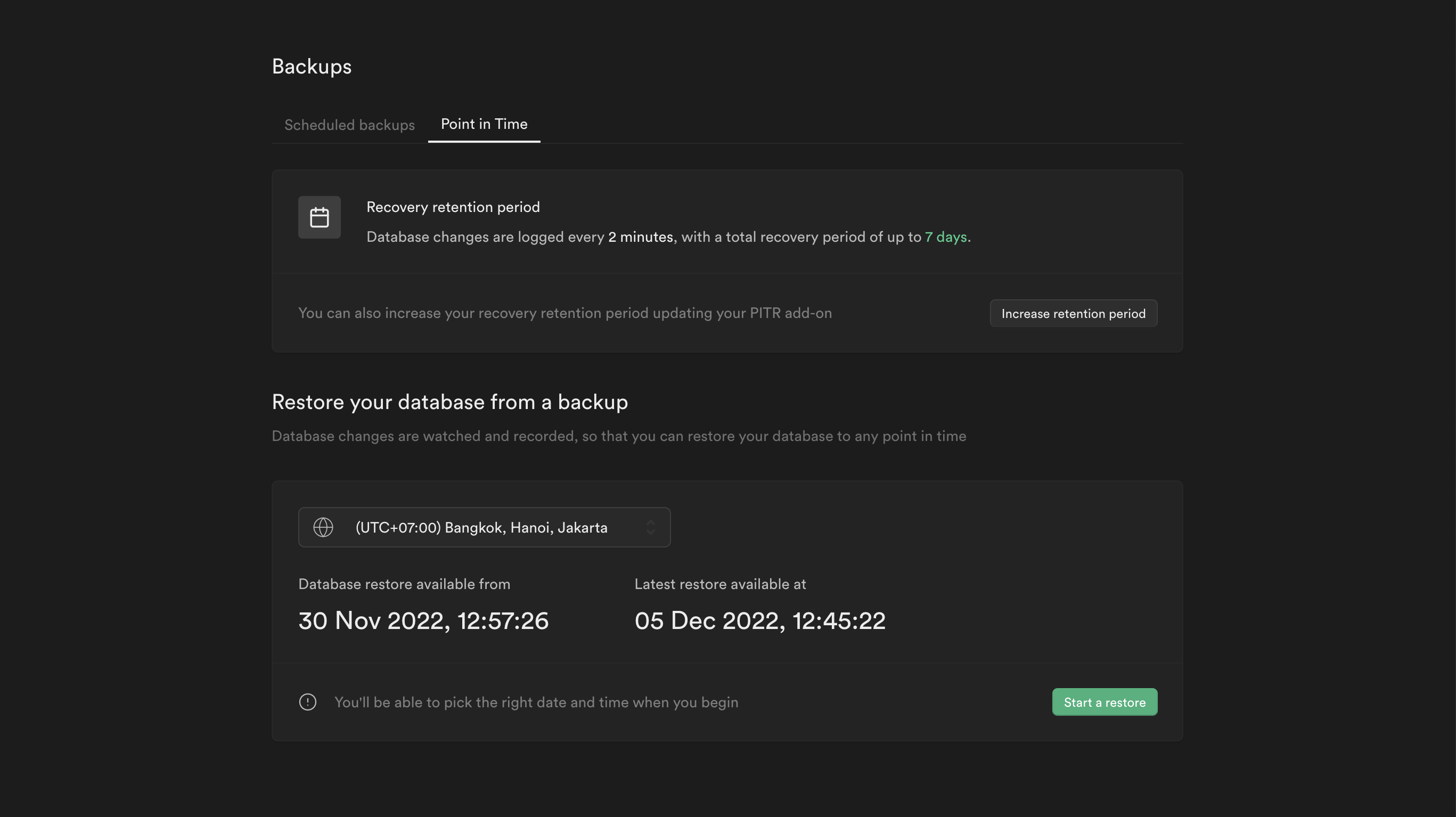
你可以在仪表板的时间点设置中访问PITR。项目的恢复周期会显示为你所选时区的最早和最晚恢复点。如果需要,你可以更改最大恢复周期。
🌐 You can access PITR in the Point in Time settings in the Dashboard. The recovery period of a project is shown by the earliest and latest recovery points displayed in your preferred timezone. You can change the maximum recovery period if needed.
项目的最新恢复点可能会明显落后于当前时间。这发生在数据库近期没有活动的时候,因此我们没有进行过最新的 WAL 文件备份。不过,只要中间没有发生任何事务,最新恢复点的数据库状态仍然反映了当前数据库的状态。
🌐 The latest restore point of the project could be significantly behind the current time. This occurs when the database has had no recent activity, and therefore we have not made any recent WAL file backups. However, the state of the database at the latest recovery point still reflects the current state of the database, given that no transactions have occurred in between.
修复过程 #
🌐 Restoration process

当你点击 开始恢复 按钮时,会出现一个日期和时间选择器。只有当选定的日期和时间在最早和最晚的恢复点之间时,流程才会继续。
🌐 A date and time picker appears when you click the Start a restore button. The process only proceeds if the selected date and time fall within the earliest and latest recovery points.
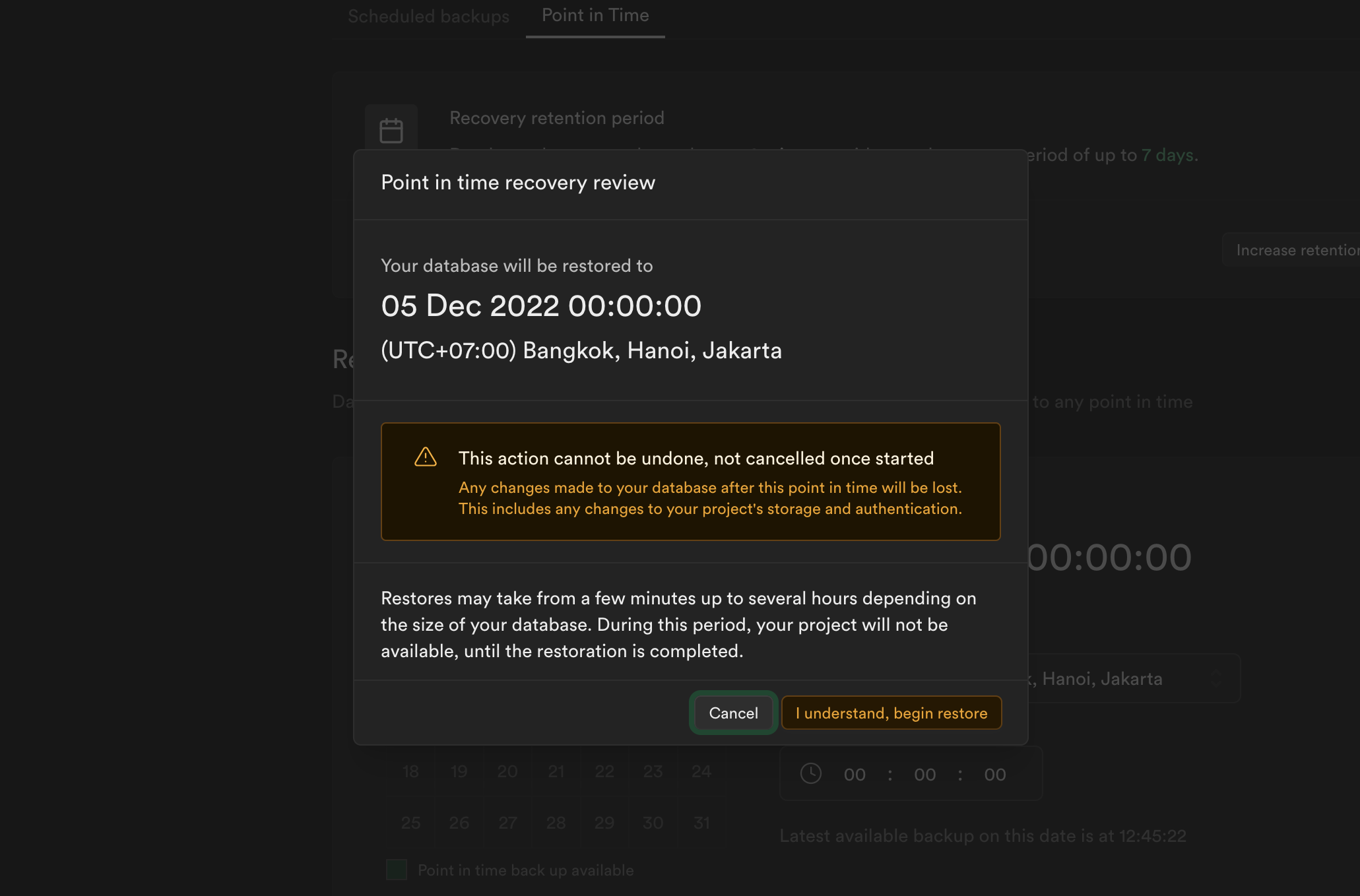
在选择好你想要的恢复点后,控制面板会提示你先审核并确认,然后才能继续进行恢复。在这个过程中,项目无法访问,所以最好提前计划好停机时间。停机时间取决于数据库的大小——数据库越大,停机时间越长。确认后,我们会将最新可用的物理备份下载到项目中,并部分恢复数据库。接着,我们会下载从这个物理备份之后生成的 WAL 文件,直到你指定的时间点。然后,我们会将这些文件中的底层事务记录在数据库中重放,以完成恢复。恢复完成后,控制面板会显示通知。
🌐 After selecting your desired recovery point, the Dashboard prompts you to review and confirm before proceeding with the restoration. The project is inaccessible during this process, so plan for downtime beforehand. Downtime depends on the size of the database—the larger it is, the longer the downtime will be. After you confirm, we download the latest available physical backup to the project and partially restore the database. We then download the WAL files generated after this physical backup up to your specified point in time. We replay the underlying transaction records in these files against the database to complete the restoration. The Dashboard will display a notification once the restoration completes.
价格 #
🌐 Pricing
定价取决于恢复保留期,它决定了你最多可以将数据恢复到过去多少天,精确到秒级别的任意时间点。
🌐 Pricing depends on the recovery retention period, which determines how many days back you can restore data to any chosen point of up to seconds in granularity.
| 恢复保留期(天) | 每小时价格(美元) | 每月价格(美元) |
|---|---|---|
| 7 | $0.137 | ~$100 |
| 14 | $0.274 | ~$200 |
| 28 | $0.55 | ~$400 |
要详细了解费用是如何计算的,请参考管理时间点恢复使用情况。
🌐 For a detailed breakdown of how charges are calculated, refer to Manage Point-in-Time Recovery usage.
在禁用 PITR 后下载备份 #
🌐 Downloading backups after disabling PITR
当你禁用 PITR 时,我们仍然只会将所有新备份作为物理备份。你仍然可以使用物理备份进行恢复,但它们无法直接下载。如果在禁用 PITR 后需要下载备份,你需要通过 Supabase CLI 或 pg_dump 手动进行 传统逻辑备份。
🌐 When you disable PITR, we still take all new backups as physical backups only. You can still use physical backups for restoration, but they are not available for direct download. If you need to download a backup after disabling PITR, you need to take a manual legacy logical backup using the Supabase CLI or pg_dump.
恢复到新项目 #
🌐 Restore to a new project
查看 重复项目文档。
🌐 See the Duplicate Project docs.