从 MySQL 迁移到 Supabase
Migrate your MySQL database to Supabase Postgres database.
本指南旨在展示将你的 MySQL 数据库迁移到 Supabase 的 Postgres 数据库的过程。Supabase 是一个强大且开源的平台,提供各种后端功能,包括 Postgres 数据库、认证、即时 API、边缘函数、实时订阅和存储。将你的 MySQL 数据库迁移到 Supabase 的 Postgres,可以让你充分利用 Postgres 的功能,并访问项目所需的所有特性。
🌐 This guide aims to exhibit the process of transferring your MySQL database to Supabase's Postgres database. Supabase is a robust and open-source platform offering a wide range of backend features, including a Postgres database, authentication, instant APIs, edge functions, real-time subscriptions, and storage. Migrating your MySQL database to Supabase's Postgres enables you to leverage Postgres's capabilities and access all the features you need for your project.
获取你的 MySQL 数据库凭据 #
🌐 Retrieve your MySQL database credentials
在你开始迁移之前,你需要收集有关你的 MySQL 数据库的重要信息。按以下步骤操作:
🌐 Before you begin the migration, you need to collect essential information about your MySQL database. Follow these steps:
- 登录你的 MySQL 数据库提供商。
- 找到并记下以下数据库信息:
- 主机名或 IP 地址
- 数据库名称
- 用户名
- 密码
获取你的 Supabase 主机 #
🌐 Retrieve your Supabase host [#retrieve-supabase-host]
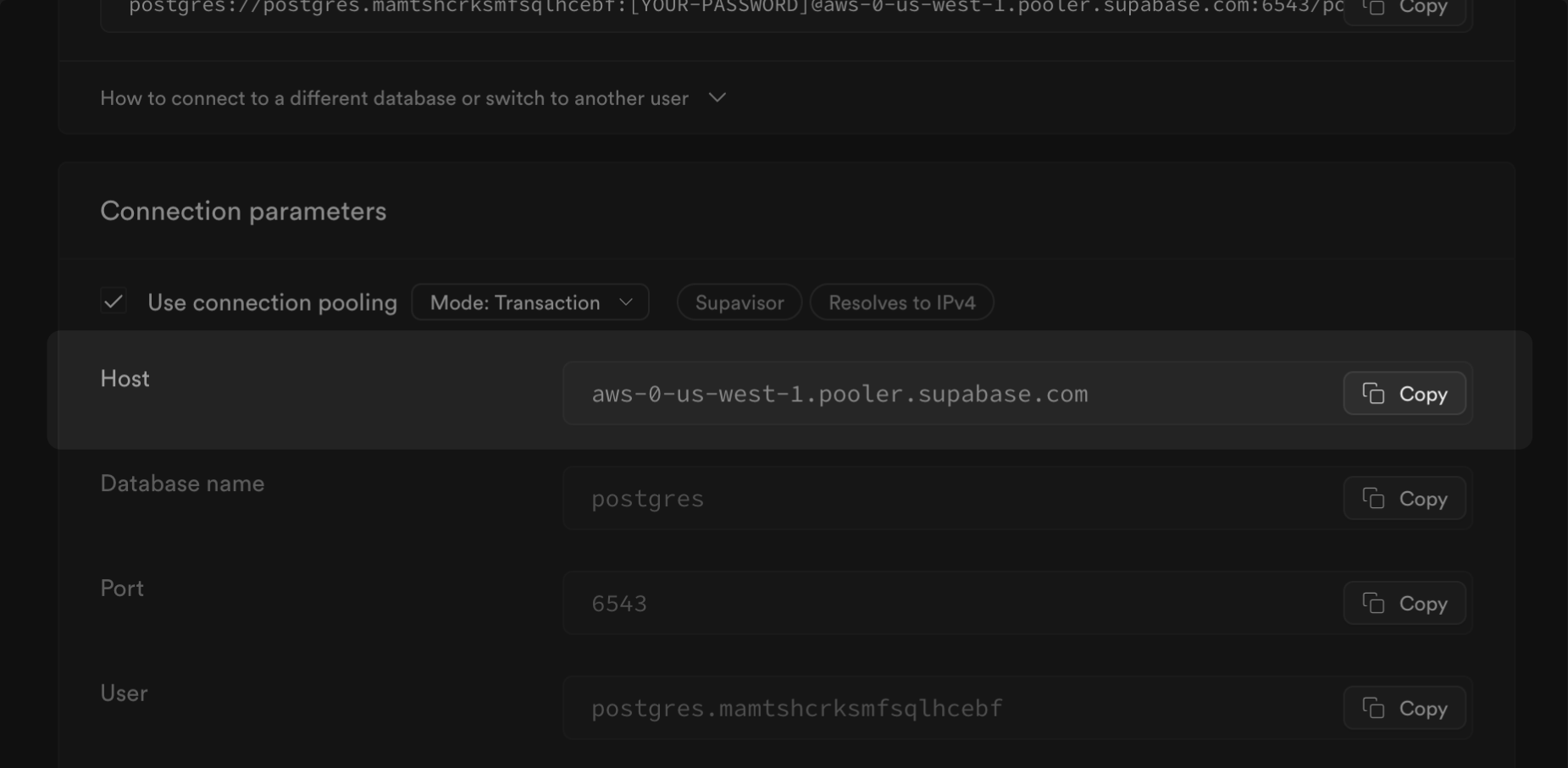
- 如果你是 Supabase 新手,先创建一个项目。记下你的密码,以后会用到。如果忘记了,可以在这里重置。
- 在你的项目仪表板上,点击 连接
- 在会话池下,点击连接字符串下的查看参数。记下你的主机(
$SUPABASE_HOST)。
迁移数据库 #
🌐 Migrate the database
迁移你的数据库最快的方法是在 Google Colab 上使用 Supabase 迁移工具。
🌐 The fastest way to migrate your database is with the Supabase migration tool on Google Colab.
或者,你可以使用 pgloader,这是一个灵活且强大的数据迁移工具,支持多种源数据库引擎,包括 MySQL 和 MS SQL,并将数据迁移到 Postgres 数据库。对于使用 Postgres 引擎的数据库,我们推荐使用 pg_dump 和 psql 命令行工具,这些工具都包含在完整的 Postgres 安装包中。
🌐 Alternatively, you can use pgloader, a flexible and powerful data migration tool that supports a wide range of source database engines, including MySQL and MS SQL, and migrates the data to a Postgres database. For databases using the Postgres engine, we recommend using the pg_dump and psql command line tools, which are included in a full Postgres installation.
- 从下拉菜单中选择源数据库的数据库引擎
- 在 Colab 注意本中设置环境变量(
HOST、USER、SOURCE_DB、PASSWORD、SUPABASE_URL和SUPABASE_PASSWORD)。 - 按照顺序运行注意本中的前两个步骤。第一个步骤设置引擎并安装必要的文件。
- 运行第三步开始迁移。这将花几分钟时间。
- 如果你打算迁移一个大于6 GB的数据库,我们建议至少升级到大型计算附加组件。这样可以确保你拥有处理迁移所需的资源。
- 我们强烈建议你提前准备好迁移所需的磁盘空间。在付费项目中,你可以通过前往基础设施设置页面来操作。想了解更多关于磁盘扩展和磁盘限制的信息,可以查看我们的磁盘设置文档。
企业 #
🌐 Enterprise
联系我们 如果你在迁移项目时需要更多帮助。