从 Render 迁移到 Supabase
Migrate your Render Postgres database to Supabase.
Render 是一个受欢迎的在线服务类别的网页托管服务,同时也提供托管的 Postgres 服务。Render 的开发者体验很棒,允许用户直接从 GitHub 或 GitLab 部署。这是他们产品的核心,而且他们做得非常好。不过,当涉及到 Postgres 数据库时,它可能不是最佳选择。
🌐 Render is a popular Web Hosting service in the online services category that also has a managed Postgres service. Render has a great developer experience, allowing users to deploy straight from GitHub or GitLab. This is the core of their product and they do it really well. However, when it comes to Postgres databases, it may not be the best option.
Supabase 是 Render Postgres 最好的免费替代之一。Supabase 提供了开发者构建产品所需的所有后端功能:Postgres 数据库、身份验证、即时 API、边缘函数、实时订阅和存储。Postgres 是 Supabase 的核心——例如,你可以使用行级安全,并且有超过 40 个可用的 Postgres 扩展。
🌐 Supabase is one of the best free alternative to Render Postgres. Supabase provide all the backend features developers need to build a product: a Postgres database, authentication, instant APIs, edge functions, realtime subscriptions, and storage. Postgres is the core of Supabase—for example, you can use row-level security and there are more than 40 Postgres extensions available.
本指南演示了如何从 Render 迁移到 Supabase,以充分利用 Postgres,同时获得构建项目所需的所有功能。
🌐 This guide demonstrates how to migrate from Render to Supabase to get the most out of Postgres while gaining access to all the features you need to build a project.
获取你的 Render 数据库凭证 #
🌐 Retrieve your Render database credentials [#retrieve-render-credentials]
- 登录你的Render账户,然后选择你想迁移的项目。
- 在菜单中点击 Dashboard,然后点击你的 Postgres 数据库。
- 在 信息 标签中向下滚动。
- 点击 PSQL Command 并编辑它,在
PSQL_COMMAND=后添加内容。
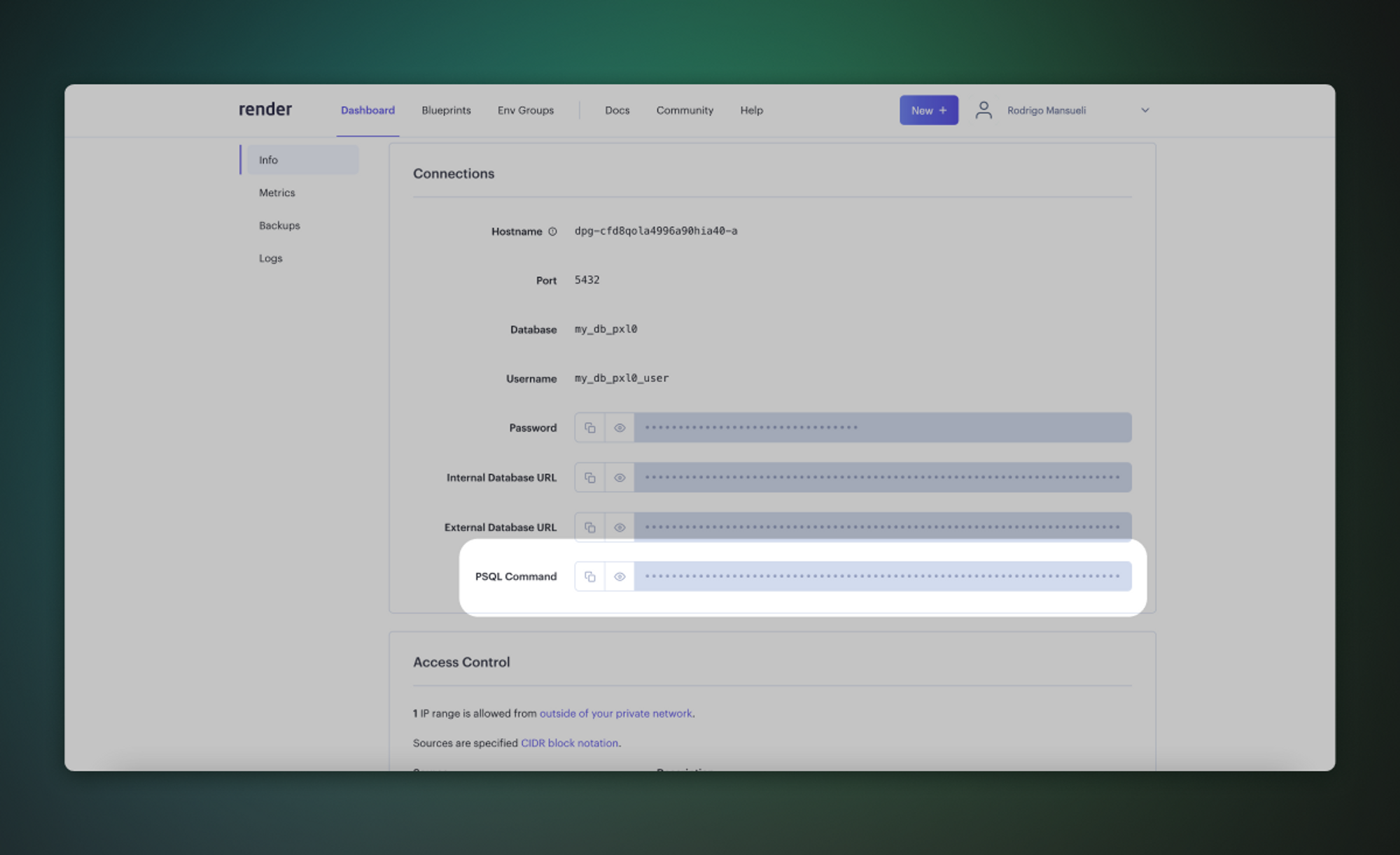 示例:
示例:
1%env PSQL_COMMAND=PGPASSWORD=RgaMDfTS_password_FTPa7 psql -h dpg-a_server_in.oregon-postgres.render.com -U my_db_pxl0_user my_db_pxl0获取你的 Supabase 连接字符串 #
🌐 Retrieve your Supabase connection string [#retrieve-supabase-connection-string]
-
在你的项目仪表板上,点击 连接
-
在会话连接池下,复制连接字符串,并将密码占位符替换为你的数据库密码。
如果你处在IPv6 环境下,或者拥有 IPv4 附加功能,你可以在会话模式下使用直接连接字符串,而不是 Supavisor。
迁移数据库 #
🌐 Migrate the database
迁移数据库最快的方法是使用 Google Colab 上的 Supabase 迁移工具。或者,你也可以使用包含在完整 Postgres 安装中的 pg_dump 和 psql 命令行工具。
🌐 The fastest way to migrate your database is with the Supabase migration tool on Google Colab. Alternatively, you can use the pg_dump and psql command line tools, which are included in a full Postgres installation.
- 在 Colab 注意本里设置环境变量(
PSQL_COMMAND、SUPABASE_HOST、SUPABASE_PASSWORD)。 - 按顺序运行注意本中的前两个步骤。第一个设置变量,第二个安装PSQL和迁移脚本。
- 运行第三步开始迁移。这将花几分钟时间。
- 如果你打算迁移一个大于6 GB的数据库,我们建议至少升级到大型计算附加组件。这样可以确保你拥有处理迁移所需的资源。
- 我们强烈建议你提前准备好迁移所需的磁盘空间。在付费项目中,你可以通过前往基础设施设置页面来操作。想了解更多关于磁盘扩展和磁盘限制的信息,可以查看我们的磁盘设置文档。
企业 #
🌐 Enterprise
联系我们 如果你在迁移项目时需要更多帮助。