为你的组织启用单点登录
想找关于如何在你的 Supabase 项目中添加单点登录支持的文档吗?快去看看 项目的 SAML 2.0 单点登录 吧。
🌐 Looking for docs on how to add Single Sign-On support in your Supabase project? Head on over to Single Sign-On with SAML 2.0 for Projects.
Supabase 提供单点登录 (SSO) 作为一种登录选项,以增强团队账户的安全性。这让公司管理员在登录 Supabase 时可以强制使用身份提供者。SSO 能够提升公司的入职和离职体验,因为员工只需要一套凭证就能访问第三方应用或工具,而且管理员也可以撤销这些访问权限。
🌐 Supabase offers single sign-on (SSO) as a sign-in option to provide additional account security for your team. This allows company administrators to enforce the use of an identity provider when signing in to Supabase. SSO improves the onboarding and offboarding experience of the company as the employee only needs a single set of credentials to access third-party applications or tools which can also be revoked by an administrator.
Supabase 目前为 团队和企业计划客户 提供 SAML 单点登录。如果你是现有的团队或企业计划客户,请继续完成下面的设置。
🌐 Supabase currently provides SAML SSO for Team and Enterprise Plan customers. If you are an existing Team or Enterprise Plan customer, continue with the setup below.
支持的提供商 #
🌐 Supported providers
Supabase 几乎支持所有支持 SAML 2.0 单点登录(SSO)协议的身份提供商(IdP)。这些指南涵盖了常用的身份提供商,帮助你快速上手。如果你使用的是其他提供商,可以联系支持。
🌐 Supabase supports practically all identity providers (IdP) that support the SAML 2.0 SSO protocol. These guides cover commonly used identity providers to help you get started. If you use a different provider, contact support.
配置完成后,你可以随时在仪表板的 组织设置 下的 SSO 部分 更新你的设置。
🌐 Once configured, you can update your settings anytime from the SSO section of the dashboard under Organization Settings.
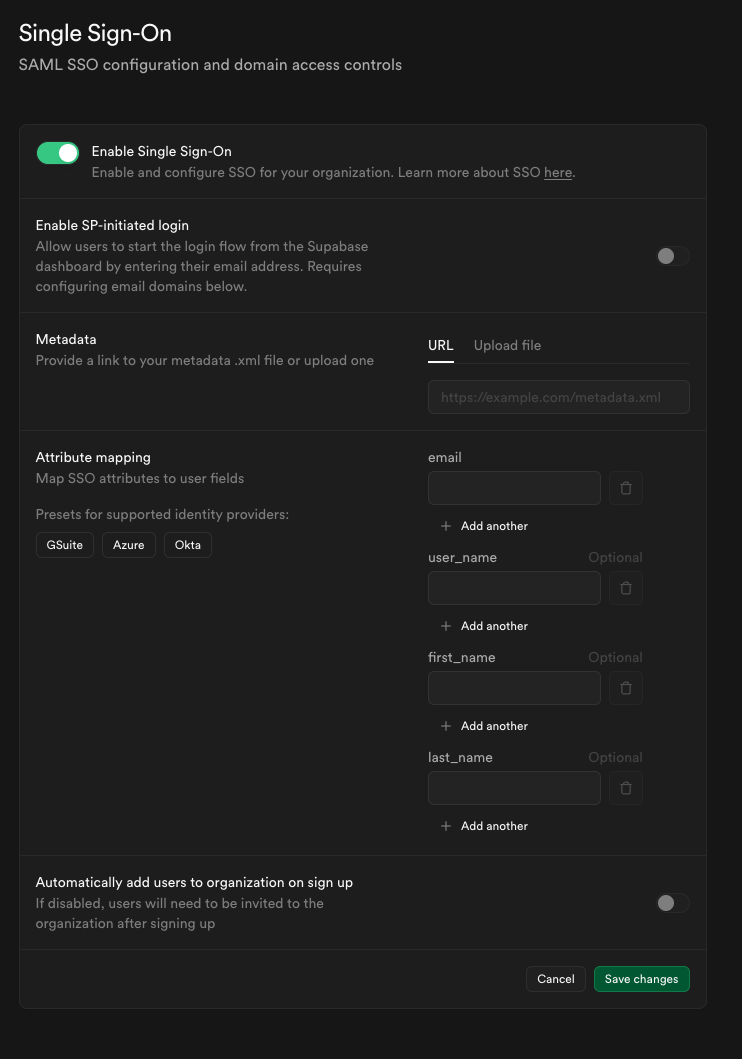
测试你的单点登录配置
在配置好你的单点登录(SSO)提供商后,进行全面测试非常重要。查看我们的SSO 测试与最佳实践指南,了解:
🌐 After configuring your SSO provider, thorough testing is essential. See our SSO Testing and Best Practices guide for:
- 逐步测试说明
- 常见问题排查
- 安全最佳实践
- 预发布清单
选择你的登录流程 #
🌐 Choosing your sign-in flow
Supabase 支持两种单点登录(SSO)登录流程:IdP 发起 和 SP 发起。你可以根据自己组织的需求启用其中一种或两种。
🌐 Supabase supports two SSO sign-in flows: IdP-initiated and SP-initiated. You can enable one or both depending on your organization's needs.
IdP 发起的登录(推荐) #
🌐 IdP-initiated sign-in (recommended)
用户可以通过点击应用图标或书签,从你的身份提供商(Okta、Azure AD、Google Workspace)开始登录。这是最简单、最常见的配置——不需要进行域配置,一旦启用单点登录就能自动工作。
🌐 Users start their sign-in from your identity provider (Okta, Azure AD, Google Workspace) by clicking an app tile or bookmark. This is the simplest and most common configuration - it requires no domain configuration and works automatically once SSO is enabled.
最佳适用对象:
- 已有身份提供商工作流程的组织
- 每个域名多个 SAML 应用(开发、测试、生产)
- 最简单的用户体验
由服务提供商发起的登录 #
🌐 SP-initiated sign-in
用户在 supabase.com 开始登录时输入他们的电子邮件地址,然后会被重定向到你的身份提供者。这个流程需要配置电子邮件域,以将用户引导到正确的身份提供者。
🌐 Users start their sign-in at supabase.com by entering their email address, then are redirected to your identity provider. This flow requires configuring email domains to route users to the correct IdP.
最佳适用对象:
- 直接收藏 supabase.com 的用户
- 正在从密码认证迁移的组织
- 支持基于域的自动身份提供商路由
需要帮忙选择吗? #
🌐 Need help choosing?
- 快速决策: 先只用 IdP 发起(默认)。它适用于90%的用例。
- **详细指南:**请参阅 选择正确的登录流程 获取基于场景的建议。
- 技术细节: 阅读 了解单点登录(SSO)登录流程 获取详细说明。
关键配置选项 #
🌐 Key configuration options
- 登录流程 - 在 IdP 发起(用户从身份提供者开始)、SP 发起(用户从 supabase.com 开始)或两者之间进行选择。对于大多数组织,推荐使用 IdP 发起的方式,并且不需要域名配置。有关指导,请参见 选择合适的登录流程。
- 邮箱域名 - 仅当你启用 SP 发起的登录时才需要。你可以将一个或多个邮箱域名与你的 SSO 提供商关联。拥有匹配邮箱地址的用户可以通过 SSO 登录 supabase.com。对于 IdP 发起的流程,则不需要。
- 自动加入 - 可选择允许拥有匹配域名的用户在通过 SSO 登录时自动加入你的组织。这适用于每次登录,而不仅仅是首次注册。
- 自动加入用户的默认角色 - 选择自动加入的用户会获得的角色(例如,
Read-only、Developer、Administrator、Owner)。我们建议使用Developer作为默认角色(最小权限原则),并根据需要单独提升用户权限。有关角色的更多信息,请参阅 访问控制。 - 邀请类型 - 在邀请用户加入你的组织时,你可以明确选择邀请是否需要 SSO 验证,或者允许非 SSO 登录(密码/社交账号)。这可以让组织同时支持 SSO 和非 SSO 用户。
Supabase 中的 SSO 是如何工作的 #
🌐 How SSO works in Supabase
当组织启用 SSO 时:
🌐 When SSO is enabled for an organization:
- 组织邀请仅限属于同一身份提供者的公司成员。
- 每个用户默认都会创建一个组织。他们可以随意创建任意数量的项目。
- 由于公司管理员通过身份提供者管理他们的访问权限,单点登录用户无法更新或重置他们的密码。
- 如果一个使用以下邮箱
alice@foocorp.com的 SSO 用户尝试使用同样邮箱的 GitHub 账户登录,将会创建一个独立的 Supabase 账户,并且不会与该 SSO 用户的账户关联。 - SSO 用户只会看到他们被邀请或自动加入的组织/项目。更多详情请参见 访问控制。
为组织启用单点登录 #
🌐 Enabling SSO for an organization
推荐工作流程:
- 创建或确认至少存在一个非单点登录的所有者账户(出于安全需要)
- 按照我们的特定提供商指南配置你的 SSO 提供商
- 开始时自动加入关闭以测试配置
- 使用你自己的账户测试 SSO 登录
- 一旦确认正常工作,如果需要的话可以启用自动加入
- 使用我们的 SSO 测试与最佳实践 指南进行全面测试
- 邀请用户加入组织或让他们在登录时自动加入
非单点登录账户
如果用户已经以非SSO账号成为组织成员,他们需要先被移除,然后通过需要SSO的邀请再次加入,以使用他们的SSO账号加入。同一邮箱的SSO账号和非SSO账号会被视为两个独立的账号。
🌐 If a user is already a member of the organization under a non-SSO account, they will need to be removed and invited again with an SSO-required invitation to join under their SSO account. SSO and non-SSO accounts with the same email are treated as separate accounts.
不关联身份
每个使用 SSO 身份提供者验证的用户账户将无法与系统中现有的用户账户进行身份关联。也就是说,如果用户 valid.email@supabase.io 曾经用密码注册过,然后又使用他们公司的 SSO 登录你的项目,系统中就会出现两个 valid.email@supabase.io 用户账户。
🌐 Each user account verified using an SSO identity provider will not be eligible for identity linking to existing user accounts in the system. That is, if a user valid.email@supabase.io had signed up with a password, and then uses their company SSO sign-in with your project, there will be two valid.email@supabase.io user accounts in the system.
用户在访问组织/项目时需要确保已使用正确的账户登录。
🌐 Users will need to ensure they are signed in with the correct account when accessing organizations/projects.
为组织禁用单点登录 #
🌐 Disabling SSO for an organization
如果你禁用或删除一个组织的 SSO 提供商,所有使用 SSO 的用户将立即无法登录。
🌐 If you disable or delete the SSO provider for an organization, all SSO users will immediately be unable to sign in.
安全要求
系统要求在允许删除 SSO 提供商之前,至少有一个非 SSO 的所有者账号。这可以防止整个组织被锁定。当你删除 SSO 提供商时,所有 SSO 成员会被自动移出组织。
🌐 The system requires at least one non-SSO owner account before allowing SSO provider deletion. This prevents complete organization lockout. When you delete an SSO provider, all SSO members are automatically removed from the organization.
在禁用或删除单点登录之前:
🌐 Before disabling or deleting SSO:
- 确认一个非单点登录账户存在并且可以登录
- 提前跟受影响的用户沟通
- 如果这个更改是暂时的,考虑禁用是否比删除更好
移除单个 SSO 用户的访问权限 #
🌐 Removing an individual SSO user's access
要撤销某个特定 SSO 用户的访问权限,而不完全禁用提供商,你可以:
🌐 To revoke access for a specific SSO user without disabling the provider entirely you may:
- 在你的身份提供者中删除或禁用用户的账户
- 降低或移除他们在 Supabase 中任何组织的权限。
测试和最佳实践 #
🌐 Testing and best practices
在向你的组织推广单点登录(SSO)之前,我们强烈建议进行彻底的测试并遵循安全最佳实践。我们的综合指南涵盖了:
🌐 Before rolling out SSO to your organization, we strongly recommend thorough testing and following security best practices. Our comprehensive guide covers:
- SSO 登录、自动加入和邀请的逐步测试步骤
- 排查常见问题(其中很多以前都需要客服介入)
- 安全最佳实践,包括证书监控和域名配置
- 安全进行单点登录变更的操作指南
- 发布前检查清单
访问 SSO 测试与最佳实践 指南了解完整详情。
🌐 Visit the SSO Testing and Best Practices guide for complete details.
高级场景 #
🌐 Advanced scenarios
大多数组织为所有用户使用单一的 SSO 提供商。不过,Supabase 支持在一个组织中使用多个 SSO 提供商,用于一些高级使用场景,比如:
🌐 Most organizations use a single SSO provider for all users. However, Supabase supports multiple SSO providers within an organization for advanced use cases such as:
- 为开发、测试和生产环境使用不同的提供商
- 不同团队或业务部门用不同的供应商
- 逐步从一个身份提供商迁移到另一个
如果你需要配置多个 SSO 提供商,请参考多个 SSO 提供商指南获取详细配置步骤,如果需要额外指导,请联系你的 Supabase 支持代表。
🌐 If you need to configure multiple SSO providers, refer to the Multiple SSO Providers guide for detailed configuration steps, and contact your Supabase support representative if you need additional guidance.
MCP 的企业管理认证 #
🌐 Enterprise-managed authentication for MCP
一旦配置了单点登录(SSO),你可以让你的身份提供者自动为你的组织授权 MCP 客户端,而无需每个成员单独批准。详情请参见 企业管理的 MCP 身份验证。
🌐 Once SSO is configured, you can let your identity provider automatically authorize MCP clients for your organization, without individual members having to approve each one. See Enterprise-Managed Authentication for MCP for details.